What B2blix can and cannot control in pigu
Understand which parts of price monitoring, calculation, export, marketplace processing, and product visibility are controlled by B2BLIX and which are controlled by Pigu.
When this guide is relevant
This guide is useful when B2BLIX has calculated or exported a product price, but the product, stock, or updated price is not visible on the marketplace.
It also explains where B2BLIX responsibility ends and where Pigu marketplace processing begins.
Short answer
B2BLIX controls the monitoring, price calculation, and preparation of supported XML or API updates. Pigu controls when marketplace imports are processed and when accepted product, stock, or price updates become visible.
If a product is included correctly in the generated B2BLIX output, B2BLIX cannot force Pigu to download, process, approve, or display it immediately.
Important: A calculated or exported price is not necessarily the live marketplace price. The update becomes live only after it has been received, accepted, and applied by Pigu.
How responsibilities are divided
| Process | B2BLIX responsibility | Pigu responsibility |
|---|---|---|
| Marketplace monitoring | Collect the available marketplace information according to the configured monitoring schedule. | Provide the marketplace listings and determine which offer receives the BuyBox. |
| Price calculation | Calculate a price using the seller's selected strategy, available product data, and minimum and maximum price limits. | Decide how offers are ranked and which offer is displayed as the BuyBox winner. |
| XML export | Prepare an accessible, correctly structured, and updated XML feed according to the account settings. | Download and process the XML according to Pigu's own import schedule. |
| API update | Prepare and submit supported updates using the configured connection. | Receive, validate, process, and apply the submitted information. |
| Marketplace visibility | Show what was calculated and included in the generated output. | Control whether and when the product, stock, or price is displayed on the marketplace. |
B2BLIX can help make pricing more responsive, but it does not control Pigu's complete BuyBox decision process and cannot guarantee a BuyBox position, orders, revenue, or profit.
What to check in your account
1. Check the product in product checker
Start with the product's EAN in Product Checker. Confirm that B2BLIX has found the correct product and marketplace.
Review the available product information, calculation result, price limits, and export data. In particular, verify that the exported output contains:
- The correct EAN or product identifier.
- The expected marketplace.
- The expected calculated or exported price.
- A positive stock quantity.
To check this in your account, open Product Checker. To understand the information shown there, read Product checker: Review product data, price calculations, and exports.
2. Review the latest synchronization report
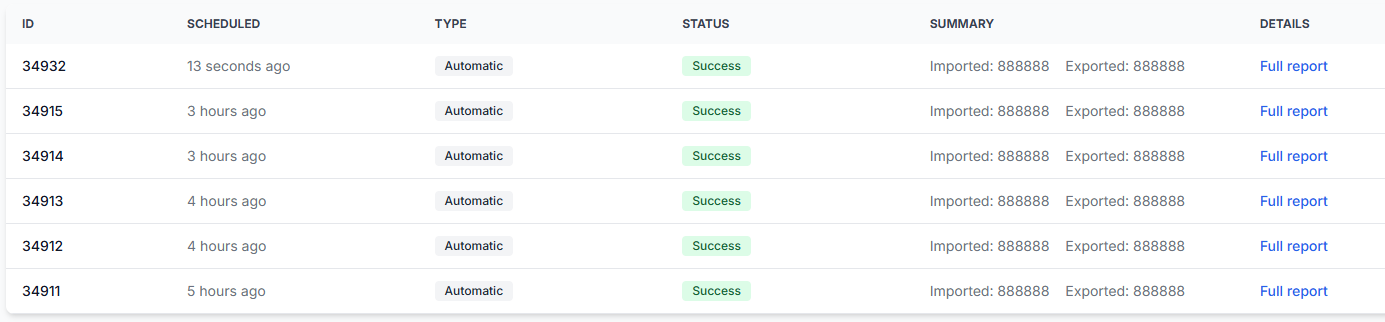
Check whether the latest synchronization processed the product and prepared the expected export result.
The report can help you distinguish between a product that was not processed by B2BLIX and a product that was processed correctly but has not yet appeared on Pigu.
To check this in your account, open Synchronization Reports. To understand the report types and item summaries, read Synchronization reports: Review import, buybox calculation, and export results.
3. Verify your synchronization and export settings
Before changing anything, check which product source and output method are currently configured. Confirm that the settings match the workflow you expect to use.
If Pigu imports your products from a public XML address, confirm that the public URL is available and that it shows a recent version of the feed.
To check this in your account, open Synchronization Settings. To understand the import, synchronization frequency, export, and public URL fields, read Sync settings: Configure product import and price export.
4. Check the connection when using API updates
If your account sends updates through a supported API connection instead of a public XML feed, verify that the required Pigu connection information is still configured.
Do not share passwords or tokens in screenshots, messages, or public materials.
To check this in your account, open Access Credentials. For an explanation of the connection fields, read Access credentials for the pigu connection.
How to interpret the result
The product is missing or incorrect in B2BLIX
If the product is missing from Product Checker, was not processed in the synchronization report, or contains an incorrect price or stock value, review the B2BLIX import and synchronization configuration.
The problem must be corrected before the generated output can contain the expected product information.
The product is correct in B2BLIX but missing on Pigu
If Product Checker and the generated XML or API result contain the correct product, price, and positive stock, the B2BLIX output has been prepared correctly.
The remaining issue may be related to Pigu's import processing, marketplace listing status, validation, or display. These parts must be checked with Pigu.
The product is visible, but the old price remains
This can mean that B2BLIX has prepared a newer value but Pigu has not yet processed or applied it. Compare the exported price with the current live marketplace price and review the latest synchronization report.
Warning: Do not make repeated pricing changes only because a marketplace update is delayed. First verify the generated output and your minimum and maximum price limits. Multiple changes can make troubleshooting more difficult and may affect later exports.
Common causes
- The latest feed has not yet been processed by Pigu. B2BLIX can update the public XML, but it cannot control Pigu's download schedule.
- Pigu received the information but has not yet applied it. Import validation and marketplace display are handled on Pigu's side.
- The product is not present in the generated output. Check the imported product data, synchronization report, and account configuration.
- The exported stock is not positive. Verify the stock value shown for the product before investigating marketplace visibility.
- The exported price differs from the expected price. Review the calculation, selected strategy, and minimum and maximum price limits in Product Checker.
- The marketplace listing has a separate issue. A correctly generated feed cannot by itself resolve listing restrictions or other marketplace-side visibility problems.
Example
A seller checks an EAN in Product Checker. The product is present in the latest output with a calculated price of €19.99 and stock of 5.
The public XML also contains the same EAN, price, and stock, but Pigu still shows the previous price or does not display the offer.
In this situation, changing the BuyBox strategy is not the first troubleshooting step. The B2BLIX output is already correct. The seller should allow for Pigu's processing schedule and ask Pigu to check the import or listing if the update remains unapplied.
What to do next
- Search for the EAN in Product Checker.
- Confirm the exported product, price, marketplace, and positive stock.
- Review the latest Synchronization Report.
- Verify the configured output method in Synchronization Settings.
- If the output is missing or incorrect, correct the relevant B2BLIX input or settings.
- If the output is correct but the marketplace has not applied it, contact Pigu and provide the EAN, marketplace, and evidence of the generated export result.
The main distinction is simple: B2BLIX can prepare and provide the update, while Pigu controls when that update is processed and displayed on the marketplace.