Xml vs api synchronization: which export method should you choose?
Learn when to use XML or API export, how the two methods differ, and what to verify before changing your B2BLIX synchronization settings.
Choosing the right export method
B2BLIX can prepare updated product information for Pigu Group marketplaces using either XML or API synchronization. The best choice depends mainly on your catalog size, the information that must be updated, and how the marketplace is currently processing your data.
This article is relevant when you are setting up synchronization, experiencing delayed marketplace updates, or have been asked to change the export method in your account.
Short answer
- Choose XML when you have a large catalog or need to send product information in bulk.
- Choose API when you have a smaller catalog and need direct updates without waiting for Pigu to fetch an XML file.
- Consider API as a fallback when Pigu's XML processing is delayed or appears to be stuck.
For very large catalogs, API synchronization may not handle the volume efficiently. In some high-volume cases, B2BLIX may need to switch the account from API to XML. If this happens, the corresponding export configuration in the seller's Pigu account must also be updated.
Warning: Changing the export method can affect live prices, stock, collection hours, and the timing of marketplace updates. Verify the current settings and destination before making changes. A price prepared or exported by B2BLIX is not necessarily live until Pigu has accepted and applied it.
How xml synchronization works
With XML synchronization, B2BLIX generates a product feed according to the supported Pigu pricing XML format. Pigu retrieves the file from its side and processes the products in bulk.
Pigu usually checks the XML file approximately every one to two hours. The actual time before a change appears on the marketplace can also depend on Pigu's processing status.
XML is generally suitable for:
- Large product catalogs.
- Bulk updates across one or more marketplaces.
- Price, stock, and collection-hour information included in one feed.
- Accounts where API delivery is not efficient for the number of products.
How api synchronization works
API synchronization sends updates directly instead of waiting for Pigu to retrieve an XML file. It is generally intended for smaller product counts and direct price updates.
Some account configurations may also show API options for stock and collection hours. Use only the options available in your account's synchronization settings.
API is generally suitable for:
- Smaller catalogs.
- Direct price updates.
- Situations where Pigu's XML processing is unusually slow or stuck.
- Stock or collection-hour updates when those API options are available in the account.
Switching to API does not guarantee that a marketplace change will appear immediately. The marketplace still validates and applies the submitted information.
Xml and api comparison
| Question | XML | API |
|---|---|---|
| How is the information delivered? | B2BLIX generates a file that Pigu retrieves. | B2BLIX submits updates directly. |
| Which catalog size is it best suited for? | Large catalogs and bulk processing. | Smaller product counts. |
| How quickly is it processed? | Pigu usually retrieves the file every one to two hours, followed by marketplace processing. | Submitted directly, but still subject to marketplace processing. |
| What information can it include? | Prices, stock, and collection hours. | Primarily direct price updates. Stock and collection hours may be available depending on the account settings. |
| When can it help? | When API delivery is not efficient for a large number of products. | When XML processing is delayed or stuck. |
What to check in your account
1. Check the current export type
Before changing anything, confirm whether your account is currently configured for XML or API. Also check which additional update options are enabled.
To check this in your account, open Sync Settings. To understand the fields on that page, read Sync Settings: configure product import and price export.

2. Check your catalog size
Consider the total number of products being sent and the number of marketplaces included. A catalog that works well through API for one marketplace may become too large when the same products are processed across several marketplaces.
If your catalog contains tens of thousands of products, XML is normally the more suitable bulk-delivery method.
3. Check what information must be updated
Confirm whether you need to send:
- Prices only.
- Prices and stock.
- Prices, stock, and collection hours.
XML can include all of these values in the generated feed. For API, verify which controls are available in your account before selecting it.
4. If using xml, verify the public feed url
XML synchronization requires Pigu to retrieve the correct B2BLIX public URL. If the export type has changed from API to XML, make sure the XML address is also configured on the Pigu side.
The personalized XML address is available in Sync Settings when XML export is configured.
5. Review the latest synchronization result
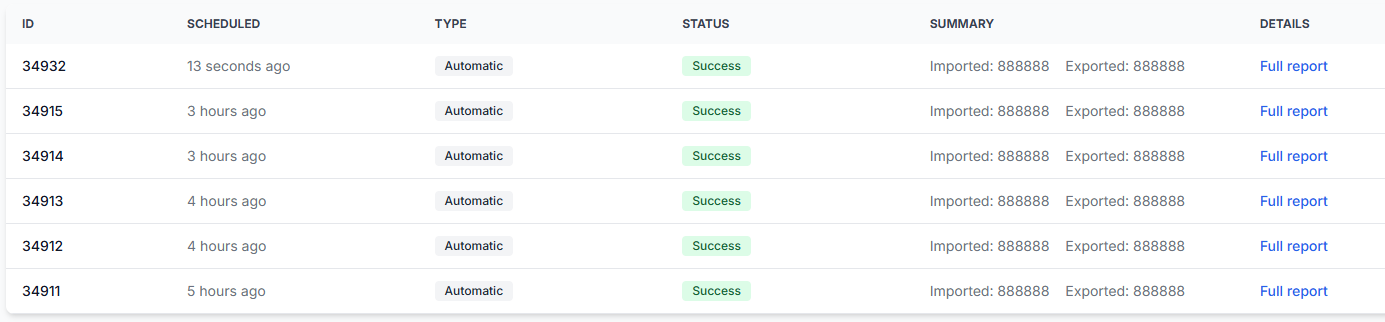
After running synchronization, check whether products were processed and whether an export was prepared successfully. This helps distinguish a B2BLIX export problem from a delay that occurred after the data was sent to Pigu.
To check this in your account, open Sync Reports. To understand the report statuses and product summaries, read Synchronization Reports: review import, BuyBox calculation, and export results.
Common scenarios
You have a very large catalog
Use XML when API delivery is not efficient for the product volume. This is especially relevant when tens of thousands of products are synchronized across several marketplaces.
Pigu is not processing the xml file
If the XML export was generated correctly but Pigu's processing is delayed or stuck, API may be used as an alternative for direct updates. First verify the latest Sync Report and confirm that the XML file was generated successfully.
You need stock and collection hours in the export
XML can include stock and collection-hour information together with prices. API may also offer these controls in some configurations, but you should confirm that they are visible and enabled in Sync Settings.
The export method changed automatically
In some high-volume cases, B2BLIX may switch from API to XML because the catalog is too large for efficient API delivery. When this happens, update the corresponding configuration in the Pigu seller account so Pigu starts retrieving the XML feed.
Example
A seller synchronizes approximately 30,000 products across three marketplaces. API delivery becomes unsuitable for that volume, so the export is changed to XML.
The seller should then open Sync Settings, copy the provided XML URL, configure that URL in the Pigu account, and review the next Sync Report. Pigu will retrieve and process the products in bulk instead of receiving thousands of individual API updates.
What to do next
- Open Sync Settings and confirm your current export type.
- Check your total product volume and included marketplaces.
- Verify whether you need prices only or also stock and collection hours.
- If using XML, confirm that Pigu has the correct public feed URL.
- Run or wait for the next synchronization and review its result in Sync Reports.
- Verify a limited set of products before relying on the new method for the full catalog.