B2BLIX Pigu BuyBox guides
Xml export

How stock affects buybox calculation and xml export
Support questions· Synchronization· Xml export· Troubleshooting
Learn how B2BLIX handles products with zero stock, when stock changes can be sent to Pigu, and how to verify stock or delivery-hour values in the exported XML. This guide explains the difference between BuyBox price calculation and stock export. It also provides practical checks for products that remain active, inactive, or out of stock after synchronization.
How to connect and use the B2BLIX XML feed in Pigu
Support questions· Xml export· Pigu import· Synchronization
Copy your permanent B2BLIX XML export URL into Pigu’s stock and price import settings, confirm the field mapping, and verify that Pigu can read the feed.
How to fix pigu xml import, mapping, structure, or rejected-feed problems
Support questions· Xml export· Pigu mapping· Troubleshooting
Troubleshoot rejected XML feeds, missing attribute mapping, unreadable file structures, and imports that do not update in Pigu. Learn how to verify the B2BLIX export, recreate the Pigu import connection, and review the result.
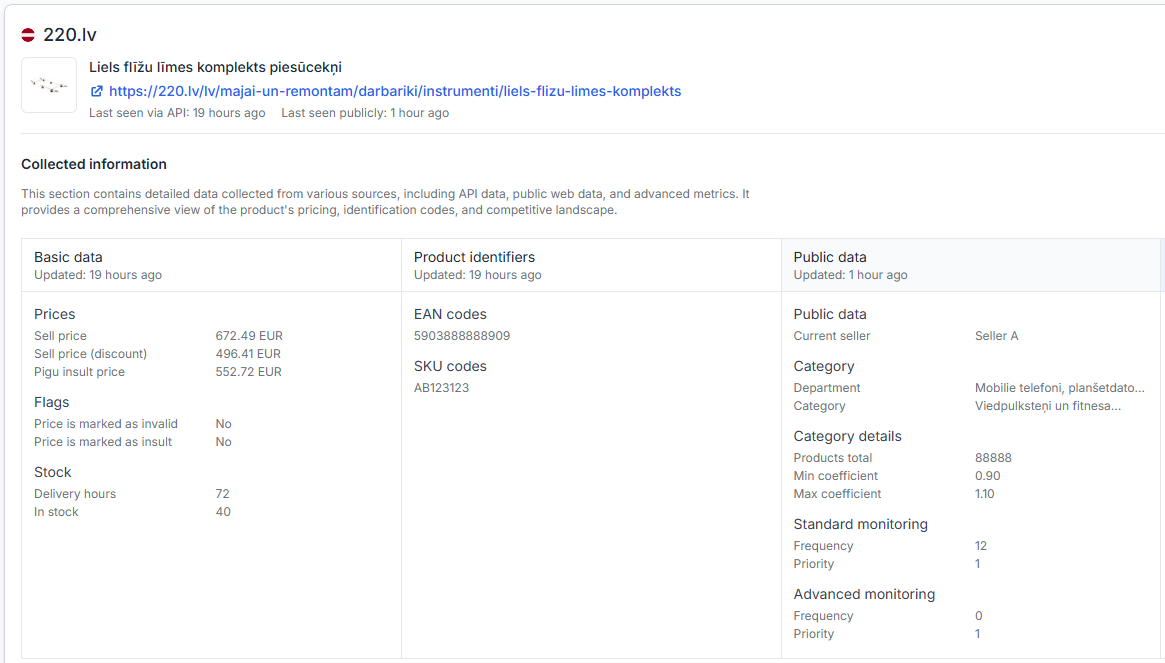
Product checker: review product data, price calculations, and exports
Interfaces· Product checker· Price calculation· Xml export
This guide explains how to search by EAN, select the correct marketplace, interpret the collected product data, follow the calculation process, and verify an exported XML result.

Xml vs api synchronization: which export method should you choose?
Support questions· Synchronization· Xml export· Api export
Learn when to use XML or API export, how the two methods differ, and what to verify before changing your B2BLIX synchronization settings.