Set the lowest allowed price for each product.
Repricing algorithm for online stores
B2BLIX checks your products on price comparison platforms, finds the best current market price, and suggests lower prices based on your rules.
Use price comparison platforms as market data sources. See when your website price is too high and lower it before customers choose a cheaper competitor.
0.10 EUR
for 1,000 product syncs
80+
Marketplaces
min/max
price protection
- Find the lowest relevant competitor price for each product.
- Lower your price using your rules and limits.
- Export suggested prices through XML, WooCommerce, or integrations.
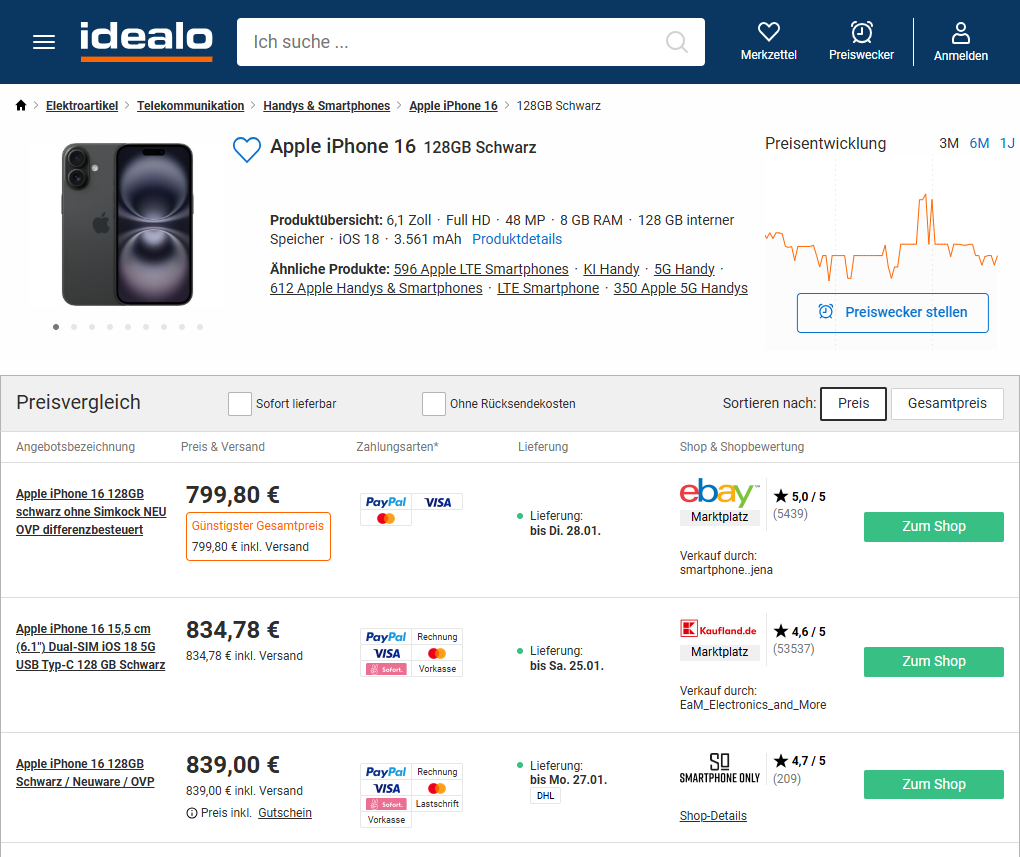
Screenshot from idealo.de
20+
European countries supported
Monitor products across many regional price comparison platforms.
+0.10 EUR
for 1,000 products per synchronization
Pay based on the number of products and monitoring frequency you choose.
30 min
Monitoring frequency
Track important products more often and slower products less often.
[...]
Works with selected products first
Start with a limited product group before expanding to your full catalog.
WHAT USUALLY GOES WRONG
Manual repricing cannot keep up with competitors
Competitor prices change constantly across price comparison platforms. If your website price stays too high, customers may find a cheaper option before your team reacts.
Your price falls behind the market
When competitors lower prices, your product can quickly become too expensive compared with the current market price.
Manual checking is too slow
Checking products by hand takes time, and price changes often happen before your team sees them.
Spreadsheets become hard to control
Spreadsheets can work at the beginning, but they become risky when products, markets, and pricing rules grow.
You do not know how low to go
Without fresh market data, price changes become guesswork. You may lower too little to win, or lower too much without needing to.
HOW IT WORKS
Connect once and let B2BLIX update prices automatically
Import your product data, choose which price comparison platforms to use as market data sources, and define how prices should update when competitors go lower.
Import product data
Connect your product data using XML, CSV, Google Sheets, or WooCommerce.
Product data should include EAN, current price, minimum price, maximum price, and stock quantity.
Set repricing rules
Choose which price comparison platforms B2BLIX should use as market data source.
B2BLIX finds the market price for each product and applies your rules - for example, lowering your price to match or beat the cheapest relevant competitor.
Automatically update prices
Use WooCommerce or another integration to apply calculated prices in your store or aggregator product feed.
You can review prices first, or build your own workflow with the exported XML feed.
WHY B2BLIX
Built for sellers to manage prices automatically
B2BLIX uses its own BuyBox-style repricing algorithm, adapted for price comparison platform data. It helps you detect when competitors are cheaper, calculate the right lower price, and keep every update inside your rules.
MARKET DATA AND INSIGHTS
•
Made for price comparison data
Use aggregator platforms to understand where your product price stands against the market.
•
Product-level transparency
Use Product Checker to see what data was used and why a price was suggested.
MARGIN AND STRATEGY
•
Reprices down first, up when possible
Lower prices when you need to compete, and raise them only when the market gives safe room.
•
Protects your margin
Every suggested price is checked against your minimum and maximum price.
CONTROL AND TRANSPARENCY
•
Export-ready workflow
Use XML, WooCommerce, API, or review-based workflows depending on how prices are updated.
•
Control monitoring cost
Monitor important products more often and less important products less often.
AUTOMATED STRATEGIC REPRICING
Lower prices when needed and raise them when possible
Most price changes start when a competitor becomes cheaper. B2BLIX calculates how far you need to lower the price, while keeping the result inside your allowed limits.
When your price is too high
B2BLIX checks the current market situation for each product and compares your price with the cheapest relevant competitor.
If your price is too high, the algorithm can suggest a lower price - for example, match the competitor, go slightly below, or use a percentage-based adjustment.
When you are already winning
If competitors are already priced higher, B2BLIX can also check whether your price can be increased safely.
This is secondary to the main workflow, but it helps avoid staying too cheap when the market gives room to improve margin.
Example: Competitor prices are lower
- Current BuyBox price: €20.00
- Your allowed price range: €19.00 - €21.00
- Strategy: BuyBox price minus €0.01
- B2BLIX calculated price: €19.99
- Result: your price becomes lower than the cheapest relevant competitor while staying inside your limits.
CONTROL EVERY UPDATE
You stay in control of every price
You decide the limits, strategy, product groups, monitoring frequency, and export method. B2BLIX works inside those rules.
Minimum price
Maximum price
Set the highest allowed price for each product.
Strategy
Choose how aggressive each product or category should be.
Monitoring frequency
Monitor important products more often and less important products less often.
Export mode
Use XML, WooCommerce, API, or a controlled review process.
Product Checker
Check the product, competitor data, current price, suggested price, and export status.
COVERAGE
European market coverage
B2BLIX supports price comparison and aggregator platforms across multiple European regions. You can start with one country and expand when needed.
Baltic region
With about €2.1B in annual e-commerce turnover, the region reaches roughly 340K online shoppers per month, with average monthly online spend of around €45 per shopper.
Nordic region
With about €55.4B in annual e-commerce turnover, the region reaches roughly 1.6M online shoppers per month, with average monthly online spend of around €270 per shopper.
Central Europe
With about €141.5B in annual e-commerce turnover, the region reaches roughly 7.7M online shoppers per month, with average monthly online spend of around €110 per shopper.
Eastern Europe
With about €16.4B in annual e-commerce turnover, the region reaches roughly 1.5M online shoppers per month, with average monthly online spend of around €80 per shopper.
Southern Europe
With about €188.3B in annual e-commerce turnover, the region reaches roughly 5.9M online shoppers per month, with average monthly online spend of around €210 per shopper.
Western Europe
With about €429.5B in annual e-commerce turnover, the region reaches roughly 10.6M online shoppers per month, with average monthly online spend of around €250 per shopper.
PRICING
Pay based on usage
Your monthly cost depends on how many products you monitor, how often data is collected, and which monitoring mode you use.
|
|
||
|
|
||
|
|
||
|
|
|
|
Price list
-
Standard data sourcesAbout 0.10 EUR per synchronization of 1000 products
-
Premium data sourcesAbout 0.30 EUR per synchronization of 1000 products
GUIDES
Practical guides based on seller questions
Learn how to connect your product data, set safe price limits, choose a pricing strategy, control monitoring cost, and export calculated prices.
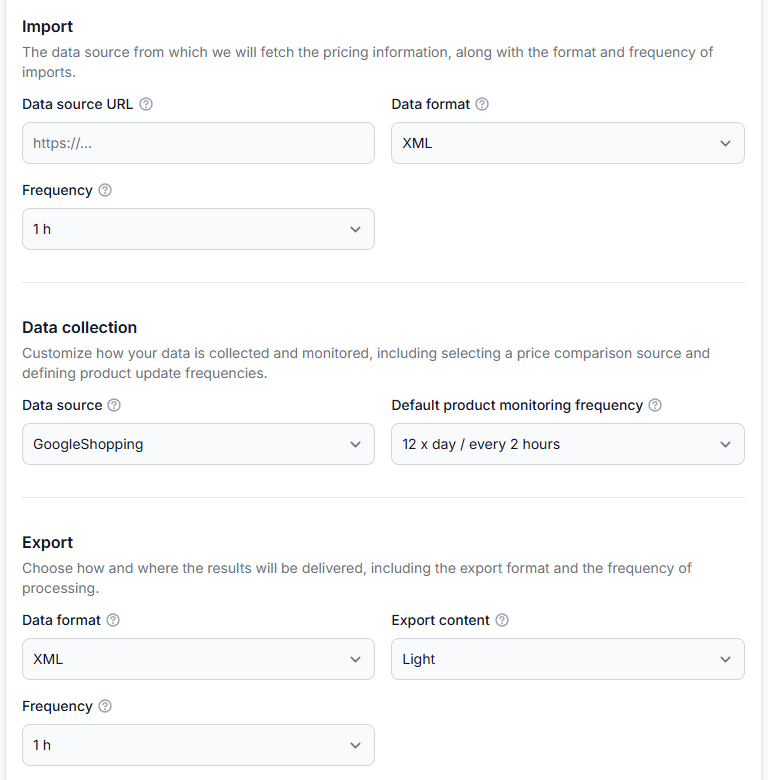
Getting started with b2blix price aggregators
Getting started· Price aggregators· Synchronization· Buybox· Import· Xml· Store integration
Create your first price synchronization, prepare a small product feed, collect competitor prices, review calculated results, and safely test XML or store delivery before expanding to your full catalog.
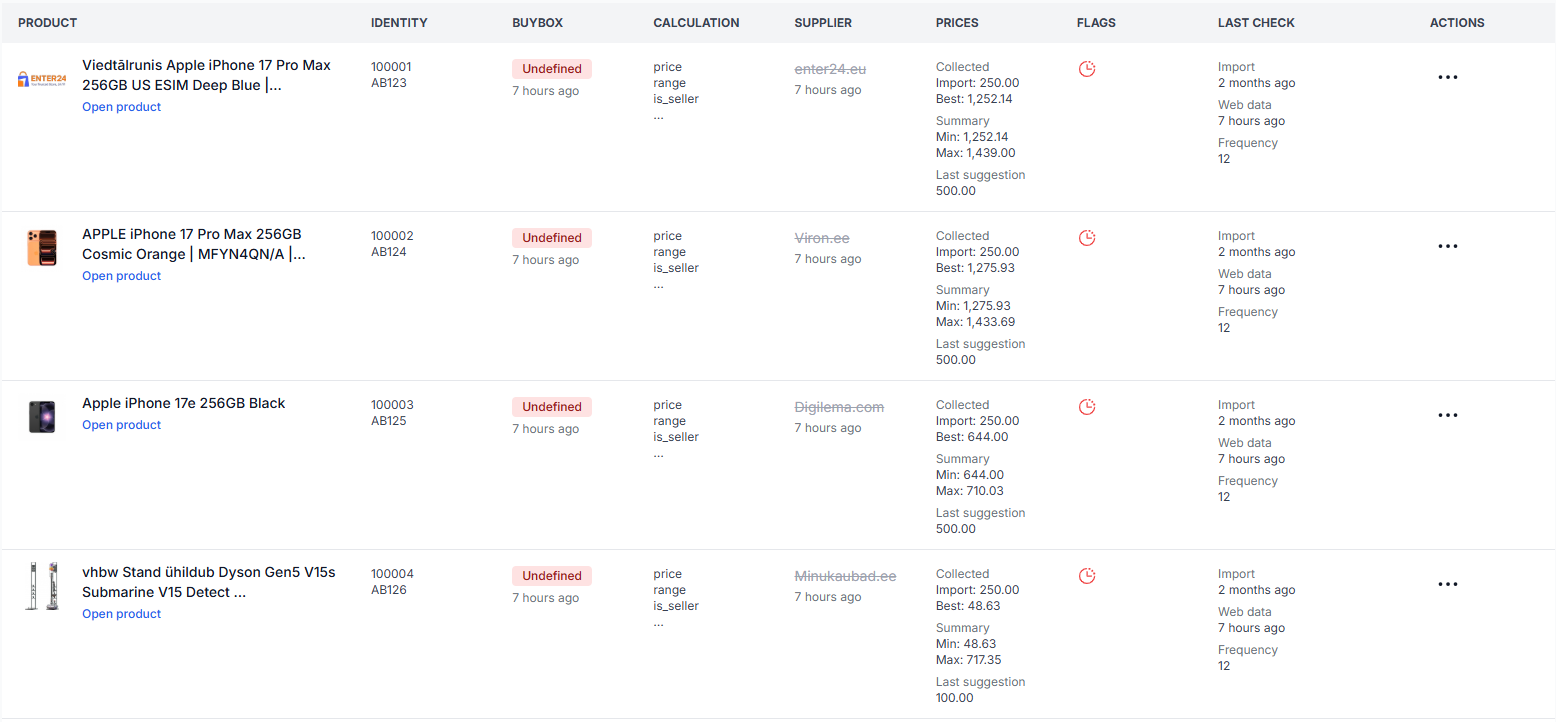
All products interface
Interfaces· Product data· Monitoring· Buybox status· Supplier catalog
This guide explains the filters, product table, price fields, status labels, timestamps, and actions available on the B2BLIX Price Aggregators All Products page.
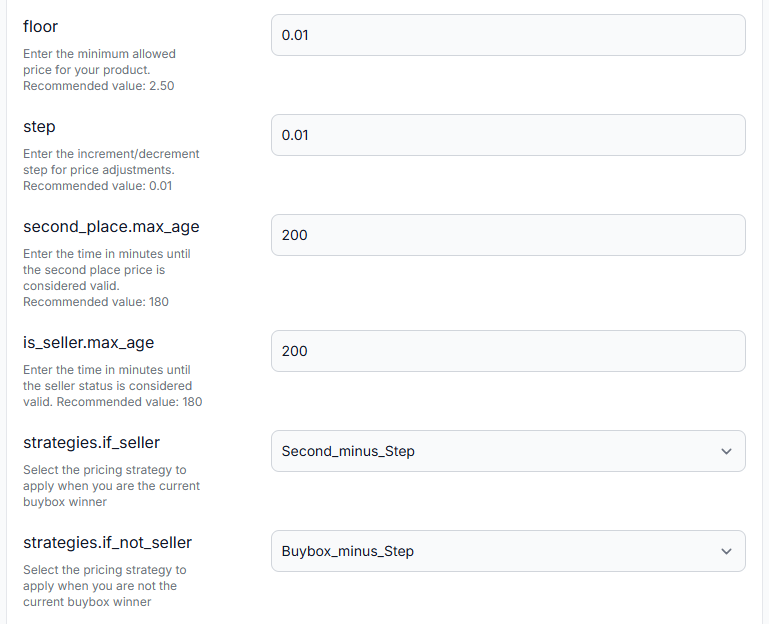
Configure buybox settings for a price synchronization
Interfaces· Buybox settings· Price synchronization· Repricing
This guide explains the pricing floor, adjustment step, data-validity periods, strategy selectors, seller identification, target position, and seller filters available in the BuyBox Settings interface.
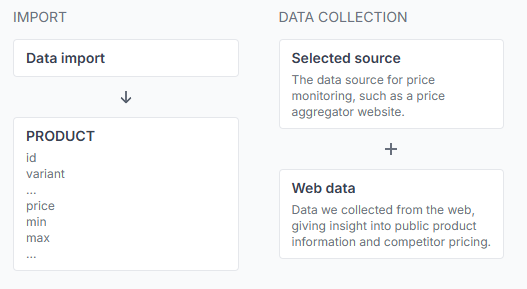
How B2BLIX aggregators monitors prices and calculates recommendations
Support questions· B2BLIX aggregators· Price monitoring· Buybox algorithm
This guide explains product queries, competitor monitoring, comparison-target selection, pricing strategies, safety limits, and the checks sellers should complete before exporting calculated prices.
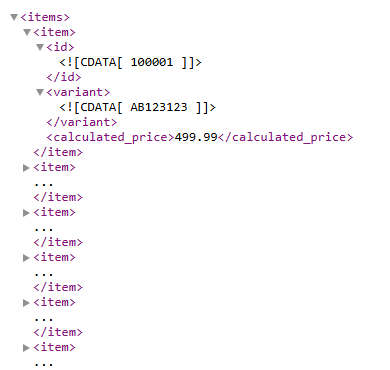
How calculated prices are delivered to a store or another sales channel
Support questions· Integrations & exports· Price synchronization· Woocommerce
B2BLIX can deliver calculated prices as an XML output or send them through a supported store integration. A connected store such as WooCommerce can then update product prices automatically. Learn how calculated prices leave B2BLIX, where to select the export method, and what to verify before enabling automatic price updates in your store.
FAQ
Frequently asked questions
Explore the most common questions about B2BLIX Aggregators, price comparison monitoring, and automated repricing.
Platform and monitoring questions
B2BLIX takes your product list, checks search results for each product on selected price comparison platforms, compares your price with the current market price, applies your repricing rules, and prepares a suggested price.
Yes. If you need a specific price comparison platform or aggregator source, contact us and we will check whether it can be added. Availability depends on the platform, country, product category, and technical access.
Yes. You can start with a small product list, for example in Google Sheets, and monitor only those products first. This is useful for a safe test because you can review the results before enabling any price updates.
Pricing and automation questions
Yes. The main use case is lowering prices when competitors are cheaper, but B2BLIX can also suggest a higher price when the market allows it and your rules permit it.
Yes. Minimum and maximum prices are the main safety limits. B2BLIX will not suggest prices outside the range you define.
Yes. You can use monitoring-only mode, review calculated prices first, and publish updates only when you are ready.
Depending on your setup, prices can be exported through XML, WooCommerce, or other available integrations.
Your usage cost depends on the number of products you monitor, monitoring frequency, and monitoring type. Use the calculator to estimate your monthly cost before starting.
Yes. After the product data, data sources, pricing rules, and update method are configured, B2BLIX can continue monitoring and calculating prices automatically. You can still review results or adjust settings when needed.
B2BLIX keeps suggested prices inside your minimum and maximum limits. This helps avoid uncontrolled price drops, even when competitors also change prices automatically.
Ready to automate your pricing?
Import your products, choose data sources, and let B2BLIX calculate when your prices should go lower.