Configure buybox settings for a price synchronization
This guide explains the pricing floor, adjustment step, data-validity periods, strategy selectors, seller identification, target position, and seller filters available in the BuyBox Settings interface.
What this page is used for
The BuyBox Settings page defines the general pricing rules for one synchronization instance. These rules are applied to every eligible product processed by that synchronization.
B2BLIX uses public offers collected from the selected price comparison source as market signals. It then selects a comparison target and applies the strategy configured on this page.
In this interface, BuyBox means the comparison target selected by the B2BLIX calculation model. It does not mean that the price comparison platform operates an official BuyBox or has declared an official winner.
Open this page after creating a new synchronization and whenever you need to change how the synchronization reacts to competitor prices, seller positions, or older market observations.
Warning: Changes on this page can affect calculated and exported prices. Saved settings become active immediately and are considered during the next synchronization cycle. Review product minimum and maximum prices before changing these settings.
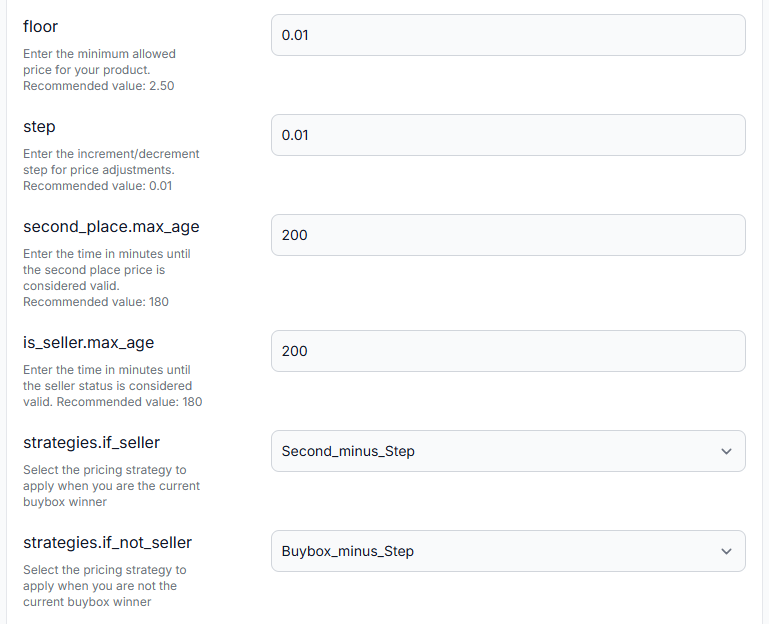
What you can do on this page
- Set an absolute minimum price for the synchronization.
- Choose the amount used for price increases and reductions.
- Control how long collected price and seller-position information remains valid.
- Select pricing strategies for different seller and market states.
- Enter the seller name used to identify your own offers.
- Choose whether to target the first result, Top 3, Top 10, or the first page.
- Ignore selected sellers or leading offers.
- Limit calculations to preferred sellers when they are present.
- Save all settings with the Update all settings button.
Main fields and controls
Price limits and adjustment size
| Field | What it means | What to check |
|---|---|---|
| floor | The absolute minimum price allowed for products in this synchronization. If the calculated price or an imported product minimum is lower than this value, the floor can raise the effective minimum used by the calculation. | Set it to a commercially safe minimum for the products in this synchronization. Do not copy the displayed recommendation without checking your costs, taxes, fees, and product-level limits. |
| step | The amount added to or subtracted from a price when the selected strategy uses a step. For example, Buybox_minus_Step uses the selected comparison target minus this amount. | Choose a value that suits your typical product prices and pricing strategy. A one-cent step may suit inexpensive products, while higher-priced catalogs may require a larger step. |
Important: The floor applies across the synchronization and can override a lower product-level minimum. For example, if a product has an imported range of EUR 1.00 to EUR 3.00 and the floor is EUR 2.50, the calculation effectively works with a minimum of EUR 2.50 for that product.
Data-validity periods
| Field | What it controls | Recommended approach |
|---|---|---|
| second_place.max_age | The number of minutes for which the stored second comparison price is considered fresh enough to use. | Set this period long enough to cover the normal interval between product observations. The interface displays 180 minutes as a recommended value. |
| is_seller.max_age | The number of minutes for which the latest detected seller status remains valid. | Align it with the monitoring schedule. When the stored status becomes older than this period, B2BLIX uses an undefined strategy branch instead of treating the old position as confirmed. |
For example, 180 minutes equals three hours. If a product is normally checked every two hours, a three-hour validity period can keep the observation valid until the next expected check. If the product is checked only once per day, a three-hour period means the information may be treated as outdated for most of the day.
These fields relate to the freshness of collected market observations. They should not be confused with the import or export frequency configured in the synchronization’s general settings.
Pricing strategy fields
The strategy fields are dropdown lists containing mathematical pricing rules. Different fields are used depending on whether your seller is detected and how your imported base price compares with the selected target.
| Field | When it is used |
|---|---|
| strategies.if_seller | Used when your seller name has been detected within the permitted freshness period. |
| strategies.if_not_seller | Used when another seller occupies the selected comparison position and your seller status is still fresh. |
| strategies.lower_if_undefined | Used when seller status is undefined and your imported base price is higher than the selected comparison target. |
| strategies.match_if_undefined | Used when seller status is undefined and your imported base price matches the selected comparison target. |
| strategies.higher_if_undefined | Used when seller status is undefined and your imported base price is lower than the selected comparison target. |
Common terms in the strategy names have the following meanings:
- Price refers to the imported base price.
- Buybox refers to the B2BLIX-selected comparison target.
- Second refers to the stored second comparison price.
- Lastpublished refers to the last price previously produced or published by the synchronization.
- plus_step and minus_step adjust the referenced value by the configured step.
- to_price describes movement from the last published price toward the imported base price.
Review the BuyBox schema before selecting a strategy. Do not choose a formula based only on its name without understanding which price it uses and in which calculation state it will run.
Seller identification
seller_name contains your shop name or store domain exactly as it appears in results from the selected source. B2BLIX compares this value with collected seller names to determine whether your offer is detected at the selected position.
Copy the name directly from the source whenever possible. Differences in spelling, punctuation, spacing, or domain format may prevent your offer from being recognized correctly.
Target position
buybox_position determines which area of the filtered results is used as the pricing target.
| Option | Purpose |
|---|---|
| first | Targets the first eligible result after filtering. |
| top_3 | Uses a Top 3 target instead of always competing for the first result. |
| top_10 | Uses a Top 10 target, allowing a wider balance between visibility and price. |
| first_page | Targets remaining on the first page rather than reaching one of the highest positions. |
A broader target may allow a higher selling price, but B2BLIX cannot guarantee a particular position. Search-result placement may depend on factors outside B2BLIX, including the source’s own ranking logic, seller reputation, availability, and other listing information.
Seller and position filters
| Field | What it does |
|---|---|
| skip_first_n | Skips the specified number of leading eligible offers after seller filtering. Use 0 to keep all results. This can be useful when you do not want to compete with the cheapest listings. |
| skip_sellers | Removes offers from the listed sellers before the target price is selected. |
| only_sellers | First tries to calculate from offers belonging to the listed preferred sellers. If at least one listed seller is present, other sellers are ignored. If none is present, processing continues with the broader available result set. |
Use Add item to create another seller-name field. Use the remove button beside an item to delete it or clear its value.
Seller names in skip_sellers and only_sellers must match the names supplied by the selected source. These fields affect which offers are considered during calculation; they do not remove sellers from the source website.
Buybox filtering order
The page includes a BuyBox filtering logic table that explains the order in which the result controls are applied:
- only_sellers checks whether any preferred seller is present. When a match is found, the calculation uses only matching preferred sellers.
- skip_sellers removes excluded sellers from the remaining result set.
- skip_first_n skips the configured number of leading offers.
- buybox_position selects the target from the offers that remain.
The selected target may therefore differ from the first or numerically lowest offer originally returned by the source.
How to use this page safely
- Confirm that imported products have correct base, minimum, and maximum prices.
- Set the floor to a value that is safe for the complete synchronization, not just one product.
- Copy your exact seller_name from the selected source.
- Choose the intended buybox_position based on your balance between competitiveness and margin.
- Add seller filters only when they support a clear commercial rule.
- Review each strategy in the BuyBox schema before selecting it.
- Choose a step appropriate for the normal price level of your catalog.
- Align both maximum-age settings with the product monitoring schedule.
- Select Update all settings to save the complete form.
- Review the next calculation in Product Checker or the synchronization reports before expanding automated export to a large catalog.
After saving, the settings become valid immediately. They are applied when the next synchronization imports the latest product data, evaluates sufficiently recent market observations, calculates prices, and prepares the configured output.
For a new configuration, begin with a small group of representative products. Check the returned product cards, detected seller, selected target, chosen strategy, provisional result, and final range check before increasing coverage.
Common mistakes
- Using an unrealistically low floor. A floor such as EUR 0.01 provides little general protection if product-level data is incorrect or unsuitable.
- Using a floor that conflicts with product ranges. A higher floor can replace lower imported minimum values across the synchronization.
- Choosing a step without considering product value. One cent may be suitable for low-priced products but too small to produce meaningful changes for expensive products.
- Using freshness periods shorter than the monitoring interval. This can cause seller or second-price information to become outdated before the next observation arrives.
- Guessing how a strategy works. Similar names can use different reference prices. Review the BuyBox schema first.
- Entering an approximate seller name. Even a small spelling or formatting difference may prevent correct seller detection.
- Setting skip_first_n too high. If you skip more offers than the source normally returns, no eligible target may remain.
- Entering seller filters with incorrect names. Excluded or preferred seller rules depend on exact names from the source.
- Assuming the target position is guaranteed. The setting controls the comparison target used by B2BLIX, not the source platform’s ranking system.
Example use case
A seller imports a product with a base price of EUR 2.90 and an allowed range of EUR 1.00 to EUR 3.00. The synchronization uses the following settings:
- floor: EUR 2.50
- step: EUR 0.01
- strategies.if_not_seller: Buybox_minus_Step
- buybox_position: first
- skip_first_n: 0
If the seller is not detected and the selected fresh comparison target is EUR 2.80, the strategy produces a provisional price of EUR 2.79. This value remains inside the effective range of EUR 2.50 to EUR 3.00, so it can be used as the calculated result.
If the selected target is EUR 2.10, the same strategy would produce a provisional price below the synchronization floor. The final result is therefore limited to EUR 2.50.
This example shows why the floor, step, strategy, selected position, and imported product limits should always be reviewed together.