Connect supplier data from XML, CSV, JSON, Excel, Google Sheets, public URLs, FTP/SFTP, API connections, manual uploads, or custom supplier onboarding.
Manage supplier product data
B2BLIX Feed helps online sellers import product data from multiple suppliers, translate and standardize it, apply custom margins and VAT rules, and merge identical products by EAN.
Then export clean product data in the format your store or marketplace needs.
40+
Supplier data sources
5+
Export destinations
20+
European countries
- Import supplier catalogues in XML, CSV, Excel, and other formats.
- Merge multiple suppliers into one structured catalog.
- Apply VAT, margins, stock rules, and EAN-based product merging.
Screenshot of B2BLIX Feed
WHAT USUALLY GOES WRONG
Supplier catalogues are not ready for direct sales
Suppliers provide product data in different formats, categories, and price structures. B2BLIX Feed standardizes different supplier catalogues into one usable product catalogue.
Supplier catalogues do not match your store
Every supplier uses different fields, categories, titles, stock logic and price formats.
Multiple suppliers create duplicate products
The same product appears in different supplier catalogues with different prices, stock levels, and descriptions.
Prices and margins are managed manually
VAT, margins, rounding and supplier price changes become risky when handled in spreadsheets.
Product data is not ready to sell
Supplier catalogues often contain weak titles, missing attributes, poor descriptions, or incorrect categories.
HOW IT WORKS
Connect supplier catalogues and automate product data
Start with one supplier, one export, and one product group. B2BLIX reads supplier data, applies your rules, and keeps clean product data ready for your sales channels.
Import supplier data
B2BLIX imports supplier catalogues from XML, CSV, JSON, Excel, Google Sheets, FTP, URL, or API sources.
It detects fields and maps supplier data into a standard product format.
Filter and apply rules
B2BLIX normalizes titles, brands, EANs, categories, prices, stock, images, attributes, VAT and delivery data.
It automatically groups identical products by EAN and applies your rules for margins, rounding, supplier priority, stock, delivery time and exclusions.
Export and synchronize
B2BLIX sends selected products to WooCommerce, Pigu, Allegro, XML, JSON, CSV, Google Sheets or custom formats.
It runs scheduled updates to keep stock, prices and product data fresh across your sales channels.
WHY B2BLIX
Built for sellers using supplier catalogues
B2BLIX Feed is not just a file converter. It helps sellers turn supplier catalogs into sellable product data: cleaned, merged, filtered, priced, and ready for stores, marketplaces, or custom exports.
SUPPLIER CATALOG FIT
•
Made for supplier-based sellers
Use B2BLIX when your products come from wholesalers, distributors, or external supplier catalogues.
•
Works with multiple suppliers
Merge several supplier catalogues into one structured product catalogue instead of managing each one manually.
PRODUCT DATA CONTROL
•
Choose what to publish
Filter products by supplier, category, brand, stock, margin, EAN or delivery logic.
•
Merge products by EAN
Group identical products from different suppliers and choose the best source by your rules.
SALES CHANNEL READY
•
Export-ready workflow
Prepare clean product data for WooCommerce, Pigu/PHH, Allegro, XML, JSON, or custom formats.
•
Not only for dropshipping
Even with your own stock, use supplier catalogues to compare availability, update purchase costs, enrich product data, and test new sales channels.
SUPPORTED SUPPLIERS
Contact us
Start with known suppliers or request a new one
B2BLIX Feed can process supplier catalogues from many different sources. You can start with an existing supplier or request support for a new supplier catalogue.
Do you have another supplier? Send us the catalogue format, and we will check whether it can be processed.
Latakko
Big Buy
Komputronik
Mature Services
B2B Sports Wholesale
ALSO
Factoryprice
Bosch
Stock Firmati
PowerSport.lt
Marsietis
MC Distribution
Griffati
Topo Group
Pricy.it
Amona
F9 Baltic
FragrancesWholesale.eu
Officeday
vidaXL
Qoltec
Sanistal
Rekman
MyFusion
Stockperfume
3MK
Bdroppy
BTS Wholesaler
Action.pl
Eselo
Sportsman24.com
Mada.pl
ACC Distribution
Lic Gotus
Gitana
Marba-Sport
BROCK ELECTRONICS
Partnertele
Matterhorn
Ptakonline
EXPORT DESTINATIONS
Send product data where you sell
After B2BLIX processes supplier data, export it to stores, marketplaces, price comparison platforms, or custom formats.
Online stores
Use processed supplier data in your webshop or e-commerce platform.
WooCommerce
Shopify
Magento
PrestaShop
Custom XML
Show more: 3
Marketplaces
Prepare supplier products for marketplace listings and product-data workflows.
Pigu.lt
220.lv
Kaup24.ee
HobbyHall.fi
Allegro
Show more: 3
Price comparison
Export product data to aggregator and price comparison platforms.
Salidzini.lv
Kurpirkt.lv
Kainos.lt
Kaina24.lt
Ceneo.pl
Show more: 3
Export options
Build flexible product exports for your own systems or external partners.
XML
JSON
CSV
Google Sheets
API
Show more: 2
CONTROL EVERY UPDATE
Prepare supplier data for sales
Import supplier catalogues, clean product data, apply pricing and stock rules, improve content, and export ready-to-use product data.
Import
Data processing
Map fields, normalize brands and categories, validate EAN codes, detect duplicates, group products by EAN, and apply supplier priority or filtering rules.
Pricing rules
Create VAT, fixed margin, percentage margin, category margin, supplier margin, rounding, currency, delivery-cost, min/max price and margin protection rules.
Stock and availability
Synchronize stock, prioritize suppliers, set minimum stock rules, filter by delivery time, handle out-of-stock products, and exclude unavailable items.
Content enrichment
Clean titles, improve descriptions, suggest categories, extract attributes, translate content, validate images, detect missing fields, and use EAN-based research.
Export
Export processed data to WooCommerce, Pigu/PHH, Allegro, XML, JSON, CSV, Google Sheets, API, scheduled exports, or custom destination formats.
PRICING
Pay based on usage
Use the pricing calculator to estimate your monthly cost based on supplier sources, exports, synchronization frequency, and optional data-processing features.
|
|
||
|
|
||
|
|
||
|
|
||
|
|
||
|
|
||
|
|
|
|
Price list
-
Data import0.04 - 0.05 EUR per one supplier
-
Data export0.04 - 0.05 EUR per one export
-
Translation0.04 - 0.05 EUR per 100 products
GUIDES
Practical guides for supplier catalogues
Learn how to connect supplier catalogues, merge products by EAN, apply VAT and margin rules, prepare WooCommerce or Pigu/PHH exports, test new supplier catalogues, and improve product data before publishing.
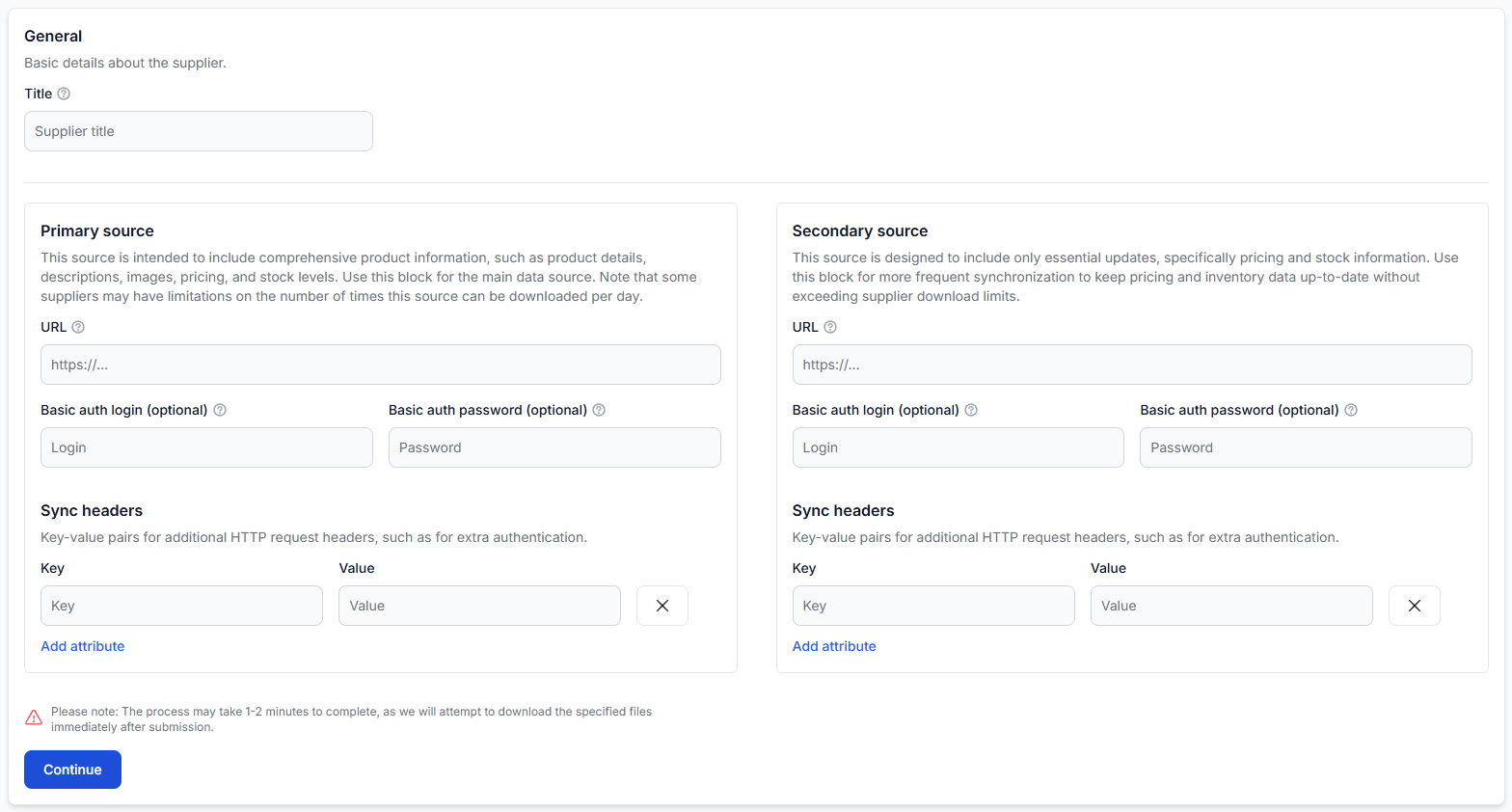
Getting started with b2blix feed
Getting started
Connect your first supplier, map and import product data, create an XML export, generate the feed, and verify the final results before connecting it to a live sales channel.
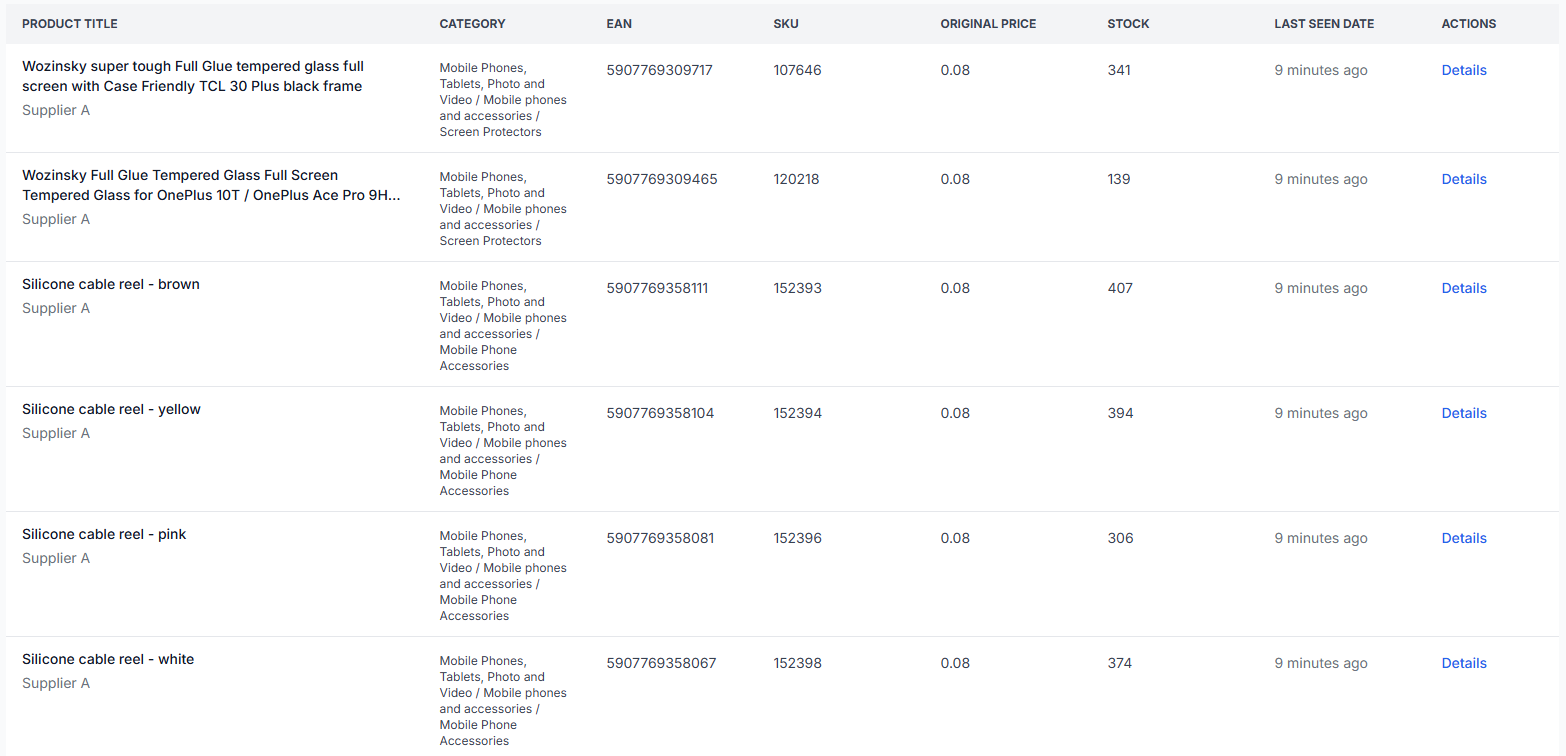
All products interface
Interfaces· Product data· Supplier catalog· Monitoring
The All Products interface shows the complete list of supplier products currently stored in B2BLIX Feed. Use it to search the catalog, review imported values, and open detailed information for a specific product.
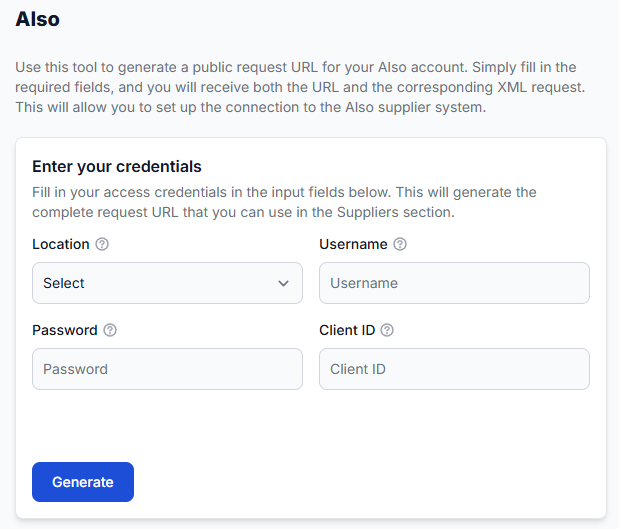
Also helper: generate a supplier request URL
Interfaces· Helper tools· Supplier sources· Request urls
The Also helper creates a complete request URL from your Also account details. You can then use this URL as a primary or secondary supplier source in B2BLIX Feed.
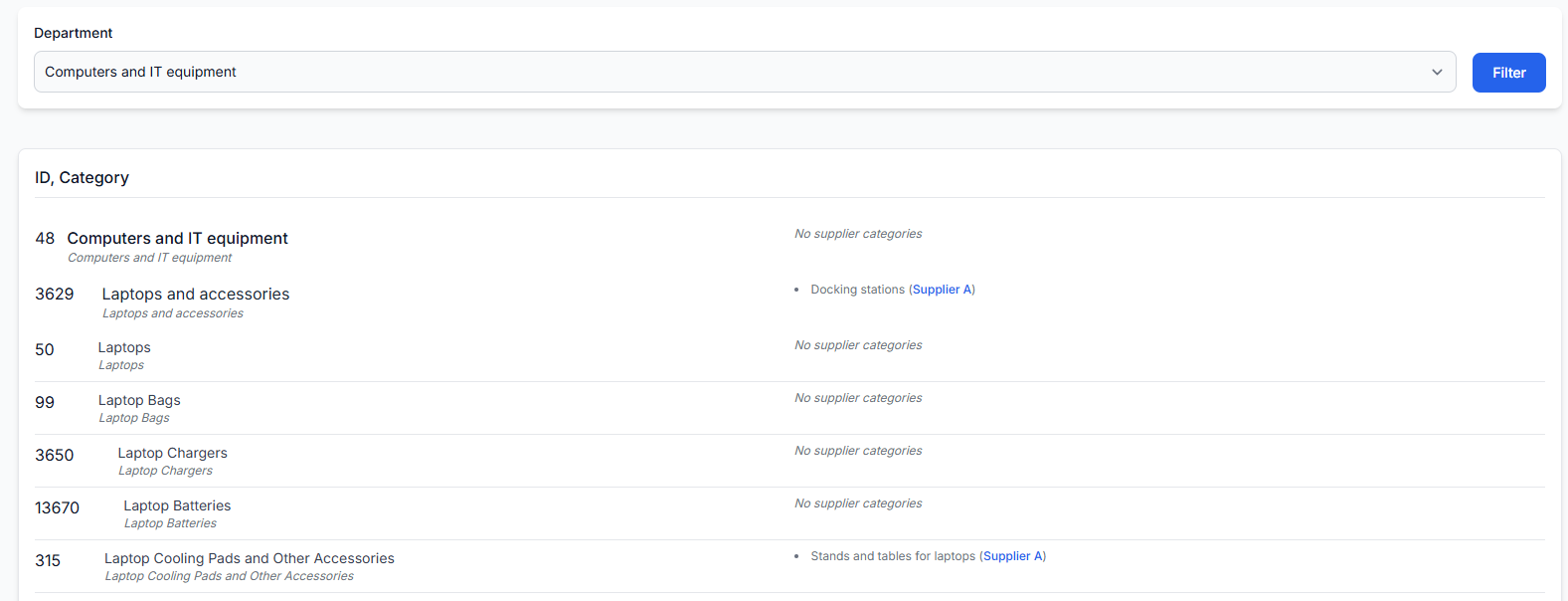
Category map interface
Interfaces· Category mapping· Supplier categories· Product data
The category map shows the predefined B2BLIX category tree and the supplier categories connected to it. Use this page to find category IDs, review category relationships, and understand how categories from different suppliers are standardized.
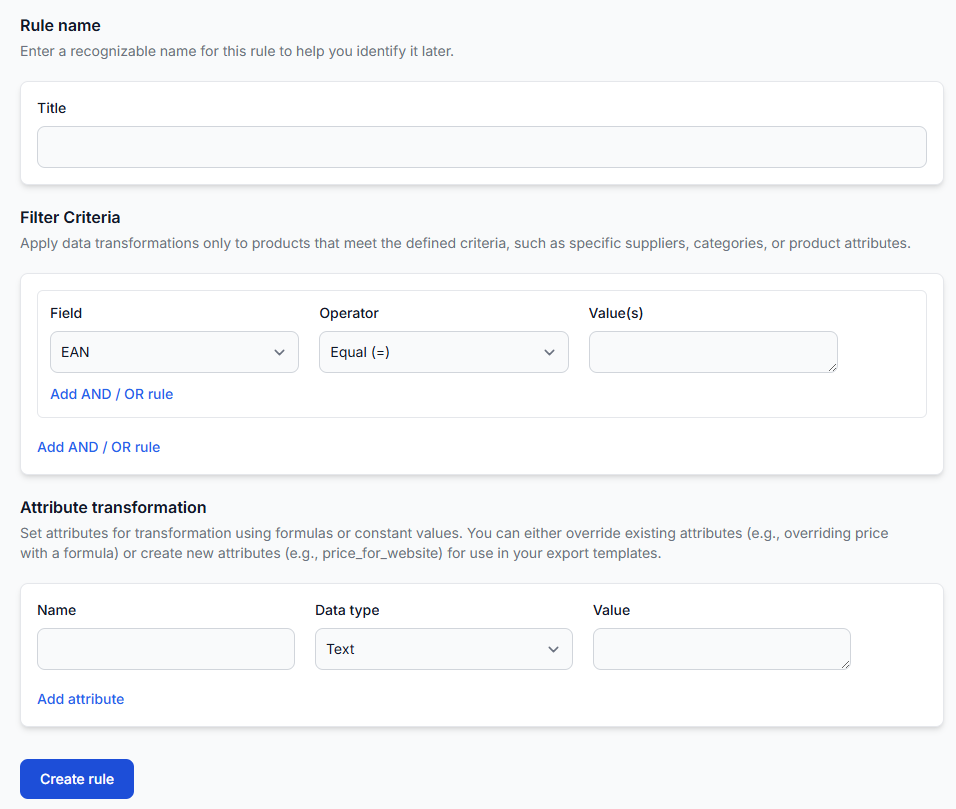
Data transformation rules
Interfaces· Data transformation· Product data· Export rules
Use data transformation rules to change supplier product data before it is written into an export. A rule can update an existing attribute, create a new export-specific attribute, and limit the change to products that match selected conditions.
FAQ
Frequently asked questions
Common questions about supplier catalogues, product data processing, exports, and how B2BLIX Feed fits into your current workflow.
Supplier catalogue questions
B2BLIX can process XML, CSV, JSON, Excel, Google Sheets, public URLs, FTP/SFTP, API sources, and custom formats.
No. Many suppliers can be processed through standard data formats without a native integration.
B2BLIX can update purchase prices, recalculate selling prices, and prepare fresh exports using your margin and VAT rules.
B2BLIX can group products by EAN and help you choose the best supplier by price, stock, delivery time, or priority.
Yes. B2BLIX can clean titles, improve descriptions, suggest categories, extract attributes, translate content, and prepare SEO-friendly fields.
Export and workflow questions
Yes. B2BLIX can prepare WooCommerce-ready product data for direct or file-based workflows.
Yes. B2BLIX can prepare product data for Pigu/PHH workflows, depending on your required format and marketplace setup.
Yes. You can use B2BLIX as a product data processor and export clean data to XML, JSON, CSV, Google Sheets, or custom formats.
Yes. You can reuse the processed supplier catalog and create a new export format for another marketplace or sales channel.
Yes. Import a supplier catalogue, process the data, review the output, and export a test file before using it live.
B2BLIX Feed focuses on supplier product data processing and export. Supplier order placement can be discussed for selected suppliers or custom workflows.
Yes. You can start with one supplier catalogue, one product group, and one export destination, then expand after the workflow is tested.
Ready to automate supplier data?
Start with one supplier, review the processed data, and export clean product data when you are ready.