Finds the most relevant B2BLIX guides, instructions, and troubleshooting information.
Meet your B2BLIX AI assistant
Starting a new B2BLIX service should not mean reading every guide before you can take the first step.
Ask what to do next. The AI assistant understands the page you are viewing, searches B2BLIX knowledge, checks relevant account information, and turns it into clear, practical guidance.
24/7
instant B2BLIX guidance
3×
knowledge, page and account context
7
languages, one assistant
- Guides you from a newly activated service to a working setup.
- Explains pages, fields, settings, reports, and common problems in plain language.
- Checks relevant account data and recommends the next practical step.
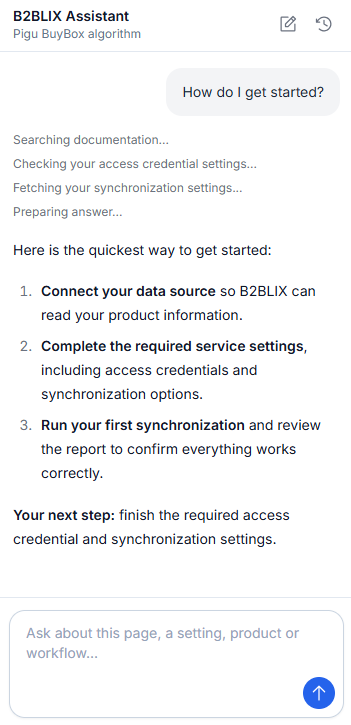
B2BLIX AI assistant guiding a new service setup
Included
With every active subscription
The AI assistant becomes available when your organization has at least one active B2BLIX subscription.
≈200
Average answers included monthly
Each active subscription adds an allowance designed for approximately 200 average-size and average-complexity conversations.
Read-only
Safe account analysis today
The assistant can inspect relevant information and explain it, but it does not currently change your settings or data.
Platform-wide
One assistant across B2BLIX
Use it for general Platform questions or open a specific service to receive account-aware assistance in that service context.
* Actual included usage depends on question length, conversation history, answer complexity, documentation searches, and account-data checks. Additional usage is billed on a pay-as-you-go basis.
WHEN A NEW SERVICE FEELS UNFAMILIAR
You should not need to guess what to do next
B2BLIX services can process complex product, pricing, supplier, and marketplace data. The AI assistant turns the interface into a conversation and helps you move forward one step at a time.
Where do I start?
Get a clear setup path based on the service and page you currently have open.
What does this setting mean?
Ask about a field, option, rule, or screen and receive a plain-language explanation.
Is my setup ready?
Let the assistant inspect the relevant configuration and point out what appears complete or missing.
Why did this not work?
Use reports, statuses, settings, and product information to understand common setup and synchronization problems.
HOW IT WORKS
Open a service, ask a question, follow the next step
There is no special prompt language to learn. Describe what you are trying to achieve, and the assistant uses the available B2BLIX context to guide you.
Open the relevant service
For account-specific help, open the B2BLIX service you want to configure or troubleshoot.
The assistant uses the current page and service context to keep the conversation focused.
Ask in your own words
Ask questions such as “How do I get started?”, “Explain this setting”, or “Is my setup ready?”
Continue the same conversation, ask follow-up questions, or switch to another language whenever useful.
Receive a practical next step
The assistant searches B2BLIX knowledge and, when relevant, checks your account settings, reports, products, statistics, suppliers, or exports.
It then explains what it found and recommends what you should do next.
MORE THAN A GENERIC CHATBOT
Built around B2BLIX knowledge and your current context
The AI assistant is focused on helping you use B2BLIX. It combines documented product knowledge with the relevant information available in your organization.
B2BLIX KNOWLEDGE
•
Support knowledge in one place
Uses B2BLIX guides, support articles, interface instructions, service playbooks, and documented troubleshooting procedures.
•
Focused on the Platform
Answers B2BLIX questions instead of acting as an unrelated general-purpose chatbot.
ACCOUNT AND PAGE CONTEXT
•
Understands where you are
Uses the current page, service, navigation, and conversation context to make the answer more relevant.
•
Checks relevant account data
Can retrieve the information available to your organization in the open service and explain what it means.
CLEAR GUIDANCE
•
Recommends the next step
Turns settings, reports, and documentation into an understandable action plan instead of leaving you with raw information.
•
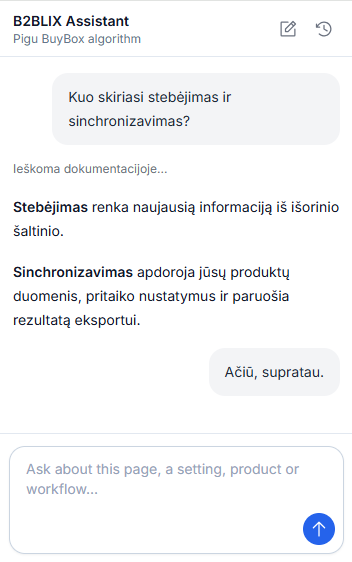
Speaks your language
Ask questions and receive answers in the language you use, or ask the assistant to repeat an explanation in another language.
NOT A GENERIC ANSWER
Ask about the setup you actually have
Traditional help content explains how a feature should work. The AI assistant can also inspect relevant information from the service you currently have open.
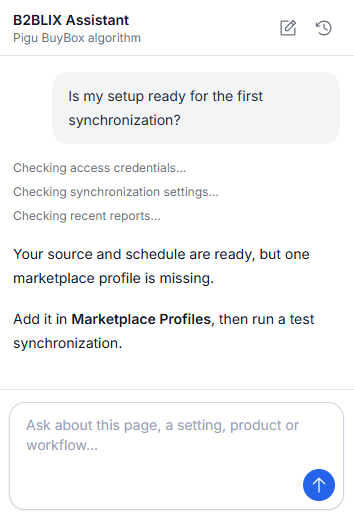
Ask about statistics, settings, products, suppliers, exports, synchronization reports, or another supported account area. The assistant can connect the documentation with your current data and explain the result.
Example conversation:
- Ask: “Is my setup ready for the first synchronization?”
- The assistant checks the relevant settings and recent service information.
- It explains what looks correct, what is still missing, and which step to take next.
INCLUDED WITH YOUR SUBSCRIPTION
AI guidance is already built into B2BLIX
The AI assistant becomes available automatically when your organization has at least one active B2BLIX subscription. There is no separate AI plan to activate.
Every active subscription adds a monthly AI usage allowance, so organizations using several B2BLIX services receive more included assistance.
After the included allowance is used, you can continue on a pay-as-you-go basis. Usage is calculated in Actions according to the work required to prepare each answer.
Simple and predictable:
- AI access is included with every active subscription.
- Included usage grows with the number of active subscriptions.
- Additional usage is charged only when an answer is produced.
SEE WHAT IT IS CHECKING
Useful answers can require more than one lookup
While the assistant prepares an answer, you can see the type of information it is gathering instead of looking at an unexplained loading screen.
Searching documentation
Checking settings
Retrieves the current configuration needed to answer a setup or account question.
Reading reports
Uses recent synchronization or processing reports to help explain what happened.
Finding products
Looks up a relevant product by supported identifiers or filters when the question requires it.
Reviewing statistics
Retrieves available statistics and chart data to explain the current account situation.
Preparing the answer
Combines the available documentation, page context, and account information into one clear response.
READ-ONLY TODAY
Ask freely without giving the AI control of your account
The current AI assistant can retrieve and analyze supported account information, but it does not change settings, publish data, start processes, or perform other write actions.
It can inspect and explain
Use it to understand your configuration, service status, products, reports, suppliers, exports, and statistics where supported.
You remain responsible for reviewing the answer and making any changes yourself.
Protected credentials stay protected
B2BLIX does not intentionally send stored passwords, access tokens, or similar authentication secrets to AI providers.
Do not paste passwords, tokens, API keys, or other sensitive credentials into the chat.
What read-only means
- Can explain settings: Yes
- Can inspect supported account data: Yes
- Can recommend the next step: Yes
- Can change settings today: No
- Can publish or submit data today: No
COMING SOON
The assistant is becoming an AI Agent
Today, B2BLIX AI explains your account and recommends what to do next. The next stage is an agent system that can complete supported tasks, monitor your services, and keep you informed.
Manage your settings
Ask the AI Agent to configure supported settings and complete selected setup steps directly from the conversation.
Run and track tasks
Start supported processes, follow their progress, and receive a clear explanation when something requires your attention.
Watch and report
Let the AI Agent monitor important service activity and prepare scheduled summaries or notifications about meaningful changes.
FAQ
Frequently asked questions
Learn how the B2BLIX AI assistant uses Platform context, account information, included usage, and multilingual conversations to help you get started.
The AI assistant provides generated guidance. Review important answers before making business, pricing, publication, or configuration decisions.
Access and capabilities
It is available to organizations with at least one active B2BLIX subscription. Authorized users access information belonging to their organization.
It can answer general Platform questions. For account-specific help, open the relevant service so the assistant uses the correct service and page context.
Not currently. The present version is read-only: it can inspect supported account information, explain it, and recommend the next step.
Depending on the open service and available tools, it may check settings, statistics, reports, products, suppliers, exports, and other supported account information.
No. It is designed specifically for B2BLIX setup, usage, navigation, account explanation, and troubleshooting.
Languages, usage and safety
Yes. Ask in the language you prefer, continue the conversation in that language, or ask the assistant to repeat an answer in another language.
Each active subscription includes a monthly allowance designed for approximately 200 average-size and average-complexity questions and answers. Actual usage varies by complexity.
Additional usage is billed on a pay-as-you-go basis using Actions. An average answer is expected to cost approximately €0.01, but complex answers may cost more.
No. Never paste passwords, access tokens, API keys, payment details, or other sensitive credentials into the conversation.
The assistant can make mistakes or work with incomplete information. Review important guidance before changing settings or making business decisions.
Start B2BLIX with an expert by your side
Create your account, activate a service, and let the B2BLIX AI assistant guide you from the first question to a working setup.