Statistics page
The Statistics page provides a read-only summary of product visibility, monitoring activity, competitors, and background processes for each Price Synchronization. Use this page to review the current state of your synchronizations, compare results from different price comparison sources, and open the latest synchronization report for more detail.
Statistics page overview
The Statistics page gives you a quick overview of what is happening in your B2BLIX account. It is intended for regular review and does not contain settings that you can change.
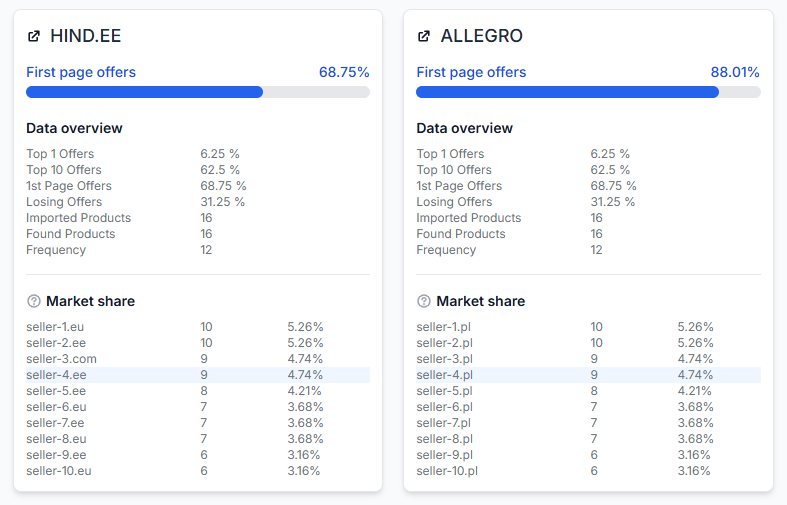
Each card represents one Price Synchronization. A synchronization uses one price comparison platform as its data source. For example, you may have one synchronization for Hind.ee and another for Allegro Poland.
If you use several synchronizations, their results are shown separately. Statistics from different platforms are not combined into one market position.
This page is read-only. Opening it or reviewing its data does not change product prices, monitoring settings, synchronization settings, or export results.
When to open this page
Open the Statistics page whenever you want a quick summary of your current monitoring results. It is useful when you want to:
- Check whether your products are appearing in collected search results.
- Review how many offers are in Top 1, Top 10, or the first page.
- Compare general performance between synchronization instances.
- See which sellers appear most often in the collected results.
- Check the progress of imports, data collection, and synchronization processes.
- Open the most recent synchronization report for more detailed information.
Synchronization cards
Every available and active synchronization has its own statistics card. The card title identifies the synchronization or its selected data source.
Always read the figures inside the context of that card. For example, the Hind.ee card describes only the data collected through the Hind.ee synchronization. It does not include results from Allegro or another source.
First page offers
First page offers shows the percentage of imported products for which your detected seller offer appears on the first page of the selected price comparison source.
The progress bar provides a visual summary of the same percentage. A higher value means that your detected offers appear on the first page for a larger share of the synchronization's imported products.
This value is informational. It does not guarantee that a product will remain on the first page, because public search results and seller positions may change.
Data overview
The Data overview section summarizes the products and positions recorded for the synchronization.
| Field | What it means |
|---|---|
| Top 1 offers | The percentage of imported products for which your detected seller offer currently appears in the first result position. |
| Top 10 offers | The percentage of imported products for which your detected seller offer appears within the first ten results. |
| 1st page offers | The percentage of imported products for which your detected seller offer appears somewhere on the first page. |
| Losing offers | The percentage of products currently classified as losing according to the synchronization's collected comparison data. |
| Imported products | The number of products currently imported into this synchronization. |
| Found products | The number of imported products for which the price comparison source returned one or more result cards for the supplied query. |
| Frequency | The average monitoring frequency used for products in this synchronization. It indicates how often the products are scheduled for checking under the current configuration. |
The position percentages are based on the latest available collected data. They may change after the next monitoring or synchronization cycle.
If Found products is lower than Imported products, some products may not yet have usable collected results, or their supplied search queries may have returned no result cards.
Market share
The Market share section lists the sellers that appear most often in the collected search results. The list includes competitors and may also include your own shop.
For each seller, the table shows:
- The seller name or domain discovered in the public results.
- The number of recorded appearances.
- The seller's percentage share within the collected data used for this summary.
The information is based on web discoveries and the seller identity currently configured for the synchronization. It should be interpreted as a summary of the collected result cards, not as the seller's complete share of the entire market.
A seller may appear under a different name or domain if the price comparison source changes how it displays that seller.
Background processes
The page can also display background processes associated with the account and its synchronizations. These may include:
- Importing a product file.
- Updating stored product data.
- Collecting public comparison data.
- Running a synchronization procedure.
- Preparing or updating synchronization output.
Progress and status information is shown separately for the relevant synchronization. Check the displayed update time when deciding whether the information is current.
A process may temporarily show an in progress or failed status. This does not always mean that immediate action is required. Some processes run on a schedule and may run again during a later cycle.
If a status appears unusual, first check when it was last updated and allow time for the next scheduled run. Use the latest synchronization report when you need more detail about a completed process.
Latest synchronization report
The page may provide information about the most recent synchronization together with a link to its detailed report.
Open the report when you need information beyond the summary card, such as processing status, imported item counts, calculation results, or output details.
The Statistics page is intended as a quick account overview. The detailed report should be used when you need to understand one specific synchronization run.
How to use this page safely
- Identify the synchronization card you want to review.
- Check the Imported products and Found products counts.
- Review the Top 1, Top 10, and first-page percentages.
- Check Losing offers for a general indication of products that may need closer review.
- Review the Market share list to see which sellers appear frequently.
- Check the timestamps and statuses of any background processes.
- Open the latest synchronization report when the summary is not detailed enough.
Because the page is read-only, there is no save action and no risk of accidentally changing live prices from this interface.
Common mistakes
- Combining results from different cards. Each card belongs to one synchronization and one data source. Compare the cards, but do not treat their figures as one combined ranking.
- Treating market share as complete market data. The list reflects sellers found in the collected result cards, not every seller operating in the market.
- Assuming found products must always equal imported products. A supplied query may return no cards, or current monitoring data may not yet be available.
- Assuming a percentage is permanent. Public result positions can change between monitoring cycles.
- Reacting immediately to an in-progress status. Check the last update time and allow the scheduled process time to finish.
- Treating one failed process as a permanent failure. Scheduled processes may run again. Review the latest report and update time before drawing conclusions.
Example use case
A seller has separate synchronizations for Hind.ee and Allegro Poland. The Statistics page shows that 68.75% of the seller's monitored Hind.ee products appear on the first page, while 88.01% appear on the first page in the Allegro synchronization.
The seller reviews each card separately. They compare the imported and found product counts, check the losing-offer percentages, and review the most frequently discovered sellers in each market.
If one synchronization has an unexpected result, the seller checks the background-process update time and opens that synchronization's latest report. No settings or prices are changed from the Statistics page itself.