Understanding the buybox schema for price aggregators
Learn how to read the B2BLIX BuyBox schema for price aggregator synchronizations, including imported data, source collection, seller-status branches, and example pricing strategies.
What the buybox schema page is for
The BuyBox schema page is an educational overview of the pricing calculation process used by B2BLIX price aggregators.
It shows how product data is imported, how public information is collected from the selected price comparison source, how the current situation is classified, and which group of pricing strategies can be applied.
This page is read-only. It does not contain editable fields, save buttons, filters, or switches, and opening it does not change any product prices.
Sellers should review this page after onboarding and before choosing strategies in their synchronization settings. Spending approximately 15 minutes reading the schema and opening its tooltips can make the strategy names much easier to understand.
Important: The schema itself cannot change live prices. However, the strategies explained on this page may affect calculated and exported prices when they are selected in your synchronization settings. Always confirm your product minimum and maximum prices before enabling automatic price updates.
How to read the schema
The page presents the calculation as a flow with four main stages:
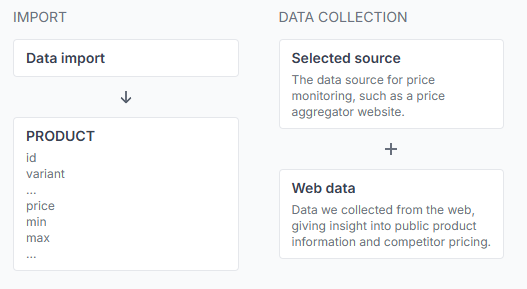
- Import: B2BLIX receives your product information.
- Data collection: B2BLIX collects public offer information from the selected source.
- Segmentation: The product is assigned to a seller-status branch.
- Strategy: The relevant group of pricing actions is considered during synchronization.
Follow the diagram from left to right. The imported product data and collected web data provide the information needed for the later segmentation and calculation stages.
What you can do on this page
- Understand the general BuyBox calculation flow.
- See which imported product values are used by the process.
- Understand why a selected data source is required for monitoring.
- Learn the difference between If seller, If not seller, and Undefined.
- Review the types of pricing strategies available for each situation.
- Open question-mark tooltips to read explanations of strategy groups and individual strategies.
- Use the schema as a reference while configuring BuyBox settings elsewhere in the synchronization.
There is nothing to save on this page. Viewing or hovering over an item does not start monitoring, run a calculation, create an export, or update a live price.
Main sections and controls
| Section or control | What it means | Effect |
|---|---|---|
| Data import | The product information received from the import source connected to the synchronization. | Provides the store data used during calculation. |
| Product id | A stable identifier for the product in your store or source data. | Identifies the imported product record. |
| Variant | An optional additional identifier for a size, color, model, or other product variation. | Helps distinguish products that share the same main id. |
| Price | The original or base catalog price supplied by the seller. | Can be used as the starting point or fallback value during calculation. |
| Minimum price | The lowest price that may be suggested for the product. | Limits calculated prices and protects the lower end of the permitted range. |
| Maximum price | The highest price that may be suggested for the product. | Limits calculated prices and protects the upper end of the permitted range. |
| Selected source | The price comparison platform used by this synchronization as its public market-data source. | Determines where B2BLIX submits product queries and collects web results. |
| Web data | Public product cards and offer information collected from the selected source. | Provides competitor prices, seller information, and the comparison target used by the calculation. |
| Segmentation | The classification of the latest known seller situation. | Determines which strategy group is evaluated. |
| Strategy | A possible pricing response for the detected situation. | Affects calculation only after the strategy is selected in the synchronization settings. |
| Question-mark tooltip | A short explanation shown for a strategy group or individual strategy. | Informational only. It does not select or activate the strategy. |
The diagram shows the main imported price fields. In an actual price aggregator synchronization, each product also uses a non-empty query so B2BLIX can request results from the selected source. The query may differ between products and sources.
Import and data collection
Imported product data
The process begins with the seller's imported product record. The main identifiers are the required product id and the optional variant.
The record also provides the base price and the permitted minimum and maximum prices. These limits are important because pricing strategies must remain within the allowed range.
If the required calculation limits are not available, the product should not receive an automatic competitive adjustment. The base price is used instead.
Selected source and web data
Each synchronization is connected to one specific price comparison data source. A source must be selected before the synchronization can collect public market information.
B2BLIX submits the seller-provided query and processes the result cards returned by that source. Available information may include displayed prices, product titles, links, images, and supplier names.
The selected source is used only for that synchronization. Results from different sources or synchronization instances are processed separately.
Note: In the price aggregators service, “buybox” means the comparison target selected by the B2BLIX calculation. It does not mean that the external price comparison platform operates an official marketplace buybox or declares a winning seller.
Understanding the seller-status branches
If seller
The If seller branch applies when sufficiently recent collected data identifies your shop at the selected comparison position.
Because your shop is currently detected in the intended position, available strategies may keep the existing result or test a controlled price increase to improve margin.
For example, Second minus step uses the second visible comparison offer as a reference and aims slightly below it. Another option, Last published plus step, gradually increases the previously calculated price by the configured step, while remaining within the permitted maximum.
If not seller
The If not seller branch applies when recent data identifies a different seller at the selected comparison position.
Strategies in this branch generally focus on keeping the base price or making a controlled reduction.
For example, BuyBox minus step uses the selected comparison target as a reference and moves the suggested price slightly below it. Other strategies may reduce the base price or the last calculated price by the configured step.
Undefined
The seller status becomes Undefined when B2BLIX does not have sufficiently recent information to confirm whether your shop is currently in the selected position.
An undefined status does not automatically mean that collection failed. It means the available seller observation is missing or older than the configured freshness period.
The schema divides this state into additional situations according to how the imported price compares with the selected target:
- Lower and undefined: The imported price is above the selected target, so a lower-price strategy may be considered.
- Match and undefined: The imported price matches the selected target, so the price may be kept or moved cautiously.
- Higher and undefined: The imported price is below the selected target, so the strategy may move the price closer to the target to improve margin.
The exact available options are shown in the interface. Open each tooltip before deciding which strategy is suitable.
How to interpret strategy names
Strategy names are compact descriptions of the values used by the calculation. Do not choose a strategy only because its name sounds suitable.
The most common terms include:
- Price: The original base price supplied in the import.
- BuyBox: The comparison target selected by B2BLIX from the collected source results.
- Second: The second relevant comparison offer available to the calculation.
- Last published: The previous price produced by the B2BLIX calculation for that product.
- Step: The configured amount used for a controlled increase or decrease.
For example:
- BuyBox minus step aims slightly below the selected comparison target.
- Second minus step aims slightly below the second relevant offer.
- Last published plus step gradually raises the previous calculated price.
These examples explain the general purpose of the strategies. The tooltip shown in the application should be treated as the current reference for each option.
How to use this page safely
- Start at Data import and confirm that you understand the role of the product id, optional variant, base price, minimum price, and maximum price.
- Check that the synchronization uses the intended selected source.
- Remember that the quality of the collected results depends on the query supplied for each product.
- Review the difference between If seller, If not seller, and Undefined.
- Open the question-mark tooltip for every strategy you are considering.
- Confirm whether the strategy uses the base price, comparison target, second offer, or previous calculated price.
- Check that every product intended for repricing has a commercially safe minimum and maximum price.
- Select strategies in the synchronization's BuyBox settings only after the schema is clear.
- Test the configuration on a small product group and review the calculations before expanding the synchronization.
Nothing is saved when you leave this page. After a strategy is selected in the separate BuyBox settings, it is used during later synchronization calculations when the relevant branch applies.
Pricing safety reminder: A competitive reference can be outside your permitted price range. B2BLIX limits the final suggestion to the product's minimum and maximum prices, so these values must be reviewed carefully before calculated prices are exported or sent to a store integration.
Common mistakes
- Looking for editable settings: The schema is a reference page. Strategies are configured elsewhere.
- Guessing from a strategy name: Always read the tooltip before selecting an option.
- Ignoring the undefined branch: Older seller information can cause a different strategy group to be used.
- Confusing the base price with collected web prices: The imported price belongs to your catalog, while web prices come from the selected external source.
- Treating the external source as an official buybox system: The buybox target is selected by B2BLIX from public comparison results.
- Assuming the first visible result is always the target: Seller filters, skipped offers, and the selected target position may change which result is used.
- Ignoring minimum and maximum prices: Unsafe or incorrect limits can produce commercially unsuitable results even when the selected strategy is otherwise appropriate.
- Expecting the schema page to start monitoring: Monitoring is controlled by the synchronization and product schedules, not by this page.
Example use case
A seller creates a synchronization for one price comparison source and imports a product with an id, an optional variant, a base price of EUR 100, a minimum price of EUR 85, and a maximum price of EUR 120.
After web data is collected, another shop is detected at the selected comparison position. The product therefore enters the If not seller branch.
The seller opens the buybox schema page and reviews the available tooltips. The seller learns that BuyBox minus step uses the selected comparison target, while another strategy may reduce the imported price or the last calculated price instead.
The seller then chooses the appropriate strategy in the synchronization's buybox settings, tests it with a small product group, and reviews the calculated prices. Any suggested result remains limited by the product's EUR 85 minimum and EUR 120 maximum.