Set the lowest allowed price for each product.
Compete on LeGuide.com
Use B2BLIX to monitor LeGuide.com search results, find relevant lower competitor offers, and calculate suggested prices based on your pricing rules.
You set the product keywords, price limits, and export method. B2BLIX checks the market data and helps you react before cheaper competitors win the customer.
France
Local price comparison source
Popular*
Strong French shopping audience*
Keyword
Search-based monitoring input
- From €0.10 per 1,000 monitored products.
- Find the lowest relevant competitor price for each product.
- Export suggested prices through XML, WooCommerce, or integrations.
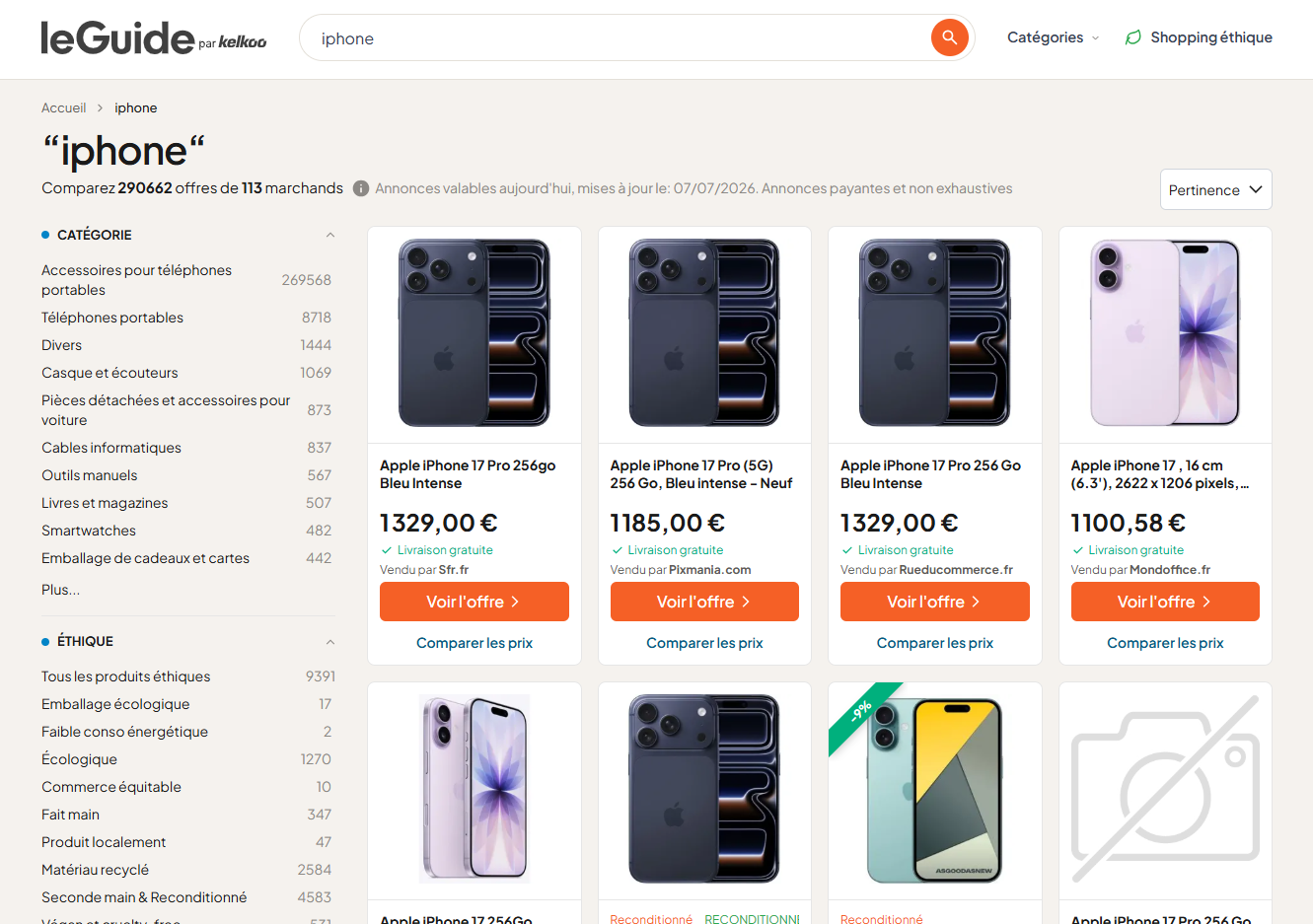
Example search results from LeGuide.com
Popular
Popular shopping website in France
LeGuide.com gives sellers another visible French comparison source to monitor when tracking competitor prices and promotions.
280.2K
Visits in last 3 months
Estimated visits make LeGuide.com useful for spotting visible competitor offers and price pressure in the French market.
85.65%
French traffic share
Most measured visits come from France, making the platform especially relevant for sellers targeting French shoppers.
71.25%
Organic search traffic
High search visibility means LeGuide.com listings may appear when shoppers research products and compare prices online.
*Metrics are based on open-data 2026 research snapshots and should be used as directional signals.
PRICE COMPARISON SOURCE
What is LeGuide.com?
LeGuide.com is a French Kelkoo price comparison service where shoppers compare prices and promotions across categories, with advertised listings covering 47 million products from 500 shops.
For sellers, the problem is simple: if your product appears next to a cheaper competitor, the customer can notice the price gap before visiting your store.
B2BLIX helps solve this by checking LeGuide.com by search keyword, finding relevant competitor prices, and calculating suggested prices inside your minimum and maximum price rules.
Precise product names, brand, model, MPN, EAN, size, or variant data can help improve monitoring quality because B2BLIX uses the search keyword as the main input.
Amazon.fr
Amazon.fr is Amazon's French marketplace where sho...
idealo.fr
idealo.fr is a French price comparison and shoppin...
Les Numériques
Les Numériques is a French high-tech review, compa...
Le Dénicheur
Le Dénicheur is a French price and product compari...
Prix.net
Prix.net is a French price comparison platform whe...
123comparer
123comparer is an independent French price compari...
Achatmoinscher.com
Achatmoinscher.com is a French independent price c...
LeGuide.com
LeGuide.com is a French Kelkoo price comparison se...
Kelkoo.fr
Kelkoo.fr is the French Kelkoo Group price compari...
HOW B2BLIX WORKS
How to monitor LeGuide.com search results
Import your product data, choose LeGuide.com as a market data source, and set your repricing rules. B2BLIX checks relevant search results and uses its BuyBox-style algorithm to calculate suggested prices inside your limits.
Import product data
Connect products using XML, CSV, Google Sheets, WooCommerce, or another integration.
Include current price, min/max price, stock, and the keyword used for LeGuide.com monitoring.
Set repricing rules
Choose LeGuide.com and define your pricing strategy.
B2BLIX finds the lowest relevant competitor price and applies your rule, or keeps the standard price when there is no useful comparison.
Automatically update prices
Export calculated prices through WooCommerce, XML, API, or another workflow.
Review suggestions first, or let B2BLIX update prices automatically when rules and limits are met.
WHAT YOU CAN USE IT FOR
Turn LeGuide.com search results into repricing signals
B2BLIX helps convert LeGuide.com market checks into controlled pricing decisions for French e-commerce products.
MARKET VISIBILITY
•
Check relevant competing offers
See whether LeGuide.com shows competing French offers that are cheaper than your current product price.
•
Focus on important products first
Start with high-volume, high-margin, or highly competitive products before expanding monitoring to a larger catalog.
REPRICING CONTROL
•
Use your own pricing strategy
Match the relevant competitor, go slightly lower, keep your current price, or apply a custom product-level rule.
•
Protect every margin
Every suggested price is checked against your minimum and maximum price before export or automatic update.
AUTOMATION WORKFLOW
•
Use with other French sources
Combine LeGuide.com with Amazon.fr, idealo.fr, Les Numériques when you need broader France coverage or want to compare multiple local price sources.
•
Export prices automatically
Send suggested prices through XML, WooCommerce, API, or another integration depending on how your store updates product prices.
LEGUIDE.COM REPRICING EXAMPLE
Update prices based on LeGuide.com market data
B2BLIX checks LeGuide.com search results, compares your price with the lowest relevant competitor, and uses your repricing rules to calculate a suggested price. The result can be exported automatically through your selected integration.
When your price is higher
B2BLIX checks LeGuide.com using the product keyword connected to your item.
If a relevant competing offer is cheaper, the BuyBox-style algorithm can suggest a lower price based on your strategy and price limits.
The calculated price can be exported automatically through XML, WooCommerce, API, or another integration.
When there is no useful competitor
If LeGuide.com does not return a relevant competing offer, B2BLIX does not need to force a lower price.
The product can keep its standard price, follow your fallback rule, or wait for the next monitoring cycle.
This helps avoid unnecessary discounts when there is nothing meaningful to compete against.
Example: competitor price found on LeGuide.com
- Data source: LeGuide.com
- Search keyword: samsung galaxy s25 256gb
- Your current price: 749.00 €
- Relevant competitor price: 729.00 €
- Your allowed price range: 719.00 € - 799.00 €
- Strategy: competitor price minus 1.00 €
- B2BLIX calculated price: 728.00 €
- Result: your price becomes more competitive while staying above the minimum price.
CONTROL EVERY UPDATE
Your rules define every LeGuide.com price change
You decide the limits, strategy, product groups, monitoring frequency, and export method. B2BLIX works inside those rules.
Minimum price
Maximum price
Set the highest allowed price for each product.
Strategy
Choose how aggressive each product or category should be.
Monitoring frequency
Monitor important products more often and less important products less often.
Export mode
Use XML, WooCommerce, API, or a controlled review process.
Product Checker
Check the product, competitor data, current price, suggested price, and export status.
PRICING
How much does LeGuide.com monitoring cost?
Use the calculator below: enter your number of products, choose the data collection frequency, select LeGuide.com as the data source, and calculate your monthly estimate.
|
|
||
|
|
||
|
|
||
|
|
|
|
Price list
-
Standard data sourcesAbout 0.10 EUR per synchronization of 1000 products
-
Premium data sourcesAbout 0.30 EUR per synchronization of 1000 products
GUIDES
Learn how B2BLIX pricing automation works
Read practical guides about product data, price limits, monitoring frequency, export workflows, and controlled repricing.
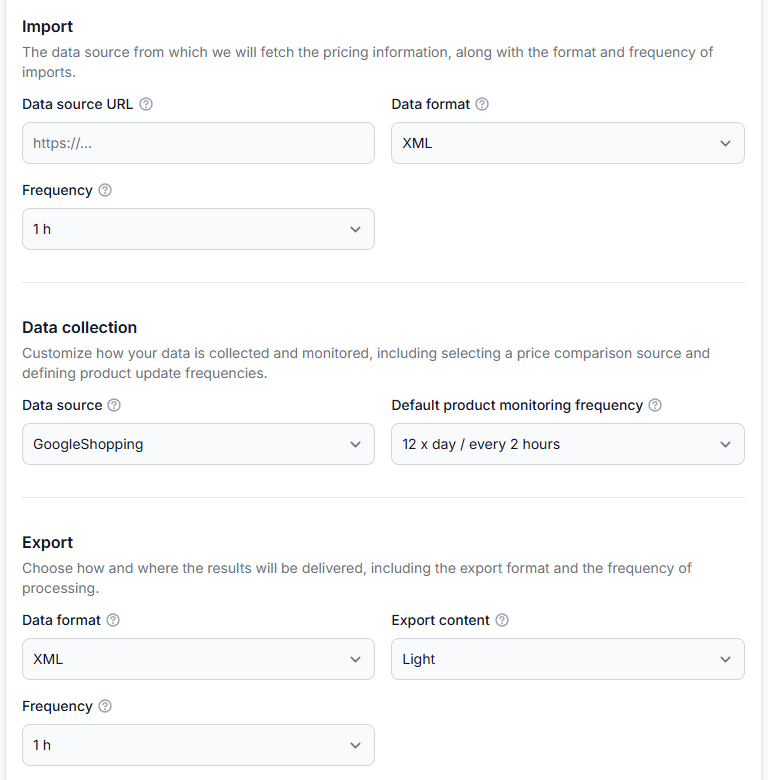
Getting started with b2blix price aggregators
Getting started· Price aggregators· Synchronization· Buybox· Import· Xml· Store integration
Create your first price synchronization, prepare a small product feed, collect competitor prices, review calculated results, and safely test XML or store delivery before expanding to your full catalog.
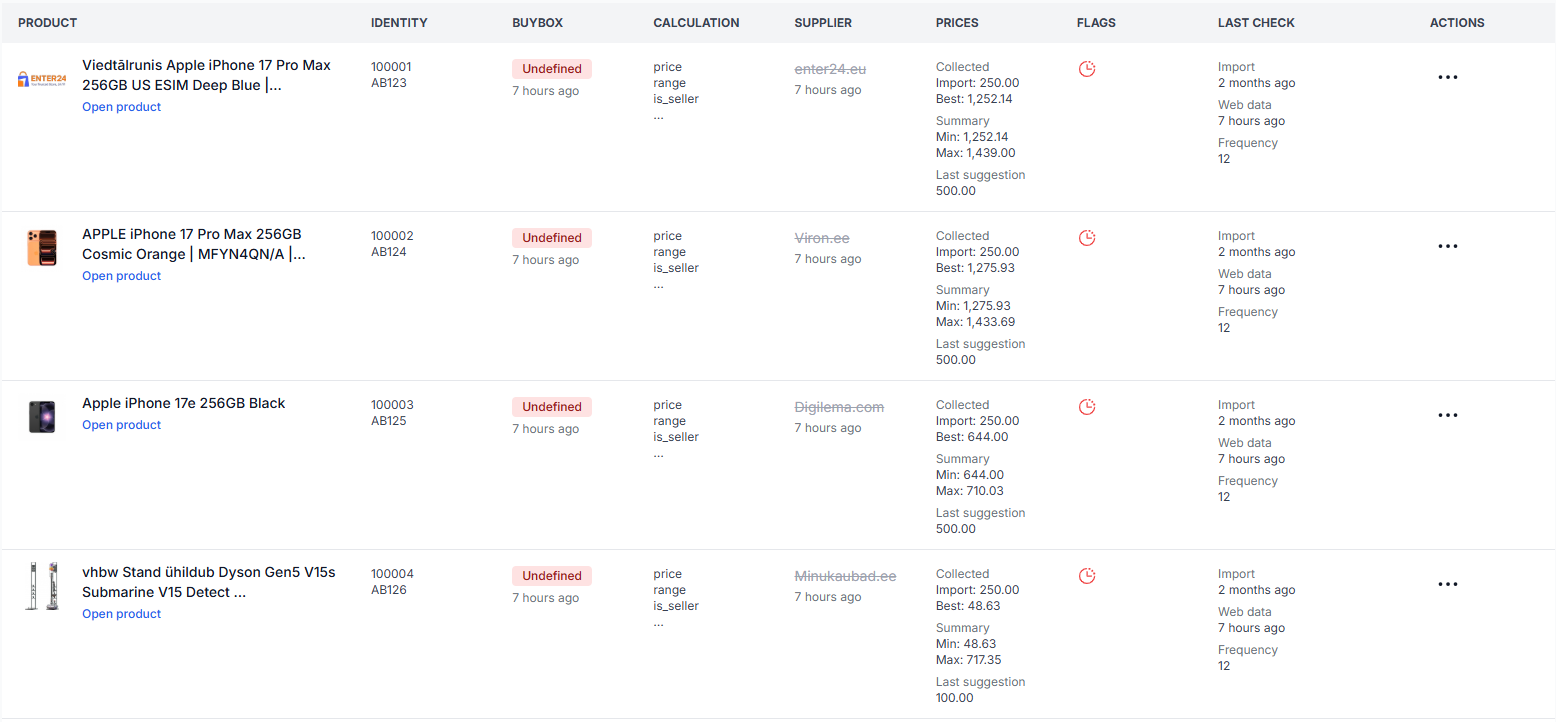
All products interface
Interfaces· Product data· Monitoring· Buybox status· Supplier catalog
This guide explains the filters, product table, price fields, status labels, timestamps, and actions available on the B2BLIX Price Aggregators All Products page.
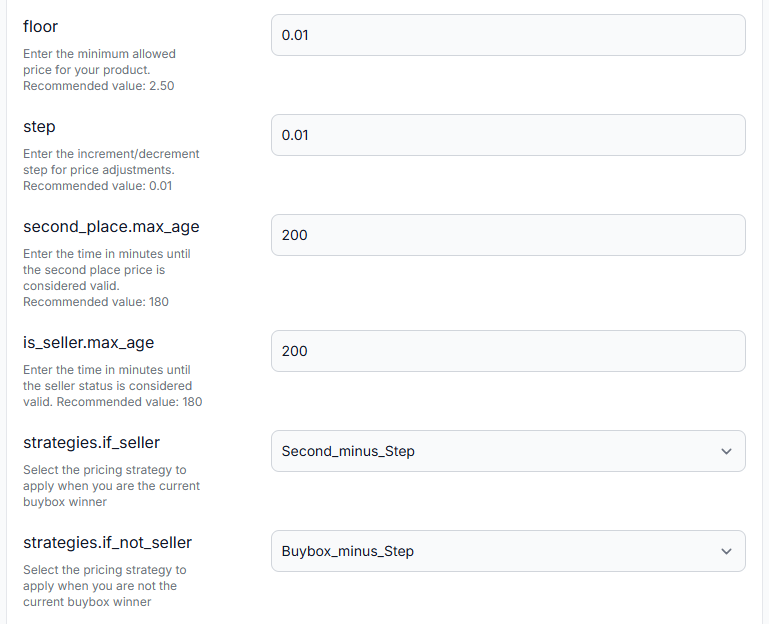
Configure buybox settings for a price synchronization
Interfaces· Buybox settings· Price synchronization· Repricing
This guide explains the pricing floor, adjustment step, data-validity periods, strategy selectors, seller identification, target position, and seller filters available in the BuyBox Settings interface.
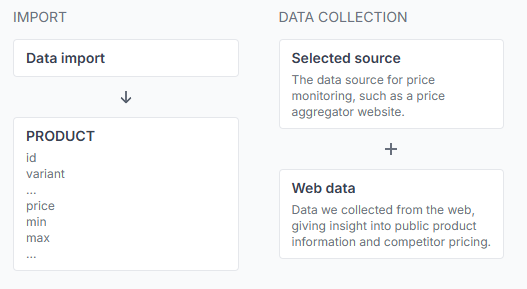
How B2BLIX aggregators monitors prices and calculates recommendations
Support questions· B2BLIX aggregators· Price monitoring· Buybox algorithm
This guide explains product queries, competitor monitoring, comparison-target selection, pricing strategies, safety limits, and the checks sellers should complete before exporting calculated prices.
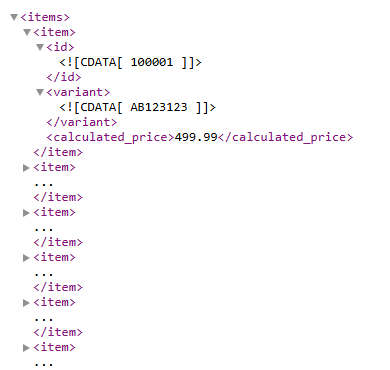
How calculated prices are delivered to a store or another sales channel
Support questions· Integrations & exports· Price synchronization· Woocommerce
B2BLIX can deliver calculated prices as an XML output or send them through a supported store integration. A connected store such as WooCommerce can then update product prices automatically. Learn how calculated prices leave B2BLIX, where to select the export method, and what to verify before enabling automatic price updates in your store.
FAQ
Frequently asked questions
Common questions about using LeGuide.com as a French data source for B2BLIX Aggregators.
Source and setup questions
Yes. B2BLIX can use LeGuide.com as a French search-based data source for competitor price monitoring and repricing workflows.
The main input is a product keyword used for LeGuide.com search. For repricing, B2BLIX also needs your current price, minimum price, maximum price, stock status, and pricing strategy.
No. For the basic search-based monitoring workflow, B2BLIX checks LeGuide.com search results using product keywords. You can still use XML, WooCommerce, API, or another integration to import product data and export calculated prices.
Yes. This is often the best starting point. You can begin with selected products, check the results, and then expand monitoring to more products when the workflow is ready.
Repricing and automation questions
Yes. B2BLIX can calculate suggested prices from LeGuide.com market data and export them through XML, WooCommerce, API, or another workflow. You can review suggestions first or automate updates when your rules are met.
No. B2BLIX works inside your rules. If there is no useful competitor price, or if the competitor price is below your minimum limit, B2BLIX can keep the current price, use a fallback rule, or wait for the next monitoring cycle.
No. B2BLIX is not affiliated with LeGuide.com. LeGuide.com is used as an external market data source for price monitoring.
Ready to monitor LeGuide.com prices?
Add selected product keywords, review LeGuide.com search results, and let B2BLIX calculate safe suggested prices inside your rules.