Why B2blix uses ean for product matching
Learn why EAN is the main product identifier used by B2BLIX and how it affects product discovery, monitoring, exclusions, and synchronization. This guide explains why Pigu product IDs are not recommended for cross-marketplace matching and what to check when a product cannot be found or processed correctly.
When this guide is relevant
This guide answers questions such as:
- Why does B2BLIX ask for an EAN instead of a Pigu product ID?
- Which identifier should I use when monitoring a specific product?
- Why is a product not found in B2BLIX?
- Which identifier should I use for product exclusions or exports?
An EAN is the barcode number used to identify a specific product. B2BLIX generally uses this identifier to connect your imported product data with products and offers found on the supported Pigu marketplaces.
Short answer
Use the product’s EAN whenever B2BLIX asks you to identify a specific product.
Pigu product IDs are internal marketplace identifiers. They may be different between 220.lv, Pigu.lt, Kaup24.ee, and HobbyHall.fi, even when the marketplaces show the same physical product. They may also not match the identifiers used by product filters, imported files, or other B2BLIX workflows.
EAN is therefore the preferred identifier for:
- Matching imported products with marketplace products
- Finding and reviewing a specific product
- Configuring individual product monitoring
- Excluding specific products from automatic repricing
- Preparing product data for synchronization and export
Important: A missing or incorrect EAN can prevent a product from being matched, monitored, excluded, calculated, or included correctly in an export. Verify the product identifier before changing monitoring or synchronization settings.
How ean matching works
B2BLIX works with several types of product information:
- Your imported product data
- Products and offers discovered on the marketplace
- Observed BuyBox and competitor information
- Prices calculated by B2BLIX
- Prices prepared for export or publication
The EAN provides a common identifier that can connect these stages. When the EAN in your source data matches the EAN associated with a marketplace product, B2BLIX can process that product using the relevant monitoring and pricing settings.
A Pigu product ID is less suitable for this purpose because it belongs to the marketplace’s internal structure. The same product can have one internal ID on 220.lv and another on Pigu.lt. Using either of those IDs would not provide a reliable common reference across marketplaces.
To see how imported EAN data and marketplace information are used in the BuyBox workflow, open BuyBox Schema when you are logged in. For an explanation of the information shown there, read Understanding the BuyBox Schema.
What to check in your account
1. Verify the ean in your product source
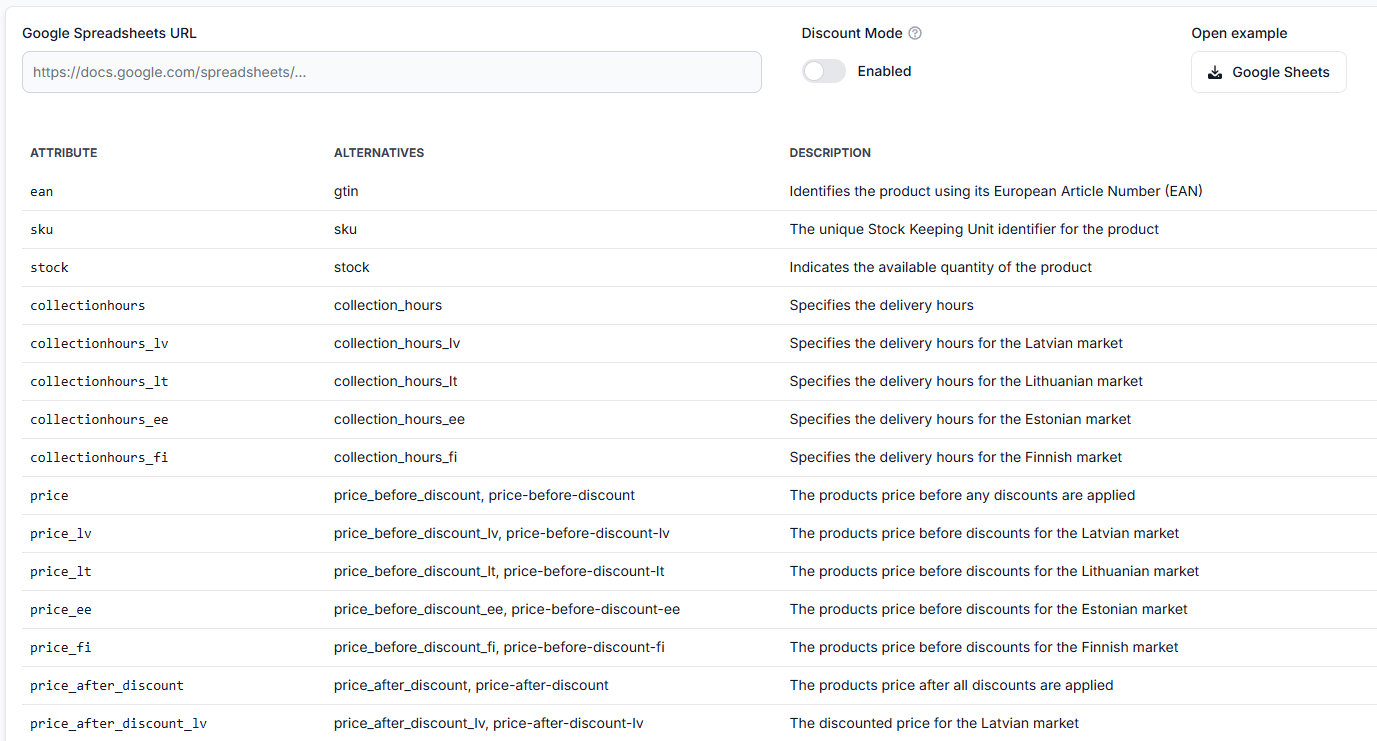
Check that each product you want B2BLIX to process has the intended EAN in your XML, CSV, Google Sheets file, URL-based feed, or other supported source.
Do not replace the EAN with a Pigu product ID. SKU and marketplace product IDs may still be useful in other contexts, but they are not the main identifier used for B2BLIX product matching.
To test whether B2BLIX can access and interpret your source, open Sync Tester. For details about the supported data structure, read Sync Tester and Google Sheets File Structure.
2. Check whether the product has been discovered
A product must first appear on the marketplace and then be discovered by B2BLIX. New products may not be available immediately.
To review products currently known to your account, open All Products. To understand the available product details and filters, read All Products Page.
3. Review one product by ean
When a specific product is missing, not calculated, or not exported as expected, use Product Checker to review the information available for its EAN.
Depending on the available data, Product Checker may show the marketplace product, latest observation, pricing limits, selected strategy, calculation result, and export information.
To investigate a product, open Product Checker. For an explanation of its sections, read Product Checker: Review Product Data, Price Calculations, and Exports.
4. Use ean for individual monitoring
If a product needs a monitoring schedule different from its category, add it as an individual product using its EAN.
To configure this, open Individual Products. For instructions, read Individual Products: Set Product-Specific Monitoring Frequencies.
EAN matching identifies the product, but it does not automatically determine how often the product is monitored. Monitoring frequency still depends on your category or individual product settings.
5. Use ean when excluding a product
If a product must not be processed by automatic BuyBox repricing, add its EAN to the product exclusion list.
To manage excluded products, open Exclude Products. For instructions, read Exclude Products from BuyBox Repricing.
Warning: Monitoring, calculation, export, and marketplace publication are separate processes. A product being matched by EAN does not mean that its calculated price is already live. An exported or submitted price must still be accepted and applied by the marketplace.
Common reasons a product is not matched
- A Pigu product ID was used instead of an EAN. Internal product IDs may not work across marketplaces or B2BLIX product workflows.
- The EAN is missing from the imported data. B2BLIX may not have a reliable identifier for connecting the imported item with the marketplace product.
- The imported EAN and marketplace EAN are different. Check that the code belongs to the exact product or variation being sold.
- The product is new. It may not yet have been discovered after appearing on the marketplace.
- Monitoring has not been configured. A matched product may still require category-level or individual monitoring settings before regular observations begin.
- The product has been excluded. Check whether its EAN is present in a product exclusion list or exclusion rule.
Example
A seller offers the same item on 220.lv and Pigu.lt. The product has EAN 4751234567895.
220.lv and Pigu.lt may assign different internal product IDs to that item. If the seller uses one marketplace’s internal ID, it may not identify the corresponding product on the other marketplace.
By using EAN 4751234567895, B2BLIX has a common product reference that can be used for matching, monitoring, product checks, exclusions, and supported synchronization workflows.
What to do next
- Confirm that the correct EAN is present in your product source.
- Use Sync Tester to verify that the source can be accessed and interpreted.
- Check All Products to see whether the product has been discovered.
- Review the EAN in Product Checker if the product is missing or its result is unexpected.
- Use the same EAN for individual monitoring or product exclusions when required.
If the same EAN is present in both your source data and the marketplace product, Sync Tester reads it correctly, and the product still cannot be matched after it has had time to be discovered, contact B2BLIX support with the EAN and affected marketplace. Do not send account passwords, tokens, or other access credentials.