Access credentials for the Pigu connection
Learn how to enter and maintain the credentials used for synchronization between B2BLIX and Pigu, including when credentials must be updated and how token expiration can affect the connection.
What this page is used for
The Access credentials page is used to authorize the connection between B2BLIX and Pigu. This connection allows B2BLIX to discover your products, retrieve available product and offer information, observe prices, and support the configured monitoring and repricing workflows.
An API connection is a system-to-system connection that allows B2BLIX and Pigu to exchange the information needed for these processes.
Under Pigu's authorization mechanism, an access token is required. You can allow B2BLIX to obtain and renew this token by securely storing your Pigu login and password, or you can generate a token yourself and enter it directly.
Sellers normally use this page during onboarding. You should return to it whenever you change your Pigu password, login details, or manually generated access token.
What you can do on this page
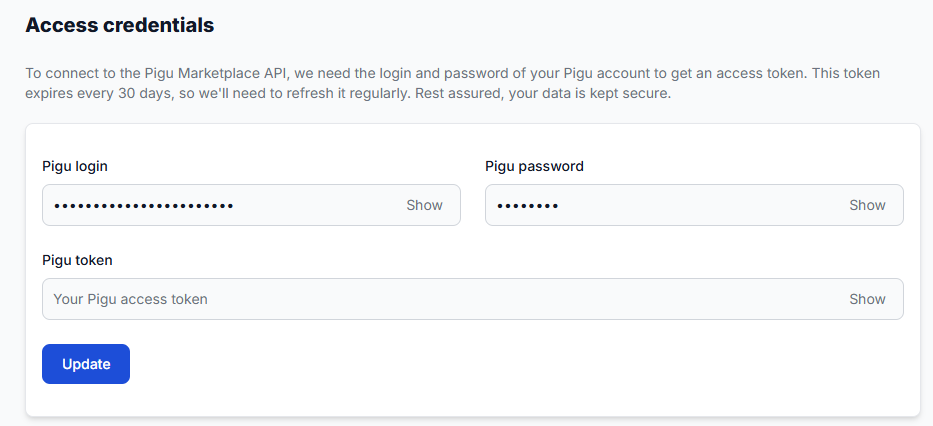
- Enter or update your real Pigu account login.
- Enter or update your real Pigu account password.
- Provide a Pigu access token that you generated yourself.
- Temporarily reveal a field value by selecting its Show control.
- Save the entered information by selecting Update.
Main fields and controls
| Field or control | What it means | When to use it |
|---|---|---|
| Pigu login | Your real Pigu account login. Together with the password, it can be used to obtain a Pigu access token when authorization must be renewed. | Enter it during onboarding when you choose the login-and-password authorization method. Update it here if your Pigu login changes. |
| Pigu password | Your real Pigu account password. It is used together with the login when B2BLIX needs to obtain a new access token. | Enter it during onboarding when using the login-and-password method. Replace it here whenever you change the password in Pigu. |
| Pigu token | An access token generated outside B2BLIX and pasted into this field. It provides an alternative to sharing your Pigu password. | Use this field when you prefer to generate and maintain the token yourself. |
| Show | Temporarily reveals the value entered in the corresponding field. | Use it only when you need to verify a value and when no unauthorized person can see your screen. |
| Update | Saves the current access information. | Select it after entering or replacing your credentials or token. |
Choosing an authorization method
Pigu login and password
With this method, provide both your Pigu login and Pigu password. B2BLIX stores the information securely and uses it when a new Pigu access token is required.
An existing valid token may continue to be used until authorization needs to be renewed. For this reason, an incorrect password might not interrupt the connection immediately, but it can prevent renewal later.
Manually generated Pigu token
With this method, generate the access token on your side and enter it in the Pigu token field. This allows you to connect B2BLIX without providing your Pigu password.
A Pigu access token is valid for approximately 30 days. B2BLIX cannot renew a manually supplied token using that token alone, so you are responsible for generating and entering a replacement before the current token expires.
Important: An expired, invalid, or outdated token can stop subsequent Pigu API requests. This can interrupt product discovery, marketplace-data synchronization, monitoring, calculations, and any connected publication workflow.
What happens after you save
When you select Update, B2BLIX securely stores the access information entered on the page.
If you use a login and password, the credentials are available when B2BLIX needs to obtain a new access token. They are not pricing settings and do not directly change product prices.
If you provide a token yourself, the saved token is used for subsequent API requests. If the token is already invalid or has expired, those requests may be rejected by Pigu.
Connection warning: This page does not directly calculate or publish prices. However, an unavailable Pigu connection can prevent the data collection and synchronization required by later monitoring and repricing processes.
How to use this page safely
- Choose whether to use your Pigu login and password or a token generated on your side.
- Enter the selected information carefully and check for typing errors.
- Use Show only in a private environment if you need to confirm the entered value.
- Select Update to save the information.
- After changing credentials, review the next synchronization or product-data activity to confirm that the connection continues to work.
- Update this page immediately whenever the corresponding login, password, or token changes in Pigu.
Changing your Pigu password regularly can be a sensible account-security practice. Each time you change it, remember to enter the new password on this page as well.
When using a manually generated token, keep your own reminder of its expiration date. Replace it before the 30-day validity period ends to reduce the risk of interrupted synchronization.
Common mistakes
- Changing the Pigu password but not updating B2BLIX. The current connection may continue temporarily, but B2BLIX may be unable to renew authorization later.
- Forgetting that a manually generated token expires. Replace the token before its validity period ends.
- Saving an incorrect login, password, or token. A typing error can prevent authorization or cause later requests to be rejected.
- Generating a new token but leaving the previous token in B2BLIX. In some Pigu authorization situations, generating another token may cause an earlier token to stop working. Save the latest valid token here.
- Revealing credentials on a shared screen. Avoid using Show during screen sharing, recordings, or in a public place.
Example use case
A seller connects a Pigu account during B2BLIX onboarding by entering the account login and password and selecting Update. B2BLIX can then use the authorized connection for product discovery and the seller's configured monitoring workflow.
Later, the seller changes the password directly in Pigu. The seller opens the Access credentials page, replaces the old password with the new one, and selects Update. This ensures that B2BLIX can obtain new authorization when the current access token is no longer valid.