Buybox settings page
The BuyBox Settings page controls the general pricing rules used by the B2BLIX BuyBox calculation for each supported marketplace. Most sellers can begin with the recommended values and change them only when their pricing or monitoring setup requires different behaviour.
What the BuyBox settings page is used for
The BuyBox settings page contains the general rules used when B2BLIX calculates prices. These settings can affect whether a price is reduced, maintained, matched, or increased during a synchronization.
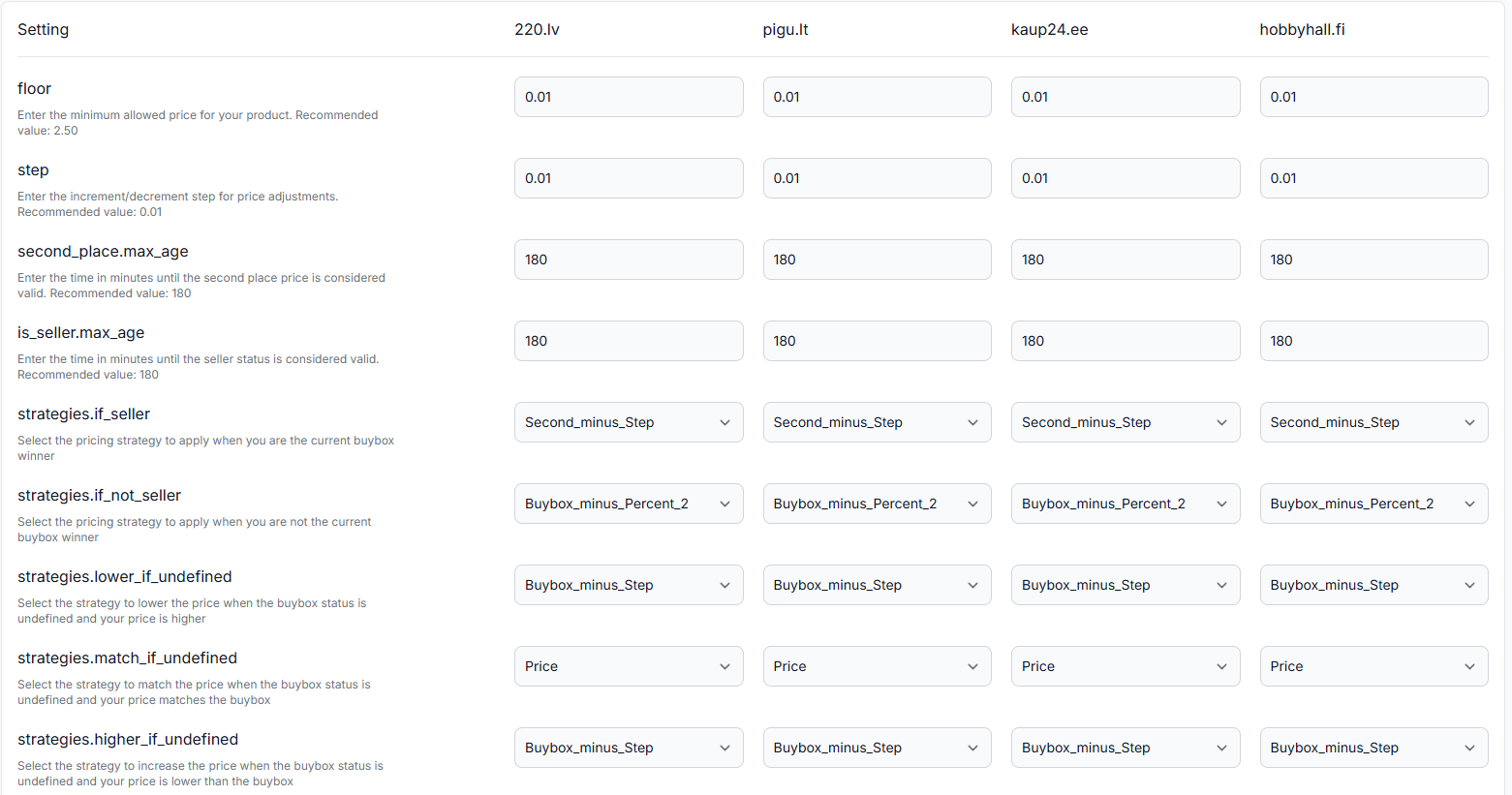
The page is organised as a table. Each row represents one setting, while each marketplace has its own column:
- 220.lv for Latvia
- Pigu.lt for Lithuania
- Kaup24.ee for Estonia
- HobbyHall.fi for Finland
This structure allows you to use the same configuration for every marketplace or set different values when your products, prices, monitoring schedules, or commercial approach differ by country.
B2BLIX calculates prices within the limits provided by the seller. The marketplace still determines the actual BuyBox winner, and changing these settings does not guarantee a BuyBox position, an order, or a specific financial result.
When to open this page
The page is normally pre-filled with recommended settings. A seller may therefore complete the initial setup without changing anything here.
Open this page when you need to:
- Change a general price safety limit.
- Adjust how much the system adds or subtracts during pricing calculations.
- Change how long observed marketplace information remains valid.
- Select a different strategy for a specific BuyBox situation.
- Use different calculation settings for different marketplaces.
This is commonly a setup-once page. Review the configuration carefully, save the appropriate values, and return only when your pricing policy, product range, or monitoring schedule changes.
Warning: Every setting on this page can affect calculated and exported prices. Do not change a value only to test what happens in a live workflow. Review the BuyBox schema and test representative products before applying unfamiliar settings to a large catalogue.
What you can do on this page
You can configure the general BuyBox calculation separately for each marketplace. The available controls include numerical fields for price and time values, together with selection fields for pricing strategies.
Changes made here can affect:
- The minimum price accepted by the calculation.
- The amount added to or subtracted from observed prices.
- Whether previously collected marketplace information is still treated as current.
- The strategy selected for different BuyBox situations.
- The recommended or exported price produced during the next synchronization.
Main fields and controls
| Setting | What it means | Recommended starting value | What it affects |
|---|---|---|---|
| floor | Sets a general minimum allowed price. When an imported product price is lower than this value, the floor is used as an additional protection. | 2.50, as shown in the interface guidance | Price calculation and the minimum price that the general settings allow. |
| step | Defines the amount used by strategies that add or subtract a fixed price step. | 0.01 | Calculations such as BuyBox price minus one step or another step-based adjustment. |
| second_place.max_age | Defines how many minutes information about the seller in second place remains valid. | 180 minutes | Whether the calculation can use the latest known second-place price or must treat that information as outdated. |
| is_seller.max_age | Defines how many minutes information confirming that your shop is the current seller or BuyBox winner remains valid. | 180 minutes | Whether the calculation can continue treating your shop as the current seller or must use a different strategy branch. |
| strategies.if_seller | Selects the strategy used when recent marketplace information indicates that your shop is the current BuyBox seller. | Use the strategy marked as recommended in the BuyBox schema. | The calculation performed when you are currently winning. |
| strategies.if_not_seller | Selects the strategy used when recent information indicates that another seller currently holds the BuyBox. | Use the strategy marked as recommended in the BuyBox schema. | The calculation performed when you are not currently winning. |
| strategies.lower_if_undefined | Selects the price-lowering strategy used when the BuyBox status is undefined and your price is higher than the observed BuyBox price. | Use the strategy marked as recommended in the BuyBox schema. | The calculation used when the status is uncertain but a lower adjustment may be required. |
| strategies.match_if_undefined | Selects the matching strategy used when the BuyBox status is undefined and your price matches the observed BuyBox price. | Use the strategy marked as recommended in the BuyBox schema. | The calculation used when the status is uncertain and the prices are equal. |
| strategies.higher_if_undefined | Selects the price-increase strategy used when the BuyBox status is undefined and your price is lower than the observed BuyBox price. | Use the strategy marked as recommended in the BuyBox schema. | The calculation used when the status is uncertain and there may be room to increase the price. |
Understanding the floor setting
The floor is an additional general protection against unexpectedly low prices.
For example, assume the marketplace floor is set to 2.50. If imported product data contains a price of 0.10, the system will not use a result below the configured floor for that marketplace.
This can be useful for products or categories where marketplace fees or commissions make very low prices unsuitable. The correct value depends on what you sell. A shop selling inexpensive products may need a lower floor than a shop selling higher-value items.
The floor must not be higher than prices you genuinely need to use. Check your cheapest products before increasing it. A floor that is too high may force those products above their intended price range.
Understanding the step setting
The step is the fixed amount used by step-based strategies. For example, a strategy described as “BuyBox minus step” takes the observed BuyBox price and subtracts the configured step.
With a BuyBox price of 20.00 and a step of 0.01, the step-based result would normally be 19.99, provided that the result remains inside the product’s permitted minimum and maximum price range.
The recommended starting value is 0.01. Some sellers may use a few cents more when this is appropriate for their average product prices. Avoid using a large step, such as one euro, unless you clearly understand how that amount will affect every strategy that uses it.
Understanding data freshness settings
B2BLIX stores the time when marketplace information was last observed. The two maximum-age settings determine how long the calculation may continue using that information.
Second-place maximum age
second_place.max_age applies to information about the offer in second place: the closest known seller behind the BuyBox winner. This information may be collected through individual product monitoring or supported advanced monitoring schedules.
When the time since the observation exceeds the configured value, the second-place information is treated as outdated. The calculation will then follow a branch that does not rely on that observation as current.
Seller-status maximum age
is_seller.max_age applies to information indicating that your marketplace account was observed as the current seller or BuyBox winner.
When that observation becomes older than the configured maximum age, the system no longer treats the seller status as confirmed and may use another configured strategy.
The recommended value shown for both settings is 180 minutes. Your value should normally be longer than the typical interval between relevant marketplace observations.
Do not set maximum-age values below your normal monitoring interval. For example, when a category is checked approximately once per hour, a ten-minute validity period would cause most observations to become outdated long before the next check.
Understanding the strategy fields
The five strategy fields define what the calculation should do when a particular BuyBox situation is detected.
The available strategy names may refer to actions such as:
- Keeping the current price.
- Matching an observed price.
- Moving below an observed price by a fixed step.
- Applying a percentage-based adjustment.
- Increasing a price when the seller appears to have room to do so.
This page is used to select the strategy, but it is not intended to explain every formula or decision branch. Read the BuyBox schema before changing these fields. The schema explains when each branch is used and marks the recommended strategy selections.
Do not choose a strategy based only on its name. Review its mathematical example and confirm that it matches your pricing policy.
How to use this page safely
-
Review one marketplace at a time.
Do not assume that the same values are suitable for Latvia, Lithuania, Estonia, and Finland. Product ranges, prices, fees, and monitoring schedules may differ.
-
Check the cheapest products.
Confirm that the floor does not exceed a valid selling price for low-cost items.
-
Keep the step small.
Begin with the recommended one-cent step unless your pricing policy requires another amount.
-
Compare freshness values with monitoring frequency.
The validity period should be long enough for marketplace observations to remain usable between scheduled checks.
-
Review the BuyBox schema.
Understand every selected strategy before replacing a recommended value.
-
Test a limited product group.
Review calculated results without immediately applying the configuration to the entire catalogue. Use the BuyBox simulator or inspect representative products in Product Checker.
-
Check product-level minimum and maximum prices.
The calculated result should remain within the limits supplied for each product or derived through the configured category rules.
What happens after saving changes
Saved settings are used by the calculation process during a subsequent synchronization. The synchronization imports the latest seller data, evaluates products using sufficiently recent marketplace observations, applies the selected strategies and price limits, and prepares the configured output.
A change can therefore affect the next calculated or recommended price. When automatic export or API submission is enabled, it may also affect the next price sent to the marketplace.
A calculated or exported price is not necessarily live immediately. It becomes a marketplace price only after it has been successfully submitted, accepted, and applied by the marketplace.
Common mistakes
Setting the floor too high
A high floor may prevent inexpensive products from using their intended prices. Compare the value with the cheapest valid product in each marketplace.
Using an excessively large step
A large step can create unnecessarily large price changes in every strategy that uses it. A value of a few cents is normally easier to control than a step measured in whole euros.
Setting maximum-age values too low
When observations expire before the next monitoring cycle, the calculation may repeatedly treat known information as undefined or outdated. This can cause results that differ from what the seller expected.
Selecting strategies without reading the schema
Strategy names are not a complete explanation of their behaviour. Review the BuyBox schema and its examples before changing a recommended selection.
Assuming every marketplace must use identical settings
The calculation applies the configured rules consistently, but the underlying products and marketplace observations may differ. Review each marketplace column separately.
Judging the entire configuration from one product
When one product produces an unexpected result, use Product Checker to review its imported data, recent observation, applicable price limits, selected strategy, calculation result, and export status. Do not change global settings until you understand the product-level cause.
Example use case
A seller operates on 220.lv and sells both regular household products and low-cost accessories. The seller begins with the recommended settings:
- floor: 2.50
- step: 0.01
- second_place.max_age: 180 minutes
- is_seller.max_age: 180 minutes
- Strategies: the selections marked as recommended in the BuyBox schema
Before saving, the seller checks the catalogue and finds accessories that are correctly priced below 2.50. The seller therefore lowers the floor for 220.lv to a value that does not interfere with those products.
The seller keeps the one-cent step because the selected strategies make small price adjustments. The category is monitored approximately once per hour, so the 180-minute freshness values provide enough time for recent observations to remain usable between checks.
The seller then tests a limited group of products and reviews the results in Product Checker before enabling wider price publication.