How to evaluate market differences between countries
This guide explains how to investigate country-level performance differences in B2BLIX and which marketplace-specific settings and product details you should verify before making changes.
Why results can differ between countries
B2BLIX supports four separate Pigu Group marketplaces: 220.lv in Latvia, Pigu.lt in Lithuania, Kaup24.ee in Estonia, and HobbyHall.fi in Finland. Each marketplace can have different sellers, competition levels, product availability, prices, and account settings.
For example, performance may be stronger in Finland because fewer Latvian, Lithuanian, or Estonian sellers have started selling there. With fewer competing offers, a seller may sometimes maintain a higher margin while remaining competitive.
This is only one possible explanation. A difference can also come from marketplace-specific pricing settings, product data, monitoring frequency, participation settings, or price limits.
Short answer
Evaluate each marketplace separately. Do not assume that the same product uses identical inputs, settings, competition data, or calculated prices in all four countries.
Start with the marketplace-level statistics. Then compare representative products from the stronger and weaker markets. For each product, check:
- Whether your shop participates in that marketplace.
- Whether the imported price or price limits have a country-specific value.
- Which BuyBox strategy and pricing settings apply to that marketplace.
- Whether the product category is monitored at the same frequency.
- How recent the available marketplace observation is.
- Which price was calculated and whether it was exported.
Warning: Changes to pricing settings, imported values, synchronization, or marketplace participation can affect calculated and exported prices. Changes to monitoring frequency can also affect usage costs. Verify the current configuration and test representative products before applying changes to a large catalog.
How marketplace-specific processing works
B2BLIX treats Latvia, Lithuania, Estonia, and Finland as separate local marketplaces. Several parts of the service are therefore configured by marketplace rather than through one shared setting.
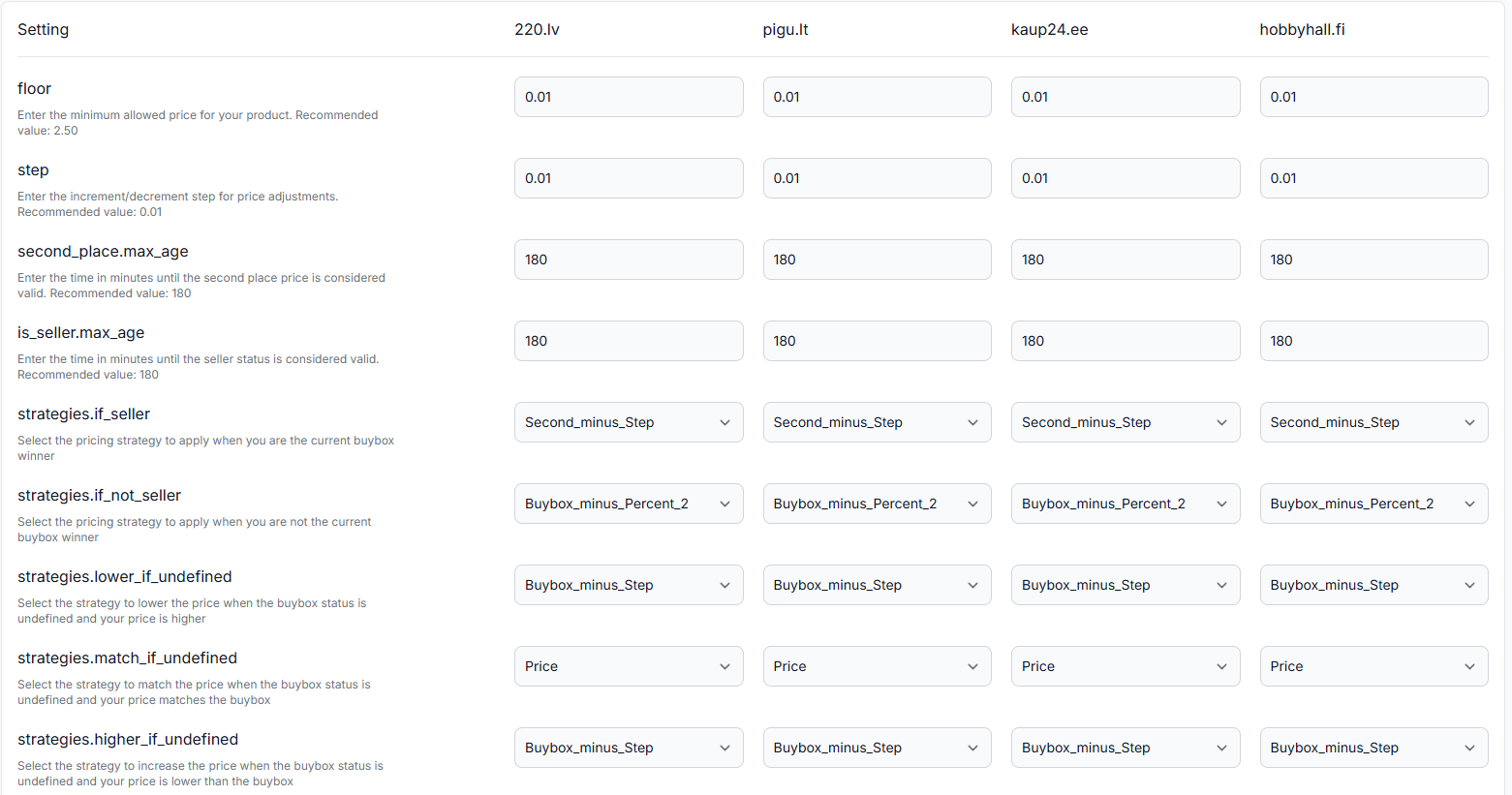
BuyBox settings
Your pricing strategy and related calculation settings can have different values for each marketplace. A strategy used for Latvia does not have to be the same as the strategy used for Finland.
When you are logged in, open BuyBox settings. To understand the available fields, read BuyBox settings page.
Categories and monitoring
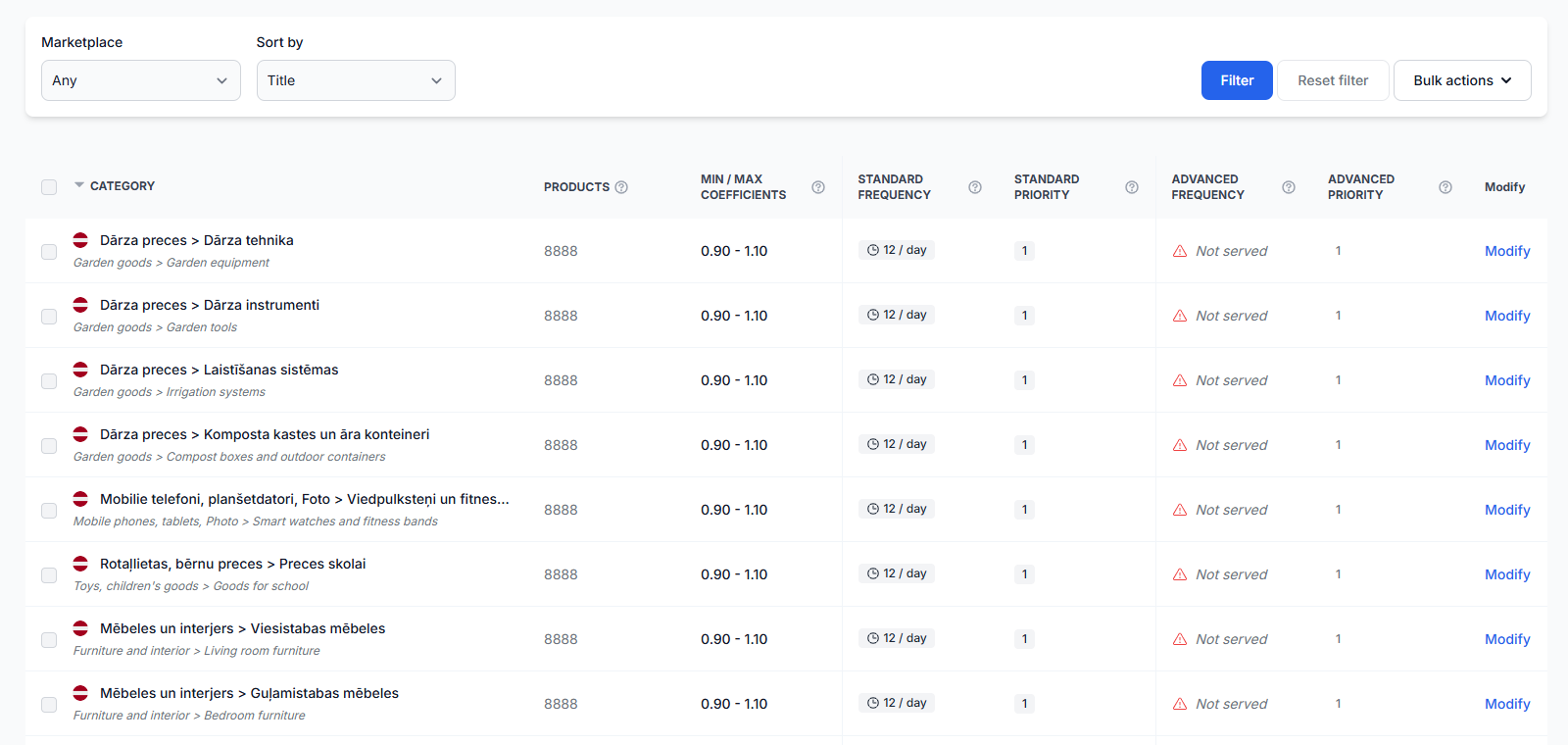
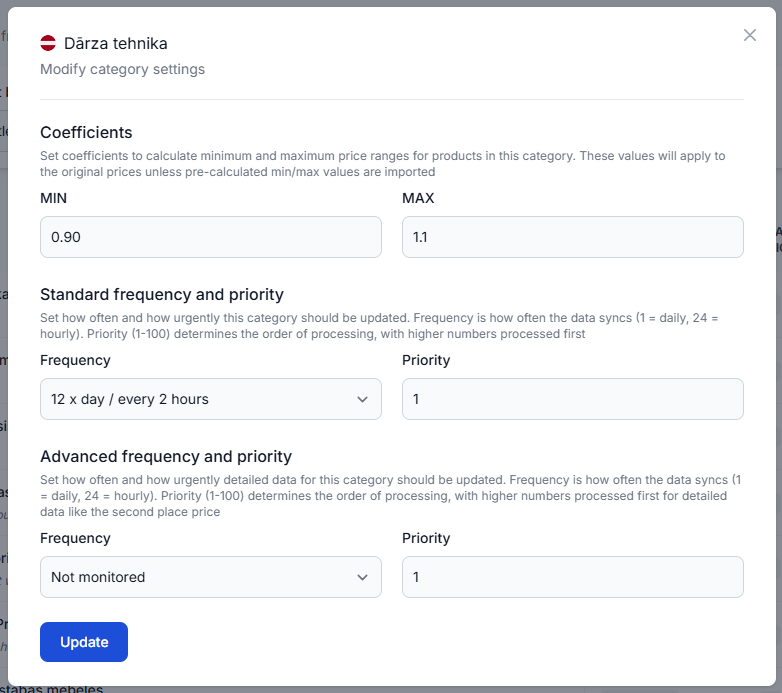
Categories are discovered and managed separately for each marketplace. The same type of product may therefore have one monitoring schedule in Latvia and another schedule in Finland.
A marketplace with less frequent monitoring may have older observations available when a calculation runs. A marketplace with more frequent monitoring may provide a more current view of the competitive situation, but it may also use more monitoring resources.
When you are logged in, open Category management. To understand category monitoring and coefficients, read Category management: monitoring frequencies and price coefficients.
Imported product values
Your import can contain values that apply to all participating marketplaces and values that override the general value for one country.
For example, a general product price may be used for Latvia, Lithuania, Estonia, and Finland. A separate Finland value can then replace that general price only for the Finnish marketplace.
The same marketplace-specific approach may be used for relevant product values such as prices, minimum and maximum limits, or collection-related settings when those attributes are present in the supported import structure.
When you are logged in, open Synchronization settings. For an explanation of product import and price export configuration, read Sync settings: configure product import and price export.
Marketplace participation
Verify the marketplace flags in your product data or synchronization configuration. These flags indicate the countries where the product or shop participates.
If Finland is not enabled, B2BLIX should not treat that product as participating in the Finnish workflow. If only Latvia, Lithuania, and Estonia are enabled, your comparison should focus on those three marketplaces.
Exported results
Calculated prices are prepared separately for each participating marketplace. This allows Latvia, Lithuania, Estonia, and Finland to receive different calculated prices when their inputs, settings, or marketplace conditions differ.
A calculated or exported price is not necessarily the current live marketplace price. The marketplace must still receive, accept, and apply the update.
What to check in your account
-
Compare the marketplace statistics.
Look for clear differences between the country cards, such as discovered products, monitored products, winning positions, non-winning positions, or recent synchronization activity.
When you are logged in, open Statistics. To understand the displayed account metrics, read Statistics dashboard: understanding your account metrics.
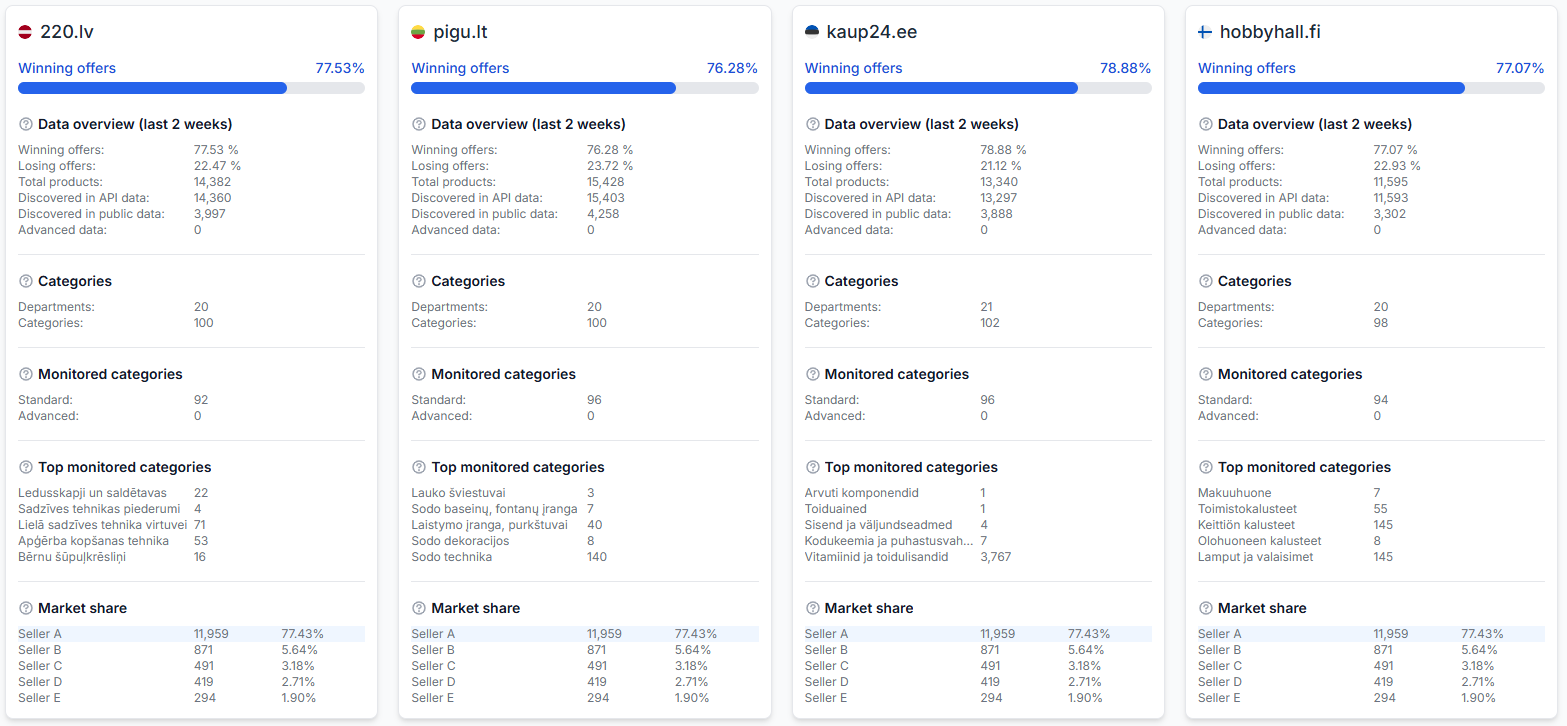
The Statistics dashboard separates account indicators for 220.lv, Pigu.lt, Kaup24.ee, and HobbyHall.fi, helping you identify which marketplace requires a closer product-level review. -
Select representative products.
Choose several products from a market with stronger results and several similar products from a market with weaker results. Avoid drawing a conclusion from only one product.
-
Review each product by marketplace.
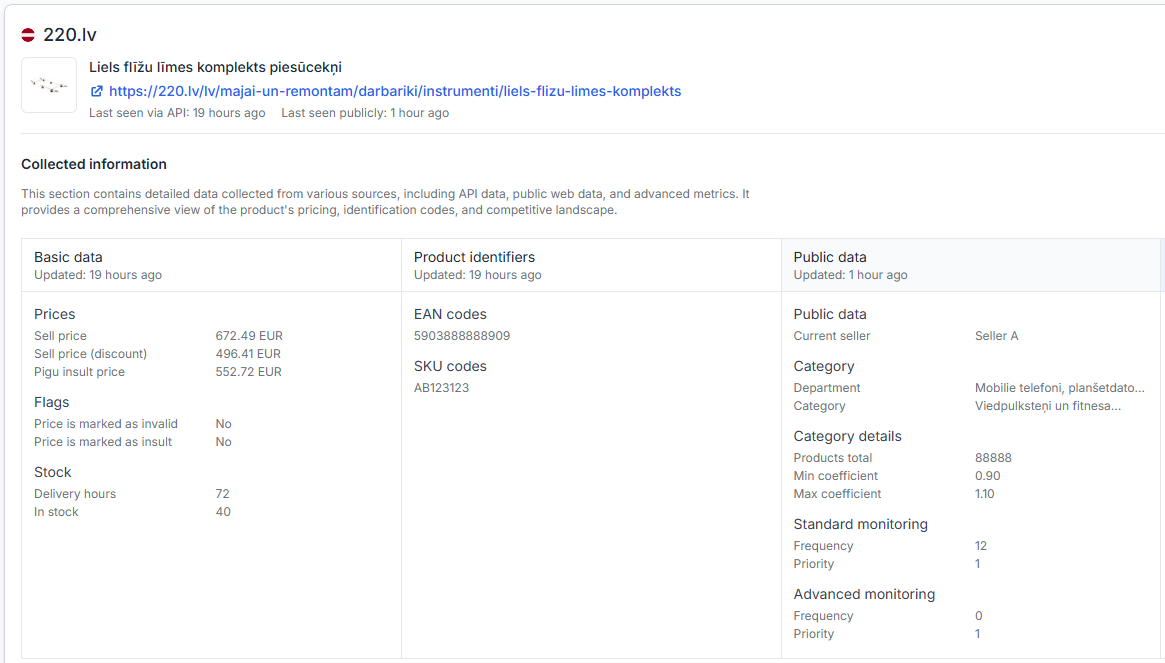
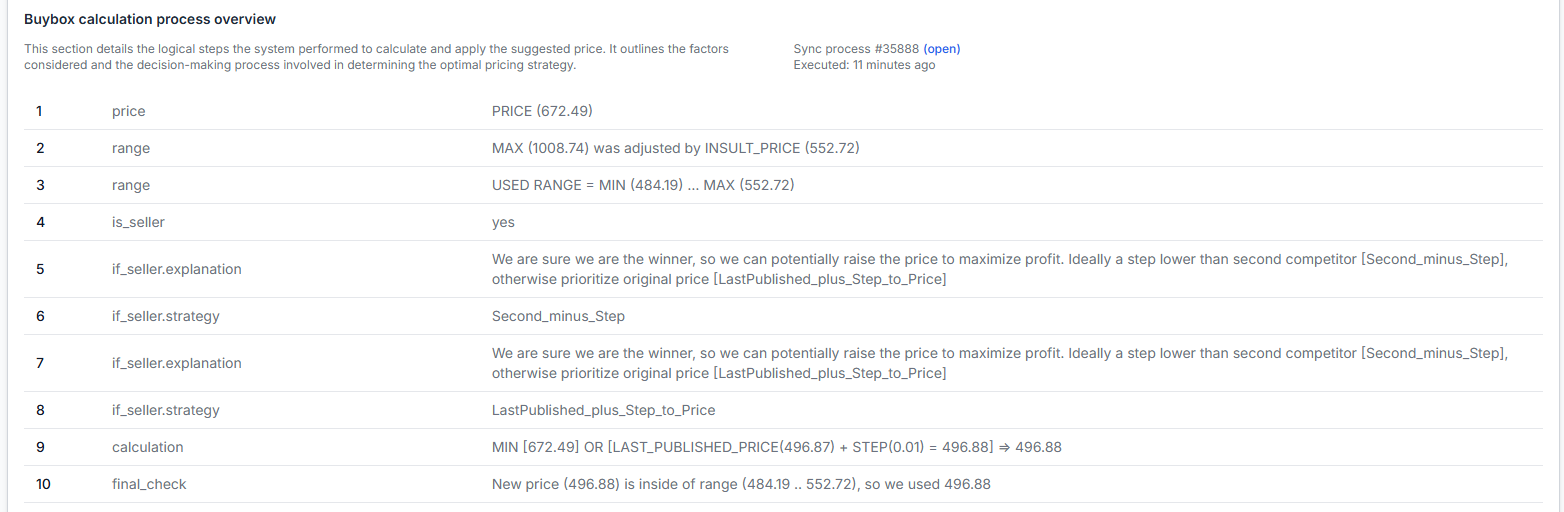
Check the known marketplace price, your imported values, minimum and maximum limits, selected strategy, calculation result, observation time, and export information.
When you are logged in, open Product Checker. For details about the product-level information, read Product Checker: review product data, price calculations, and exports.
-
Compare the BuyBox settings for each country.
Check whether the stronger market uses a different strategy, pricing step, price-limit behavior, or handling of older marketplace observations.
-
Compare category monitoring.
Verify that the relevant categories are enabled and check whether their monitoring frequencies differ between marketplaces.
-
Review the imported country values.
Check whether a general value is being used or whether one marketplace has a specific override. Pay particular attention to the current or base price and the minimum and maximum price limits.
-
Verify marketplace participation.
Confirm that the product is enabled only for marketplaces where your shop is active and the offer should be processed.
-
Check the export result.
Confirm whether the expected marketplace-specific price was included in the output. Remember that export confirms what B2BLIX prepared, not necessarily what is already live on the marketplace.
Common reasons for country-level differences
- Different levels of competition: One marketplace may have fewer sellers offering the same EAN.
- Different marketplace participation: Some sellers operate only in Latvia, Lithuania, and Estonia and do not sell in Finland.
- Different BuyBox settings: Each marketplace can use a different strategy or pricing adjustment.
- Different price limits: A country-specific minimum or maximum value may restrict the available calculation differently.
- Different imported prices: A marketplace-specific price may override the general product price.
- Different monitoring schedules: Categories or individual products may be checked at different frequencies.
- Different data freshness: The latest known marketplace observation may be newer in one country than another.
- Different offer conditions: Price is important, but the marketplace determines the BuyBox winner and may consider factors that B2BLIX does not control.
- Different synchronization results: A product may be imported, calculated, excluded, or exported differently depending on its marketplace-specific data and configuration.
Example
A seller imports a product with a general price of EUR 100. This value is used for Latvia, Lithuania, Estonia, and Finland unless a more specific country value is provided.
The seller also provides a Finland-specific price of EUR 110. Finland therefore starts from EUR 110, while Latvia, Lithuania, and Estonia continue to use EUR 100.
If there are fewer competing sellers in Finland, the configured Finnish strategy may calculate a higher price while remaining within the permitted minimum and maximum range. In Lithuania, where more sellers offer the same product, the calculation may produce a lower price.
This does not mean that Finland will always perform better. It shows why the imported values, local competition, price limits, monitoring data, and settings must be compared separately.
What to do next
- Identify the marketplaces with the largest performance difference in Statistics.
- Select several representative EANs from each marketplace.
- Compare their marketplace data, price limits, calculation decisions, and export results in Product Checker.
- Verify the marketplace-specific BuyBox settings and Category management configuration.
- Check the imported product data for country overrides and participation flags.
- Change one setting or data source value at a time so that you can evaluate its effect.
- Review calculated or exported results before enabling wider live price publication.
If the difference is caused mainly by competition, changing your settings may not be necessary. If it is caused by inconsistent local settings, price limits, monitoring, or imported values, correct the relevant marketplace configuration and review the next calculation results before expanding the change to more products.