How price increases work when you are already winning the buybox
Understand how B2BLIX can raise a product price while you are already winning the BuyBox, including second-place price logic, gradual increases, and maximum price protection.
Why is B2BLIX increasing my price?
B2BLIX is not designed only to reduce prices. When your offer is already winning the BuyBox, the service may identify an opportunity to increase the price while keeping the offer competitive.
This article is relevant when:
- Your product is already shown as the current BuyBox seller.
- The calculated price is higher than the last published or imported price.
- The price is increasing gradually instead of moving immediately to the expected level.
- You expect the price to follow the second-place seller but it does not.
Short answer
When you are already winning, B2BLIX can raise the price according to your selected strategy. The increase may continue until the price reaches the configured maximum price, approaches the next competitor, or causes your offer to lose the winning position.
If second-place price information is available, the system can calculate a price slightly below that competitor. If it is not available, another configured strategy may increase the last published price gradually toward the product’s permitted price level.
Price calculations, synchronization, export, and the live marketplace price are separate stages. A calculated or exported price is not necessarily live until it has been accepted and applied by the marketplace. Price changes can also affect your current BuyBox position.
How price raising works
Using the second-place price
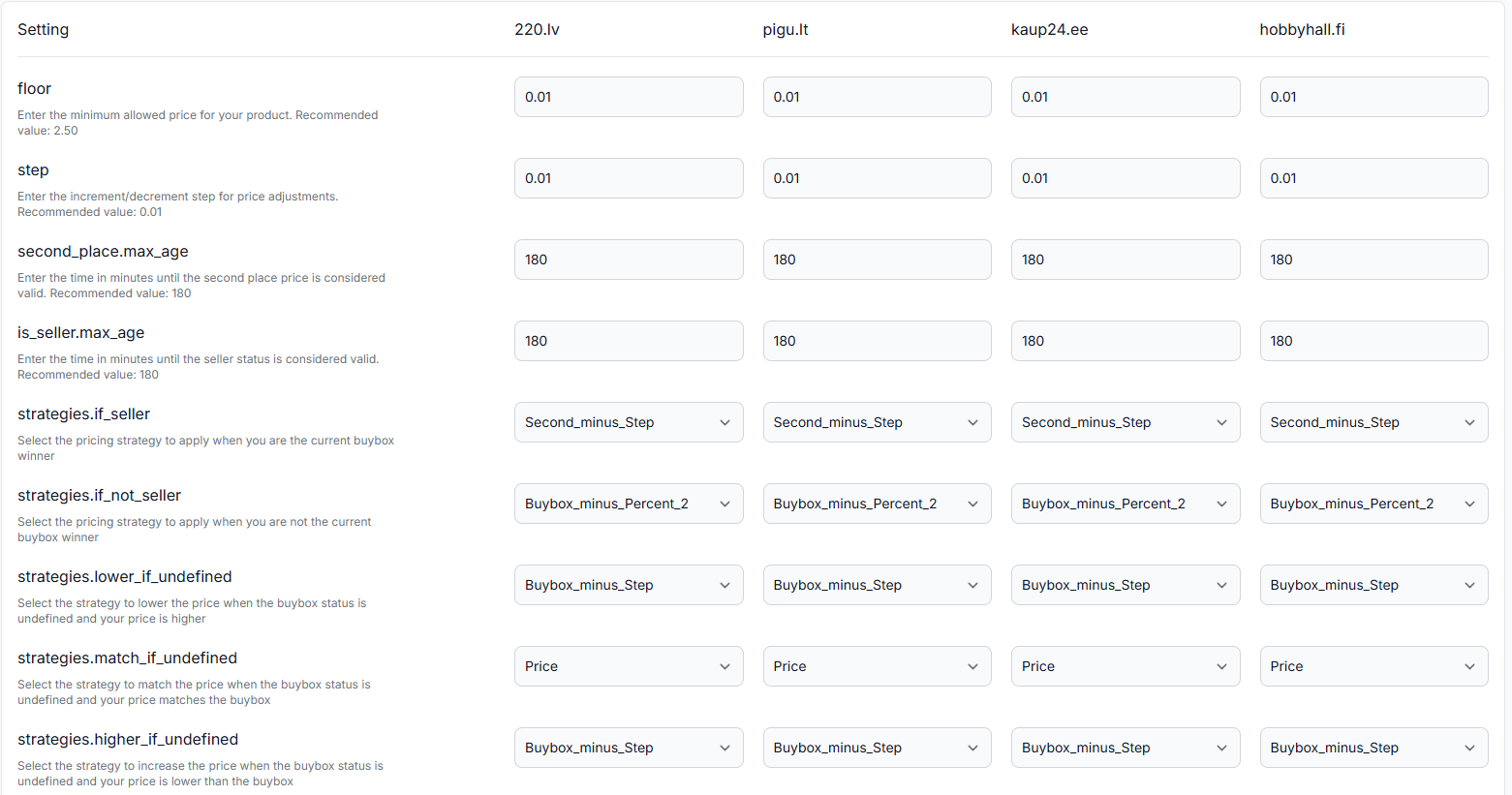
When your offer is winning and advanced marketplace data is available, a strategy such as Second minus step can use the price of the next seller.
The configured price step is subtracted from the second-place price. This allows the calculated price to remain just below that competitor when the product’s minimum and maximum limits permit it.
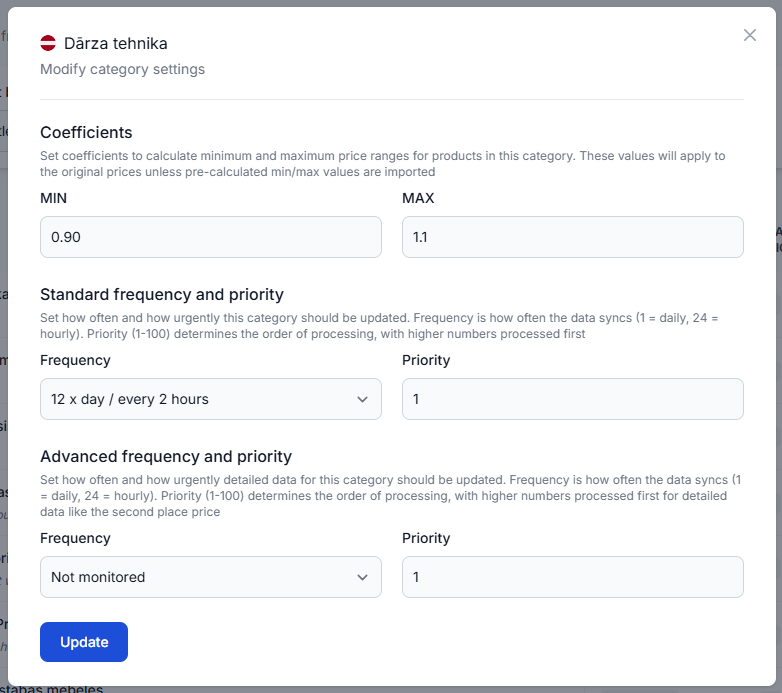
To use a strategy based on the second-place price, the relevant category must have a positive advanced monitoring frequency. Without advanced monitoring, the algorithm does not have the second-place price data required for this type of calculation.
Increasing the last published price gradually
If second-place price data is unavailable, the selected strategy may increase the last published price by the configured step. The price can rise over several synchronization cycles instead of jumping directly to the original or maximum price.
This gradual approach can be used to test whether a higher price remains competitive. If the seller loses the BuyBox, the algorithm can apply a different strategy during a later calculation.
Careful and more aggressive behaviour
A careful price-raising setup makes smaller changes over time. It may be appropriate when you want to avoid large price jumps while your offer is winning or when your selling price matches the observed BuyBox price.
A more aggressive setup may move closer to the next competitor or increase the price more quickly. The actual result still depends on the selected strategy, the configured step, available marketplace observations, and the product’s price limits.
What to check in your account
-
Confirm that you are currently identified as the winning seller.
Price-raising strategies for a winning offer are relevant only when the latest available marketplace observation identifies your shop as the current seller.
-
Check the selected winning-seller strategy and price step.
Open BuyBox settings in your account. To understand the available fields and strategy settings, read the BuyBox settings page guide.
-
Check whether advanced monitoring is enabled.
Open Category management and review the relevant marketplace category. A positive advanced monitoring frequency is required when the strategy depends on second-place price information.
For an explanation of category monitoring fields, read Category management: monitoring frequencies and price coefficients.
-
Verify the minimum and maximum prices.
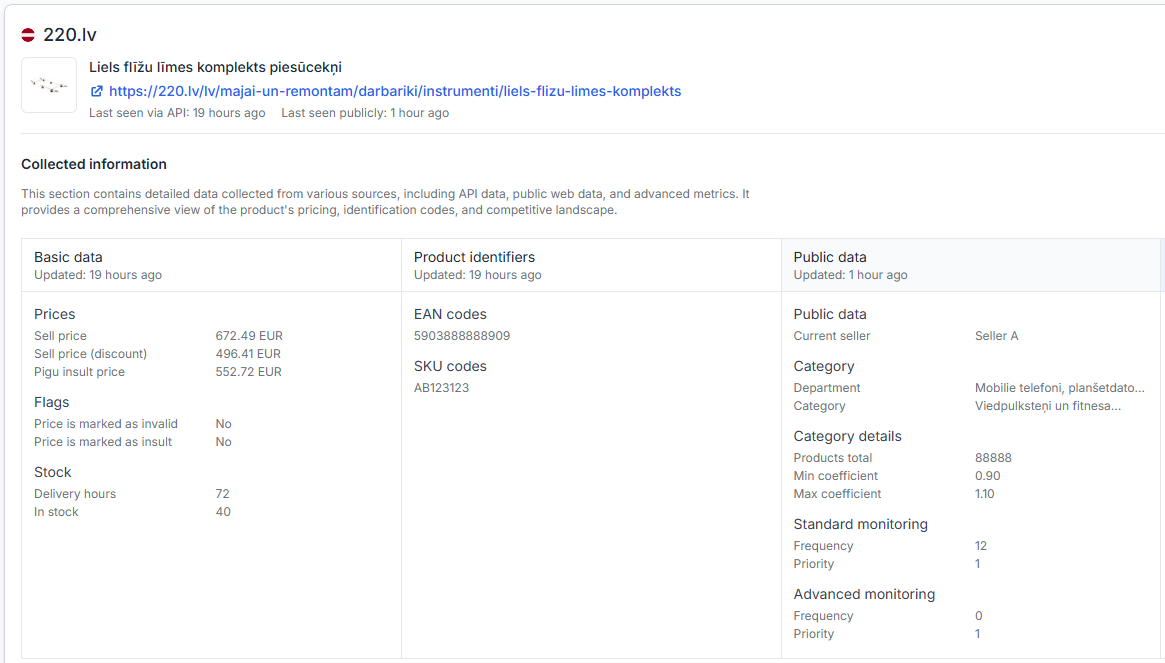
The calculated price cannot exceed the available maximum price or go below the minimum price. Product-level limits from your imported data take precedence over category-derived limits.
-
Review the product-level calculation.
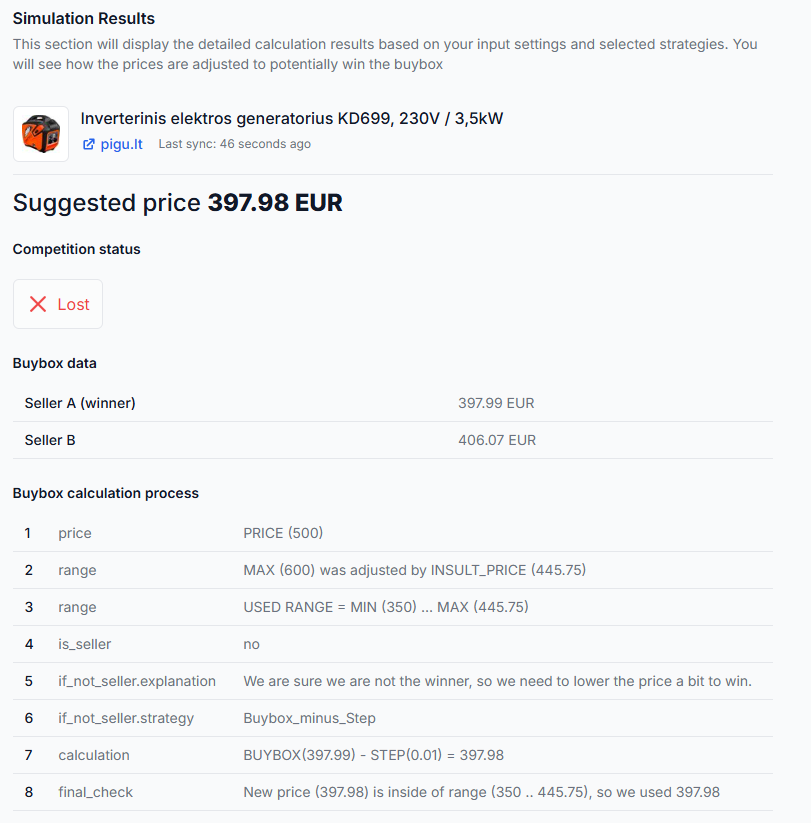
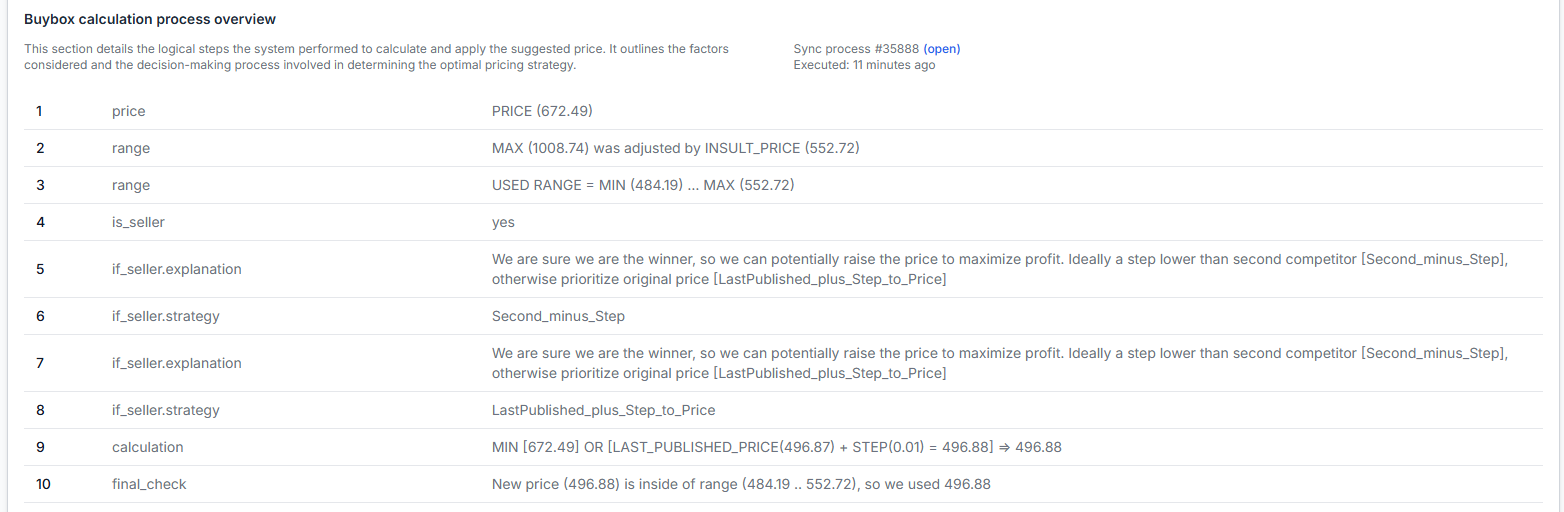
Open Product checker and search for the product’s EAN. Review the latest known seller status, competitor information, price limits, selected strategy, calculated price, and export status.
For details about the information shown there, read Product checker: review product data, price calculations, and exports.
-
Check whether several synchronization cycles are expected.
A conservative strategy may raise the price one step at a time. A slow increase does not necessarily mean the calculation is failing.
Common reasons a winning price does not increase as expected
- Advanced monitoring is not enabled. A second-place-based strategy cannot work as intended without the required second-place price data.
- The strategy uses gradual price increases. The price may move by one configured step during each synchronization cycle.
- The maximum price has already been reached. B2BLIX will not calculate a higher price than the available maximum limit.
- The second-place price is too close or outside the permitted range. The configured step and price limits can prevent the expected increase.
- The latest observation no longer shows your offer as winning. The algorithm may switch to the strategy configured for a non-winning situation.
- The marketplace information is not recent enough. The system may apply more conservative behaviour when the current competitive position cannot be treated as confirmed.
- The new price has been calculated but not yet published. Check the calculation and export information before comparing it with the live marketplace listing.
Example
Your offer is currently winning the BuyBox. The observed second-place price is €27.49, and your configured price step is €0.01.
When second-place price data is available and the selected strategy is Second minus step, the suggested price can be:
€27.49 − €0.01 = €27.48
This calculation raises your price while keeping it slightly below the observed second-place seller. It will only be used if €27.48 is within the product’s permitted minimum and maximum price range.
With a gradual strategy instead, the system may increase the last published price by one step during each synchronization. It may continue until the maximum price is reached or the marketplace observation shows that your offer has lost the BuyBox.
What to do next
- Review the winning-seller strategy and price step in BuyBox settings.
- Confirm that advanced monitoring is enabled for the relevant marketplace category when using second-place price logic.
- Verify the product’s minimum and maximum prices before changing the strategy or step.
- Use Product checker to inspect the latest product-level calculation and export status.
- Allow for more than one synchronization cycle when the configured strategy uses gradual increases.
B2BLIX can adjust prices according to your settings, but the marketplace determines the BuyBox winner. A higher price may change your competitive position, and no strategy can guarantee that your offer will continue winning.