How buybox pricing strategies and schema fields work
This guide explains common B2BLIX pricing strategies, how price increases and reductions work, and what to check before applying a strategy to live products.
What this article explains
B2BLIX can calculate different prices for the same product depending on your selected strategy, the latest known marketplace situation, and the product’s permitted price range.
This article explains common questions about:
- Buybox_minus_Percent_1 to Buybox_minus_Percent_15.
- LastPublished_plus_Step.
- LastPublished_plus_Step_to_Price.
- The difference between step and frequency.
- Raising prices without using advanced competitive data.
Short answer
A pricing strategy tells B2BLIX how to calculate the next price for a product. Some strategies reduce the price when you are not currently the BuyBox seller. Other strategies can gradually raise a winning price.
The main differences are:
- Buybox_minus_Percent_X reduces the price by the selected percentage relative to the observed BuyBox price when you are not the current BuyBox seller.
- LastPublished_plus_Step raises the last published price by the configured step, up to the permitted maximum price.
- LastPublished_plus_Step_to_Price raises the last published price back toward the product’s standard or original price, rather than toward the maximum price.
All calculated prices remain subject to the available minimum and maximum price limits.
Before using a strategy for live price updates: verify the product’s minimum price, maximum price, standard price, step, and selected strategy. Test the result before enabling automatic export or marketplace updates. A calculated or exported price is not necessarily live until it has been accepted and applied by the marketplace.
How percentage reduction strategies work
The strategies named Buybox_minus_Percent_1 through Buybox_minus_Percent_15 are percentage-based price reduction strategies.
The number at the end of the strategy name indicates the percentage that is deducted from the observed BuyBox price:
- Buybox_minus_Percent_1 means BuyBox price minus 1%.
- Buybox_minus_Percent_5 means BuyBox price minus 5%.
- Buybox_minus_Percent_15 means BuyBox price minus 15%.
These strategies can be useful when reducing the price by a small fixed step would not create enough distance from a competing offer.
The reduction is still restricted by the product’s minimum price. B2BLIX should not calculate a price below the permitted minimum simply because the selected percentage would produce a lower result.
Example: reducing the price by a percentage
Suppose the latest known BuyBox price is €20.00, and you select Buybox_minus_Percent_5.
A 5% reduction from €20.00 is €1.00, so the formula produces a price of €19.00. If the product’s minimum permitted price is €19.50, the minimum limit must protect the product from being calculated below €19.50.
How to raise prices without advanced competitive data
You can use a mathematical strategy based on the product’s last published price when you do not want the increase calculation to depend on advanced competitor-position data.
The relevant strategies include:
- LastPublished_plus_Step
- LastPublished_plus_Step_to_Price
These strategies start from the last price published by B2BLIX and add the configured step during eligible recalculation runs.
They are useful when the objective is to raise a price gradually instead of immediately moving it to a higher target.
Difference between lastPublished_plus_step and lastPublished_plus_step_to_price
| Strategy | What it does | Target |
|---|---|---|
| LastPublished_plus_Step | Adds one configured step to the last published price during each eligible recalculation. | Moves toward the configured maximum price. |
| LastPublished_plus_Step_to_Price | Adds one configured step to the last published price but stops when it returns to the product’s standard or original price. | Moves toward the standard price, not the maximum price. |
This distinction is important when the product’s standard price and maximum price are different.
Example: standard price and maximum price are different
Assume a product has these values:
- Last published price: €18.00
- Standard price: €20.00
- Maximum price: €23.00
- Step: €0.50
With LastPublished_plus_Step_to_Price, the price can increase in €0.50 steps until it returns to €20.00. It does not continue toward €23.00.
With LastPublished_plus_Step, the price can continue increasing in €0.50 steps toward the configured maximum of €23.00, provided the strategy’s other conditions allow the increase.
How step and frequency work together
Step controls the size of one price movement. Frequency controls how often the strategy is recalculated.
For example, suppose:
- The last published price is €20.00.
- The step is €0.20.
- The maximum price is €21.00.
- The selected strategy is LastPublished_plus_Step.
- The product remains eligible for a price increase.
If recalculation runs every 30 minutes, the price can move from €20.00 to €20.20, then €20.40, and continue by one step during each eligible run until it reaches the maximum price.
If you change the frequency from every 30 minutes to every three hours, each individual step remains €0.20. The increases simply happen less often.
Frequency is not the same as monitoring frequency. Changing a strategy’s recalculation frequency slows down or speeds up price calculations. It does not by itself change how often B2BLIX collects marketplace information.
How price increase logic supports profitability
BuyBox repricing is not intended only to lower prices. When you are already winning and the selected strategy allows it, B2BLIX can look for an opportunity to increase the price within the permitted range.
This may help avoid remaining at an unnecessarily low price. However, the marketplace determines the actual BuyBox winner, and price is not necessarily the only factor considered by the marketplace.
B2BLIX does not guarantee that an increase will preserve the BuyBox position, produce an order, or increase profit. The result depends on the available data, your settings, competing offers, and marketplace behavior.
What to check in your account
1. Review the strategy description
To review the available strategies, their descriptions, and examples, open Buybox schema in your account. For a detailed explanation of that section, read Understanding the Buybox Schema.
In the schema, use the available question-mark explanations next to strategies to check what each option is designed to do.
2. Verify your active settings
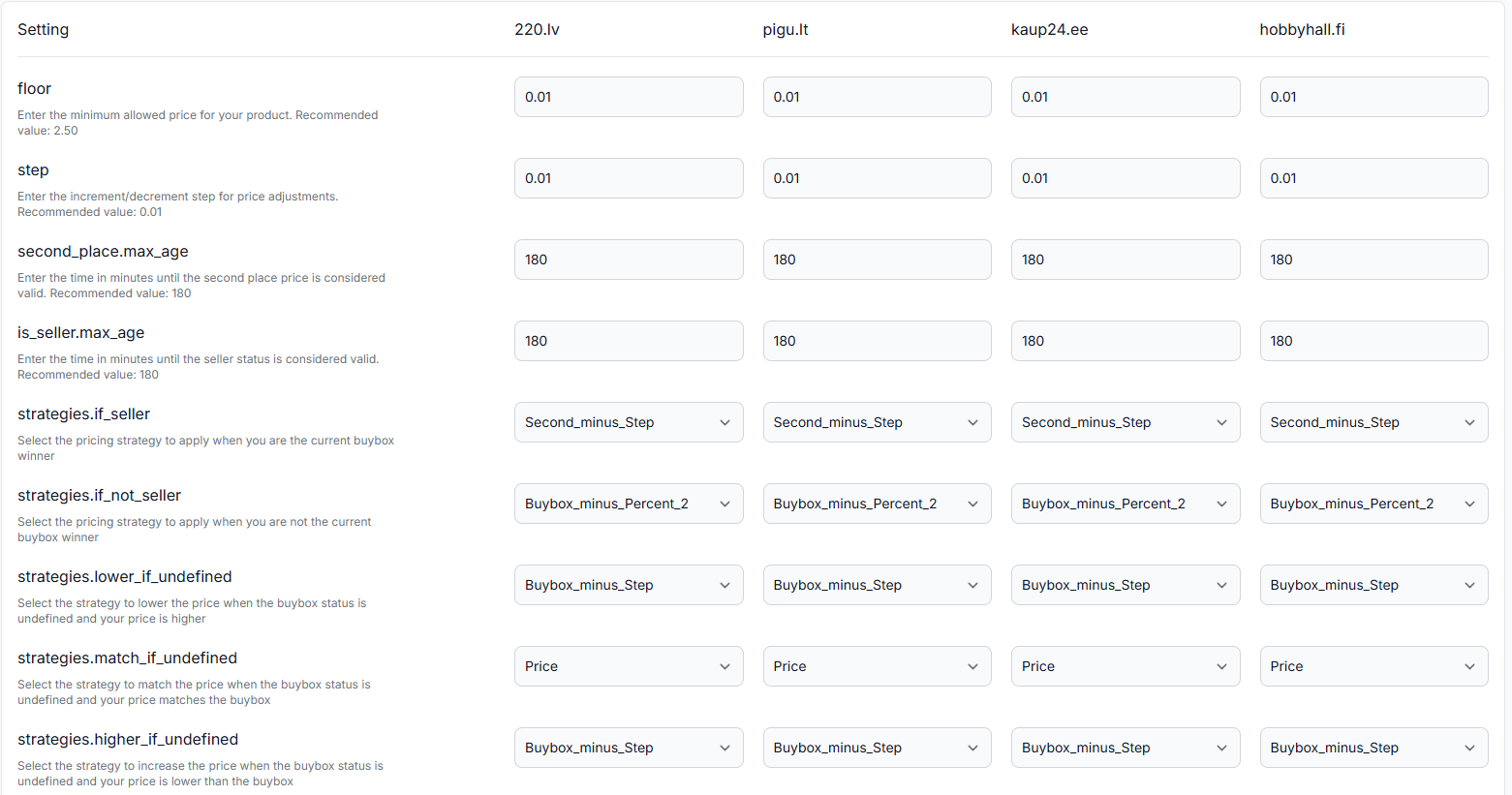
Open Buybox settings in your account to check which strategies, steps, frequencies, and price-limit options are currently configured. For details about the fields on that page, read the BuyBox Settings Page guide.
Before changing a strategy, verify:
- The strategy used when you are currently winning.
- The strategy used when you are not currently winning.
- The configured step.
- The configured frequency.
- The product’s standard or original price.
- The product’s minimum and maximum prices.
- Whether the intended target is the standard price or the maximum price.
3. Test the strategy before publishing
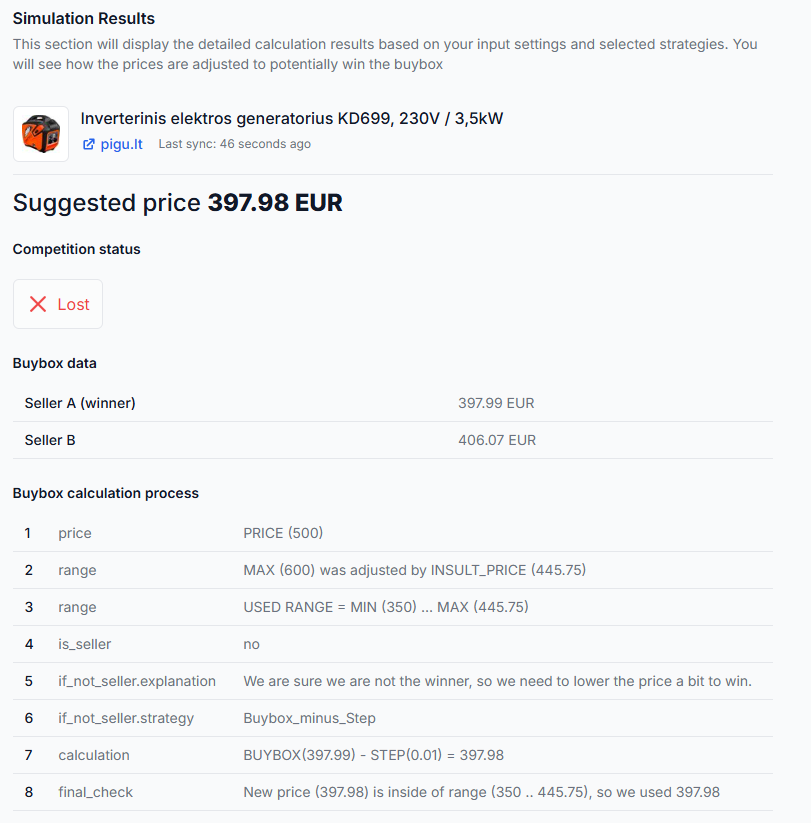
Open the Buybox simulator in your account to test representative values without relying on a live publication workflow. For instructions, read Using the BuyBox Simulator.
Enter realistic values for the current price, standard price, minimum price, maximum price, step, marketplace situation, and selected strategy. Then review both the suggested price and the calculation steps.
4. Check how a real product was calculated
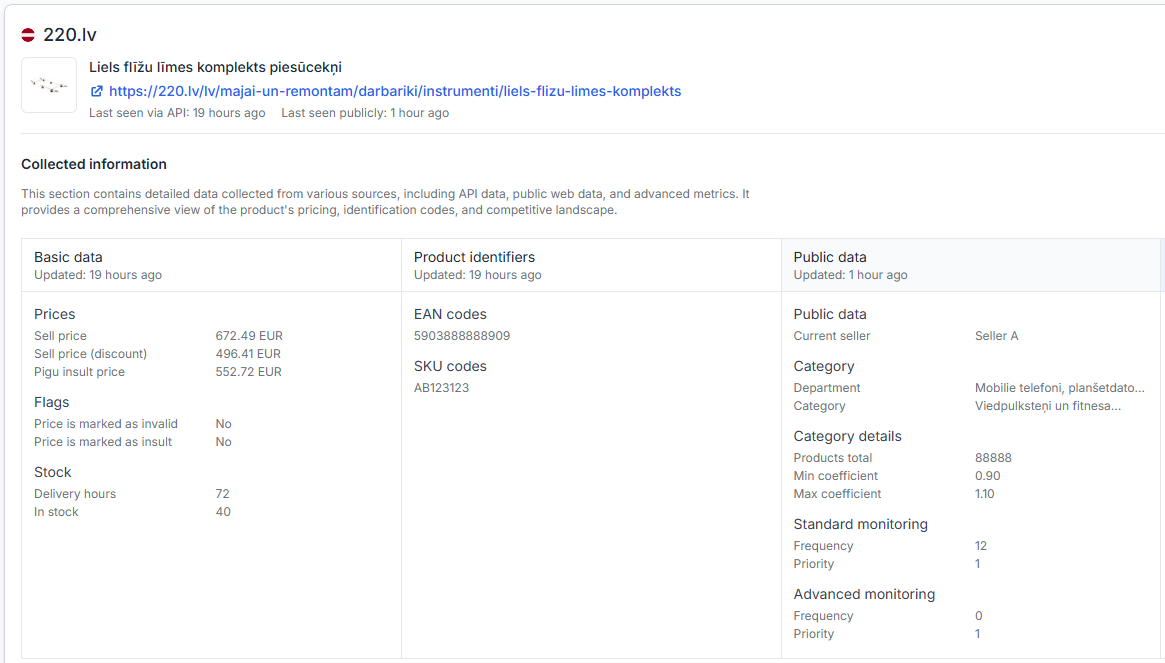
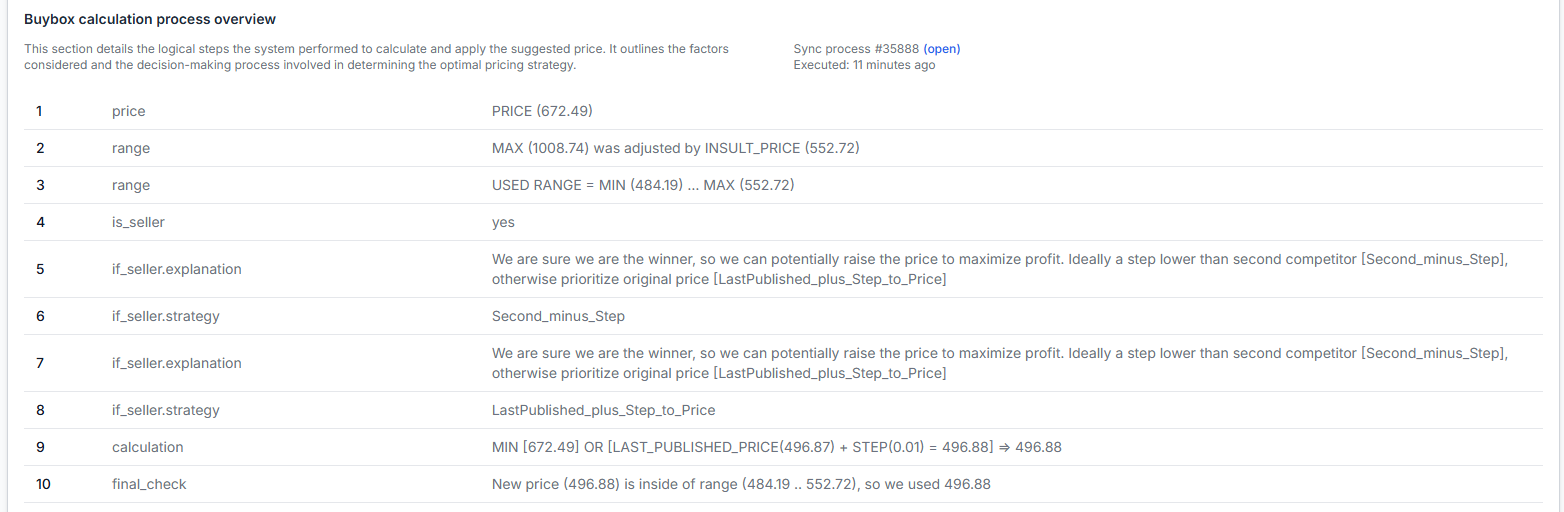
For a product-specific explanation, open Product Checker in your account. To understand the displayed product data and calculation stages, read Product Checker: Review Product Data, Price Calculations, and Exports.
Product Checker can help you confirm the known product data, price limits, selected strategy, calculation decisions, calculated price, and available export information.
Common reasons a result is different from what you expected
- The strategy targets the standard price instead of the maximum price. This is the expected behavior of LastPublished_plus_Step_to_Price.
- The step is smaller than expected. The price changes only by the configured step during each eligible recalculation.
- The frequency is longer than expected. A three-hour frequency produces fewer price movements than a 30-minute frequency.
- A minimum or maximum price stops the calculation. The strategy cannot move the calculated price outside the permitted range.
- The standard price is already reached. A strategy that moves toward the standard price may stop even when the maximum price is higher.
- The product is not currently eligible for the expected strategy branch. Winning and non-winning situations can use different configured strategies.
- The marketplace situation has changed. B2BLIX calculations use the latest sufficiently recent information available to the service, while the marketplace itself determines the live BuyBox position.
What to do next
- Open the Buybox schema and confirm the intended behavior of the strategy.
- Check whether your target should be the product’s standard price or maximum price.
- Verify the step, frequency, minimum price, and maximum price in Buybox settings.
- Test the same values in the Buybox simulator.
- Review a real EAN in Product Checker before enabling or continuing live publication.
- Start with a limited product group and confirm the results before applying the strategy to a larger catalog.