Practical Pigu BuyBox guides
Explore practical guides to importing products, setting min/max price limits, choosing repricing strategies, configuring monitoring, and exporting updates through XML or API.
How to fix synchronization, import-column, ean, and report validation problems
Support questions· Synchronization· Import validation· Troubleshooting
Troubleshoot failed synchronization reports, unrecognized import columns, faulty EANs, items not found, and temporary source-reading problems.
How to improve buybox sales
Support questions· Optimization· Monitoring· Min/max prices
A practical guide to improving BuyBox performance across 220.lv, Pigu.lt, Kaup24.ee, and HobbyHall.fi through better monitoring, realistic minimum and maximum prices, and careful strategy testing.
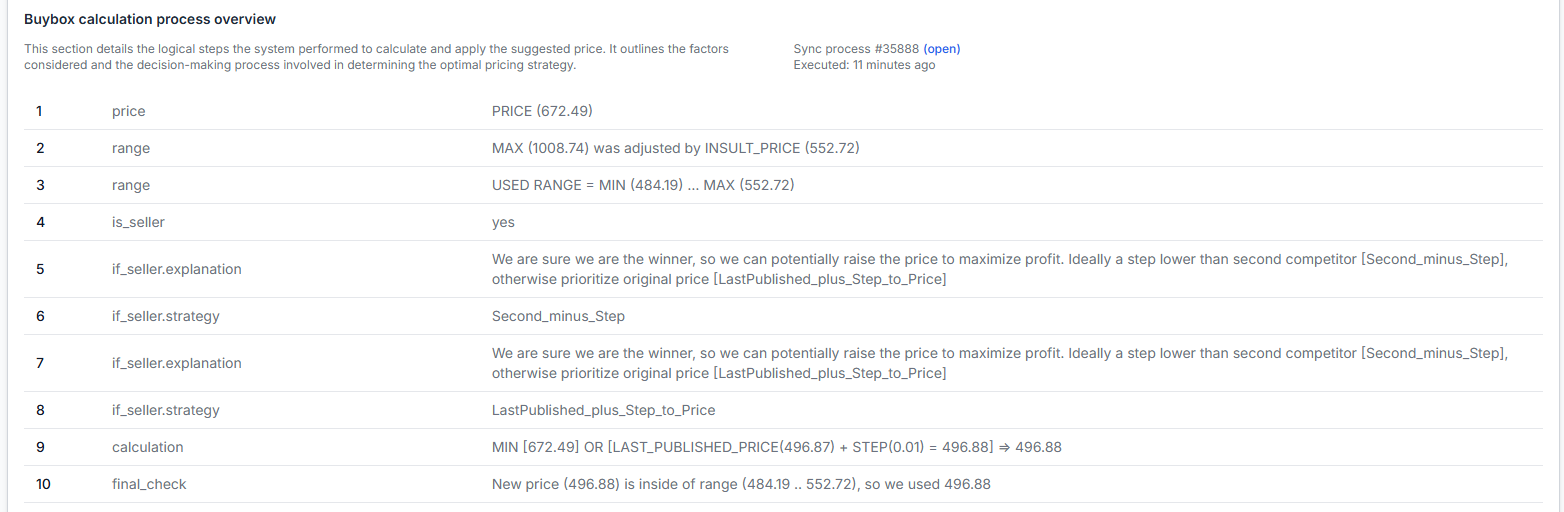
How to inspect a product’s buybox calculation
Support questions· Troubleshooting· Product checker· Price calculations
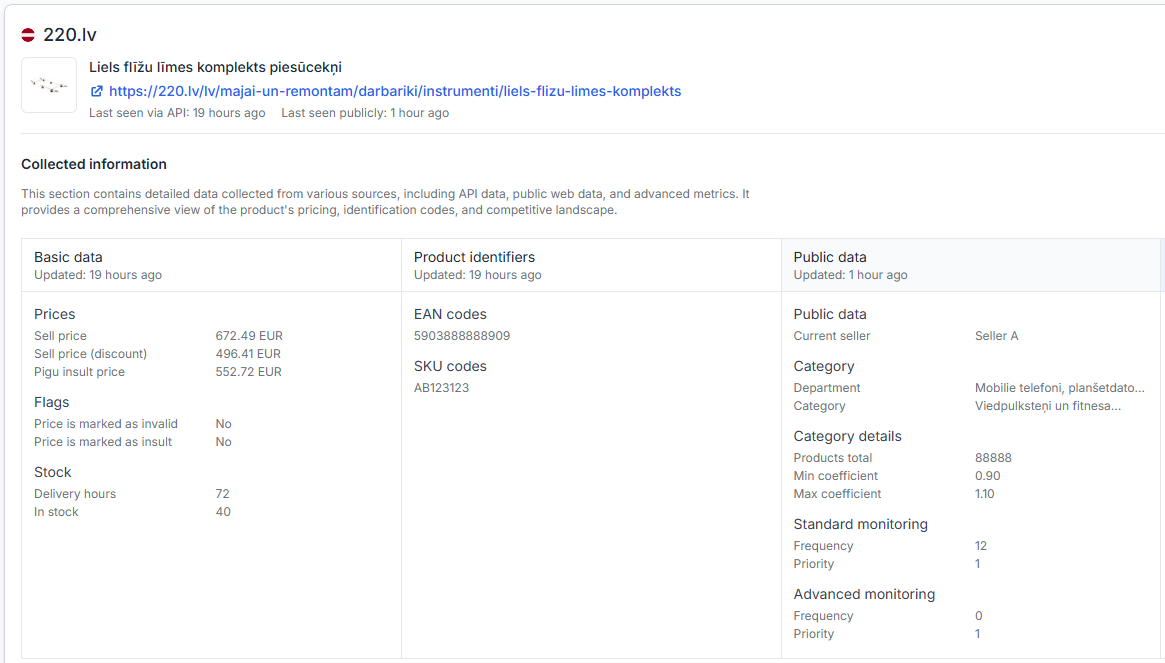
Use Product Checker to review the data recognized for a product, the latest observation times, the calculation steps, and the resulting price. Learn how to investigate an unexpected BuyBox price and verify which product data, marketplace observations, price limits, and pricing decisions were used.
How to manage billing, invoices, subscriptions, trials, and cancellation
Support questions· Account & billing· Subscriptions· Invoices
Learn where to download invoices, update billing details, manage or cancel your subscription, apply a discount coupon, and check service reactivation after payment.
How to provide and validate min/max price limits
Support questions· Min/max prices· Pricing algorithm· Troubleshooting
This guide explains the two ways to configure MIN/MAX limits in B2BLIX, the validation rules that apply, and the checks sellers should complete before exporting calculated prices.
How to recover or reset your B2BLIX login
Support questions· Account access· Password reset· Troubleshooting
Learn what to check when your B2BLIX login fails, how to reset your password, and what to do when the normal recovery process does not restore access.
How to remove a product from export safely
Support questions· Export· Synchronization· Stock removal
Safely remove a product from B2BLIX export by sending its stock as zero before removing it from your imported product data. This guide explains why a product should normally remain in the import with zero stock until the update has been exported and applied by the marketplace.
How to set up google sheets import for buybox repricing
Support questions· Google sheets· Synchronization· Setup
This guide explains how to create and connect a Google Spreadsheet for B2BLIX BuyBox repricing, including required product data, sharing permissions, synchronization testing, and XML export setup.
How to set up product import into B2blix
Support questions· Import & synchronization· Product feed· Setup
Learn how to connect a Google Sheet, XML feed, CSV feed, or PIM-generated data source to B2BLIX and verify the import before enabling regular synchronization or price updates.
How to start using the Pigu BuyBox algorithm
Support questions· Getting started· Synchronization· Buybox algorithm
This guide explains how to prepare a new B2BLIX Pigu BuyBox account safely, test the workflow, and verify calculated prices before enabling marketplace updates for a wider catalog.
How to test and validate BuyBox repricing before live updates
Support questions· Testing· Synchronization· Min/max prices
Learn how to test B2BLIX BuyBox calculations with a small Google Spreadsheet, identify missing or incorrect price limits, and review results before enabling live synchronization.
How to troubleshoot api data, stock, and collection-hours synchronization
Support questions· Export to pigu· Api synchronization· Troubleshooting
Learn why the “Exported” value may be empty when using API synchronization and what to check when API data, stock, or collection hours are not updating.
How to troubleshoot missing marketplace statistics or data
Support questions· Troubleshooting· Marketplace slugs· Statistics
Learn how to check and correct marketplace slug settings when B2BLIX cannot discover your products or display marketplace statistics.
How to use b2blix with an existing pigu xml feed
Support questions· Export to pigu· Xml integration· Synchronization
Learn how to place B2BLIX between your existing product feed and Pigu, what to verify before enabling price exports, and how to check that products and calculated prices are being processed correctly.
How winning percentage is calculated
Support questions· Statistics· Buybox status· Troubleshooting
The winning percentage shows the approximate share of recently observed product offers where your shop was identified as the current BuyBox seller.