How B2BLIX pricing, billing limits, and monthly cost optimization work
Understand which BuyBox activities create usage, how monitoring frequency affects monthly cost, and how to reduce unnecessary spending without disabling important monitoring.
What this guide answers
This guide is for sellers who want to understand why their B2BLIX BuyBox cost changes from month to month, how monitoring frequency affects billing, and what they can adjust to keep usage under control.
It also explains the difference between standard monitoring, advanced monitoring, synchronization, and billing limits. These settings are related, but they do not perform the same function.
B2BLIX BuyBox uses usage-based, post-paid billing. You do not need to prepay or add a payment card simply to start using the service. Your monthly cost depends mainly on how much marketplace data B2BLIX successfully collects for your monitored products.
Short answer
Your monthly cost is affected mainly by:
- The number of products being monitored.
- The number of marketplaces where those products are monitored.
- The monitoring frequency configured for each category.
- Any individual product monitoring schedules.
- Whether you use standard or advanced monitoring.
- Your current usage volume and the applicable rate in the live pricing calculator.
The most effective way to reduce cost is normally to use standard monitoring for most categories, reserve advanced monitoring for selected high-priority categories or products, and disable monitoring for categories that are temporarily not relevant.
Important: Increasing a monitoring frequency can increase chargeable usage immediately. Before applying a frequency change to many categories or products, check the number of affected products and estimate the resulting monthly usage.
What creates chargeable usage
Billing is connected to successful monitoring activity. B2BLIX checks products according to their configured monitoring schedules and processes the marketplace information that is successfully received.
A category forecast or displayed product count is useful for estimating cost, but it is not by itself the final bill. Actual usage depends on the monitored products and the successful data updates completed during the billing period.
A monitoring attempt that does not receive the required public marketplace data should not be counted as a successful collected update.
A simple way to understand the main usage calculation is:
Monitored products × checks per day × number of days × applicable usage rate
Calculate standard and advanced monitoring separately because their rates and the type of collected information are different.
Product count
More monitored products usually create more data collection activity. However, the total number of products in your source file is not always the same as the number of products actively generating monitoring usage.
For example, products may be:
- Present in your imported catalog but not yet discovered on a marketplace.
- Located in a category where monitoring is disabled.
- Excluded from BuyBox processing.
- Monitored only on one marketplace rather than all supported marketplaces.
- Configured with an individual monitoring schedule.
Marketplace count
The same EAN can be monitored separately on 220.lv, Pigu.lt, Kaup24.ee, and HobbyHall.fi. Monitoring a product on several marketplaces can therefore create more usage than monitoring it on only one marketplace.
When estimating cost, count the active product and marketplace combinations rather than assuming that one EAN always produces only one monitored item.
Monitoring frequency
A category checked once per day produces much less monitoring activity than the same category checked many times per day. Frequency is therefore one of the most important settings for cost control.
Use higher frequencies for products where frequent competitive changes justify the additional usage. Slower or less important categories can normally use a lower frequency.
Standard and advanced monitoring
Standard and advanced monitoring collect different levels of marketplace information. They should not be treated as interchangeable settings.
| Monitoring type | Purpose | Recommended use | Cost impact |
|---|---|---|---|
| Standard monitoring | Collects the main BuyBox information used to understand the current competitive position. | Use broadly for normal catalog monitoring and repricing workflows. | Normally the lower-cost option. |
| Advanced monitoring | Collects additional product-level competitive information, such as second-place pricing data where available and required by the selected workflow. | Use for selected important categories or products that need more detailed competitive information. | Can be significantly more expensive when applied to a large catalog. |
Advanced monitoring is not automatically better for every product. It is useful when the selected pricing strategy needs additional competitor information, but it can create unnecessary cost when applied to products that do not need that data.
A practical configuration is:
- Use standard monitoring for most active categories.
- Enable advanced monitoring only for high-priority or highly competitive categories.
- Use individual product monitoring when only a small number of EANs need special treatment.
- Review advanced monitoring regularly and remove it when it is no longer required.
Monitoring and synchronization are different
Monitoring collects updated marketplace information. Synchronization imports your current product data, applies the configured BuyBox rules using sufficiently recent observations, calculates prices, and prepares the selected output.
Changing the synchronization frequency does not automatically mean that marketplace monitoring will happen at the same frequency. Category and individual product monitoring schedules are configured separately.
For example, a synchronization may run every hour, but a category configured for monitoring once per day will not receive new marketplace observations every hour. The synchronization can only use the sufficiently recent information that is available.
To review your import, synchronization, and export schedule, open Sync settings when you are logged in. To understand the controls on that page, read Sync settings: configure product import and price export.
Important: Monitoring, calculation, export, and an actual marketplace price update are separate stages. A calculated or exported price is not necessarily live until it has been accepted and applied by the marketplace.
How to estimate your monthly cost
Use the current B2BLIX pricing calculator for the final estimate because rates, volume pricing, minimum commitments, and other pricing conditions may change.
Before using the calculator, prepare the following information:
- Count your active monitored products. Do not automatically use the full number of rows in your product source.
- Separate the marketplaces. Estimate how many product and marketplace combinations are active.
- Group products by monitoring frequency. For example, separate categories checked once per day from categories checked several times per day.
- Separate standard and advanced monitoring. Do not combine them into one estimate.
- Include individual product schedules. An individual EAN may override its category schedule.
- Consider the number of days in the billing period. A configuration enabled halfway through a month will not create the same usage as a configuration active for the full month.
A practical estimation formula
For each monitoring group, calculate:
Products × daily checks × days in the month
Then calculate advanced monitoring separately:
Products with advanced monitoring × advanced checks per day × days in the month
Enter the resulting product volume and frequency assumptions into the current pricing calculator. Do not rely on an old unit rate copied from a previous estimate because the effective rate may depend on usage volume and the current price list.
Example: why a small frequency change can have a large effect
Assume a category contains 1,000 active products.
- At one check per day, the category can produce approximately 1,000 scheduled product checks per day.
- At 24 checks per day, it can produce approximately 24,000 scheduled product checks per day.
- If advanced monitoring is also enabled, its usage must be calculated separately and added to the estimate.
This means that changing a category from once per day to hourly monitoring does not create a small increase. It can multiply the scheduled monitoring activity by 24.
The exact billed amount still depends on successful collected updates and the current pricing terms, but the example shows why frequency changes should be reviewed before they are applied to large categories.
How soft and hard billing limits work
B2BLIX BuyBox uses post-paid billing. During account setup, the seller can configure controls that help prevent unexpected usage.
Soft limit
The soft limit is a warning threshold. When usage reaches this level, the account can send an email notification.
Reaching the soft limit does not necessarily stop monitoring. Its purpose is to give you time to review your current usage, monitoring schedules, and expected month-end cost.
Hard limit
The hard limit is a stopping threshold. When it is reached, new chargeable data collection can stop.
This helps control spending, but it can also mean that new marketplace observations are not collected. Calculations and synchronization processes may then have less recent marketplace information available.
Warning: Do not increase a hard limit only to restart monitoring without first checking why the limit was reached. Review category frequencies, advanced monitoring, individual product overrides, and active marketplaces before changing the limit.
To review or change these thresholds, open the BuyBox limits or Spending Limits and Usage Summary section in your account. A direct public guide link for this section is not included here.
What to check in your account
1. Check category monitoring frequencies
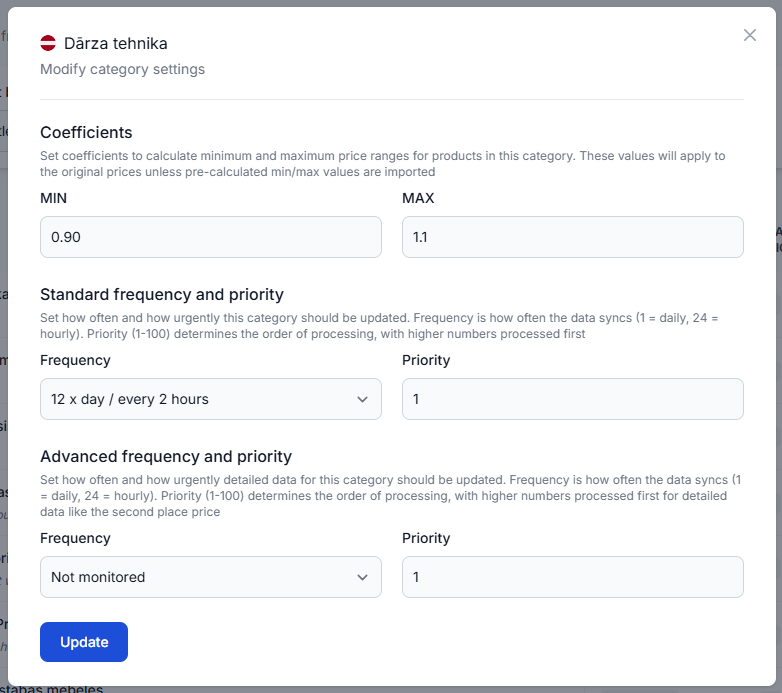
Category monitoring is normally the first place to investigate when your expected monthly cost increases.
To check this in your account, open Category Management. To understand the fields and bulk actions on that page, read Category Management: monitoring frequencies and price coefficients.
For each marketplace, check:
- Which categories have monitoring enabled.
- The product count in each active category.
- The standard monitoring frequency.
- Whether advanced monitoring is enabled.
- Whether the frequency is appropriate for the category's importance and competitiveness.
2. Check for advanced monitoring applied too broadly
Look for categories where advanced monitoring is enabled for a large number of products.
Ask whether those products genuinely need additional competitive information. If the selected strategy does not require second-place data or another advanced observation, standard monitoring may be sufficient.
Be especially careful when using bulk actions. Applying advanced monitoring to several large categories can increase usage much more than changing one small category.
3. Check individual product overrides
An individual product schedule can override the broader category schedule. This is useful for priority products, but old overrides may remain active after they are no longer needed.
To check this in your account, open Individual Products. To understand how product-specific frequencies work, read Individual Products: set product-specific monitoring frequencies.
Check whether:
- The listed EANs are still high-priority products.
- The configured frequency is still required.
- The same products are already adequately covered by their category schedule.
- Old test products can be removed from the individual list.
4. Check temporarily irrelevant categories
If a category is seasonal, temporarily out of stock, no longer part of your active catalog, or not currently important, consider switching its monitoring off or reducing its frequency.
Do not disable a category only because it is currently losing the BuyBox. That may be the category where updated competitor information is most useful. Base the decision on commercial importance, available stock, expected sales, and the value of frequent monitoring.
5. Check all active marketplaces
A category can have different monitoring settings for 220.lv, Pigu.lt, Kaup24.ee, and HobbyHall.fi.
Review each marketplace separately. A category that needs frequent monitoring in one country may not need the same frequency in another country.
6. Review account activity
Use the account statistics to understand the scale of your discovered and monitored catalog and to compare recent activity with your expectations.
To check this in your account, open Statistics. To understand the displayed account metrics, read Statistics dashboard: understanding your account metrics.
Statistics provide useful context, but use the account's usage or billing summary for the final chargeable usage figures.
7. Check whether your pricing strategy requires advanced data
Some pricing strategies can work with standard BuyBox observations. Other workflows may use additional competitor information collected through advanced monitoring.
Where suitable for your pricing policy, static price-increase strategies such as LastPublished_plus_Step or LastPublished_plus_Step_to_price may reduce the need to collect advanced competitor data broadly.
These strategies should not be selected only because they may reduce monitoring cost. Confirm that their pricing behavior matches your commercial rules, minimum and maximum price protection, and intended response when you are already winning.
Common reasons for unexpectedly high cost
Advanced monitoring is enabled for every category
This is one of the most significant cost risks. Advanced monitoring should normally be limited to categories or products where the additional data is useful.
A bulk frequency change affected more products than expected
A category name may look small while containing many product and marketplace combinations. Check the displayed product count before applying a bulk update.
Individual product overrides were forgotten
A product may continue to use a frequent individual schedule even after its category frequency has been reduced.
The same catalog is monitored across several marketplaces
Monitoring 1,000 EANs across four marketplaces can create substantially more activity than monitoring 1,000 EANs on one marketplace.
Seasonal or inactive categories are still enabled
Monitoring can continue even when a category is no longer commercially important. Review category settings when your catalog, stock, or seasonal range changes.
The soft-limit warning was ignored
The soft-limit notification is an opportunity to investigate usage before the hard limit is reached. Review it promptly rather than waiting for chargeable collection to stop.
Synchronization frequency was confused with monitoring frequency
Increasing synchronization frequency does not replace category monitoring, and reducing synchronization frequency does not necessarily reduce marketplace data collection. Check both configurations separately.
An old estimate was treated as a fixed monthly price
Usage-based estimates depend on your current catalog, frequencies, successful collected updates, usage volume, and current pricing terms. Recalculate after any significant configuration change.
A practical cost-optimization plan
- Review your hard and soft limits. Confirm that they match the maximum monthly usage you are prepared to accept.
- Export or note your current monitoring configuration. Understand the existing setup before changing several categories.
- Identify your highest-priority categories. Keep faster monitoring where frequent price changes materially affect your business.
- Reduce frequency for slower categories. Use a schedule that reflects how often the competitive situation actually changes.
- Remove unnecessary advanced monitoring. Keep it only where additional competitor information is needed.
- Use individual monitoring for exceptions. Do not increase the frequency of an entire category when only a few EANs need priority monitoring.
- Disable temporarily irrelevant categories. Re-enable them when the products become commercially active again.
- Recalculate the expected monthly usage. Use the current pricing calculator after making the proposed changes.
- Apply changes gradually. Start with selected categories and review usage before changing the full catalog.
How to balance cost and useful monitoring
The lowest possible monitoring cost is not always the best business configuration. Monitoring too rarely can leave the pricing calculation dependent on older marketplace observations.
A balanced setup normally uses:
- Frequent monitoring for important and highly competitive products.
- Moderate standard monitoring for the main catalog.
- Lower-frequency monitoring for slow-moving products.
- Advanced monitoring only where the selected strategy benefits from additional data.
- Individual overrides for a small number of priority EANs.
- Soft and hard limits that reflect an acceptable monthly budget.
The correct configuration depends on your catalog and commercial priorities. B2BLIX can improve pricing responsiveness, but it does not control how the marketplace selects the BuyBox and cannot guarantee orders, revenue, profit, or a winning position.
What to do if your hard limit was reached
- Open your account's usage and billing limits section.
- Check when the soft and hard thresholds were reached.
- Review recent category frequency changes.
- Check whether advanced monitoring was enabled through a bulk action.
- Review individual product overrides.
- Confirm how many marketplaces are active.
- Reduce unnecessary monitoring before increasing the hard limit.
- Recalculate the expected month-end usage with the current pricing calculator.
After the billing limit or payment situation has been resolved, confirm that monitoring activity has resumed. Remember that products may need a new successful observation before calculations use updated marketplace information.
When to contact B2BLIX support
Contact B2BLIX support when:
- Your account shows chargeable usage that you cannot connect to any active category or individual product schedule.
- You believe unsuccessful data collection was included as successful monitored usage.
- Your hard limit has been resolved but chargeable monitoring does not resume.
- The usage summary and the configured product counts differ in a way you cannot explain.
- You need help identifying which categories or monitoring types created the largest part of the usage.
When reporting a billing question, include the relevant billing period, marketplace, category, approximate product count, configured frequency, and whether standard or advanced monitoring was enabled. Do not send your marketplace password, access token, or other credentials.
Recommended next steps
Start by reviewing Category Management and identifying categories with high frequencies, large product counts, or advanced monitoring.
Then review Individual Products for product-level overrides and check your account's soft and hard billing limits.
Before saving broad changes, estimate standard and advanced monitoring separately using the current pricing calculator. Apply the changes to a limited group first, review the resulting activity, and then expand the configuration when the usage matches your expectations.