How to troubleshoot missing marketplace statistics or data
Learn how to check and correct marketplace slug settings when B2BLIX cannot discover your products or display marketplace statistics.
Why marketplace statistics may be missing
This guide is relevant when statistics are missing for HobbyHall.fi, 220.lv, Pigu.lt, or Kaup24.ee, even though your shop and products are available on that marketplace.
B2BLIX uses a marketplace-specific seller slug or shop profile name to associate marketplace offers with your seller account. If this value is missing or incorrect, B2BLIX may not discover your products for that marketplace. As a result, the corresponding marketplace statistics may remain empty or incomplete.
Short answer
Check that the seller slug or store URL configured for the affected marketplace matches your actual public shop profile.
For example, when HobbyHall.fi statistics are missing, verify the value entered for HobbyHall.fi in your marketplace slug settings. After you correct the value, B2BLIX should resume collecting the relevant marketplace data automatically.
Important: Data collection does not recover immediately after a marketplace slug is changed. Allow approximately 12–24 hours before checking the statistics again.
How marketplace slugs affect data collection
Each supported marketplace has its own shop profile identifier. B2BLIX uses this identifier to recognize which marketplace offers belong to your store.
The supported marketplaces are:
- 220.lv for Latvia
- Pigu.lt for Lithuania
- Kaup24.ee for Estonia
- HobbyHall.fi for Finland
A correct identifier for one marketplace does not automatically identify your shop on another marketplace. Each marketplace value should therefore be checked separately.
When the configured identifier does not match the public shop profile, B2BLIX may be unable to associate discovered offers with your account. Correcting the value allows the normal discovery and data-collection process to continue.
What to check in your account
-
Identify the affected marketplace.
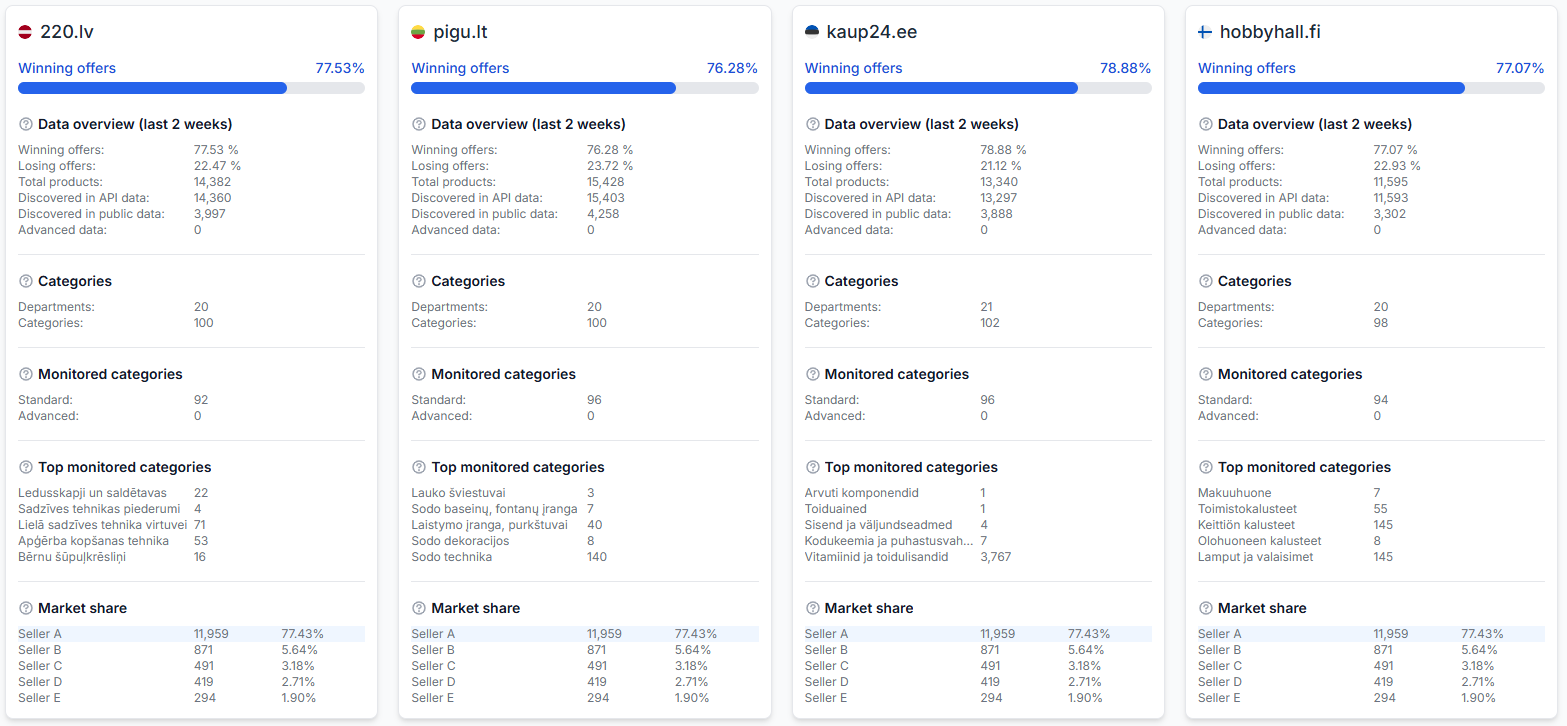
Open Statistics when you are logged in and confirm whether data is missing for one marketplace or several marketplaces.
For an explanation of the information shown there, read Statistics dashboard: understanding your account metrics.
-
Open the marketplace slug settings.
Open Marketplace slugs in your account.
For details about the fields on this page, read Marketplace slugs: add or update your shop profile names.
-
Check the value for the affected marketplace.
Verify that the shop profile name, seller slug, or store URL information belongs to the correct local marketplace. Pay particular attention to the HobbyHall.fi field when Finnish statistics are missing.
-
Correct any missing or incorrect value.
Use the identifier from your actual public marketplace shop profile. Follow the Marketplace Slugs interface guide if you are unsure which part of the shop profile address should be entered.
-
Allow data collection to recover.
After applying the correction, wait approximately 12–24 hours. B2BLIX needs time to discover the relevant offers and collect new marketplace observations.
-
Check the Statistics page again.
Return to Statistics and verify whether information for the affected marketplace has started to appear.
Common causes
- The marketplace slug is incorrect. The configured value does not match the seller’s current public shop profile.
- The marketplace value is missing. No shop identifier has been provided for the affected marketplace.
- The value belongs to another marketplace. A shop name or URL for one local Pigu marketplace was entered in a different marketplace field.
- The setting was corrected recently. The new value may be correct, but B2BLIX has not yet completed a new discovery and data-collection cycle.
Verify the marketplace and public shop profile carefully before changing the setting. Changing BuyBox strategies, minimum prices, maximum prices, or synchronization settings will not correct an invalid marketplace seller identifier.
Example
A seller has active products on HobbyHall.fi, but the HobbyHall.fi cards on the Statistics page contain no data. The seller checks Marketplace Slugs and finds that the Finnish shop identifier does not match the current HobbyHall.fi store profile.
After entering the correct HobbyHall.fi identifier, the seller leaves the other BuyBox settings unchanged. B2BLIX then begins discovering and collecting the relevant marketplace data. The seller checks the Statistics page again after 12–24 hours.
What to do next
Start by confirming the affected marketplace on the Statistics page. Then verify its exact seller identifier in Marketplace Slugs and correct it when necessary.
After making a correction, avoid repeatedly changing the value while data collection is recovering. Allow approximately 12–24 hours, then check the marketplace statistics again. If data is still missing, compare the configured value with the public shop profile once more and confirm that it was entered under the correct marketplace.