Manufacturers interface
Learn how to read the manufacturers list, identify which suppliers provide each brand value, and use the information safely when preparing product rules and exports.
What the manufacturers interface is used for
The Manufacturers interface is a read-only overview of manufacturer and brand values discovered in imported supplier data.
These values originate from the supplier fields mapped to the standard manufacturer or brand attribute. The page therefore reflects the information received from your suppliers and processed through your supplier mappings.
This page is useful when you need to:
- See which manufacturer or brand names are present in your supplier catalogs.
- Check the exact spelling used by a supplier.
- Find which supplier provides a particular manufacturer value.
- Prepare manufacturer-based product filters.
- Prepare data transformation rules that apply only to selected brands.
- Review manufacturer data before configuring an export projection.
The values on this page come from supplier data. A listed value should not automatically be treated as an official, corrected, or standardized brand name.
When to open this page
Open the manufacturers interface after supplier data has been imported and the manufacturer or brand field has been mapped.
You will commonly use this page before creating a filter or transformation rule. It allows you to confirm the value as it appears in the catalog instead of entering a brand name from memory.
You may also review this page after adding a supplier, updating a supplier mapping, or receiving changed product data from a supplier.
What you can do on this page
- Review the manufacturer and brand values currently discovered in supplier data.
- See which connected supplier is associated with each value.
- Compare the spelling and formatting used by different suppliers.
- Use the displayed values as a reference when configuring another B2BLIX feed workflow.
The interface shown is informational. It does not provide controls for renaming, deleting, merging, or directly editing manufacturer values.
Main fields and controls
| Field or control | What it means | How to use it |
|---|---|---|
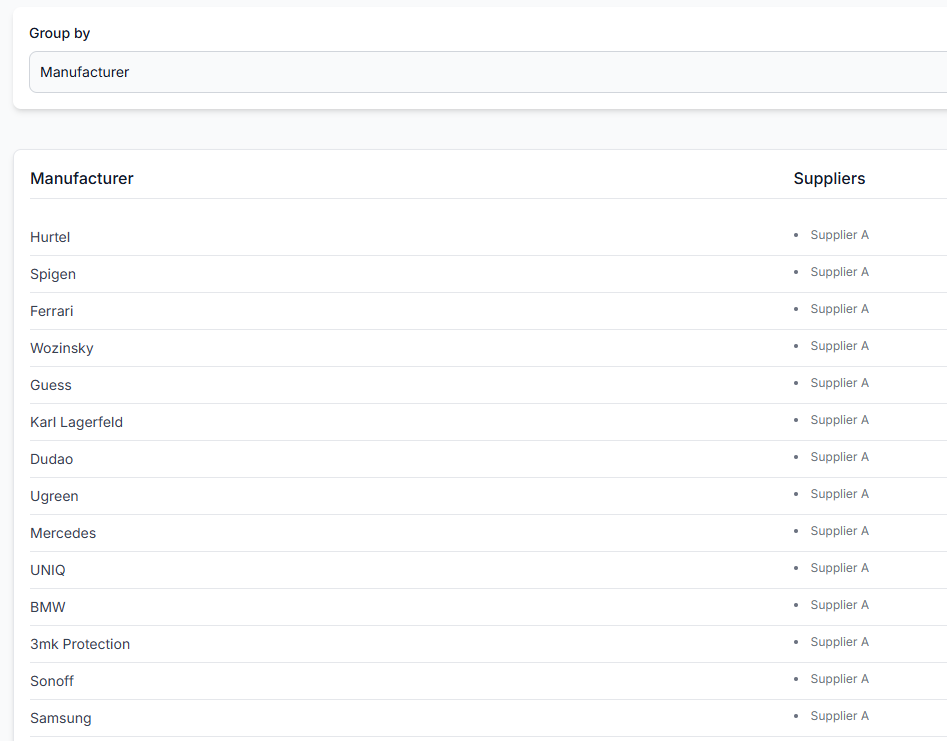
| Group by | Shows how the displayed information is organized. In the provided screenshot, the list is grouped by Manufacturer. | Use the current grouping to review manufacturer values and their associated suppliers. |
| Manufacturer | The manufacturer or brand value extracted from imported supplier product data through the configured mapping. | Check the exact writing before using the value in a product filter or transformation rule. |
| Suppliers | The supplier instance or instances whose imported data contains the displayed manufacturer value. | Use this column to identify where the value came from and whether it is limited to one supplier or appears in several supplier catalogs. |
How to interpret manufacturer values
The list represents values found in received supplier data. It does not necessarily represent a manually maintained list of official brands.
For example, supplier data may contain differences such as:
- Alternative spelling.
- Different capitalization.
- Extra spaces or punctuation.
- A manufacturer name used by one supplier and a brand name used by another.
- An incomplete or inaccurate value supplied in the original catalog.
When creating a rule, copy or carefully reproduce the value shown on this page. Treat differently written values as potentially different inputs unless your rule is deliberately designed to handle several variations.
How this page connects to other workflows
The manufacturers interface helps you prepare settings elsewhere in B2BLIX feed. It does not itself change product data.
Manufacturer values may be used when:
- Filtering products for an export projection.
- Limiting a data transformation rule to selected brands.
- Reviewing an individual product in all products.
- Checking why a product was included, excluded, or transformed in export checker.
- Preparing manufacturer-specific titles, margins, categories, stock rules, or other output attributes.
Any filtering or transformation must be configured in the relevant rule or export interface. The manufacturers page is only a reference for the available values.
How to use this page safely
- Confirm that the relevant supplier has completed an import.
- Find the manufacturer or brand you want to use.
- Check the exact spelling, spacing, and punctuation.
- Review the Suppliers column to understand where the value appears.
- Use the value in the appropriate filter or data transformation rule.
- Test the resulting product selection or transformation before using it in a production export.
- Review representative products in all products or export checker to confirm that the rule affects the intended items.
Do not assume that a familiar brand name is written consistently across every supplier. A rule based on one displayed value may not match another supplier's variation of the same brand.
What happens when supplier data changes
There is no save action on the manufacturers page. The list is based on manufacturer and brand values discovered from imported supplier data.
Values shown here may change after:
- A supplier sends updated product information.
- A supplier is added, enabled, or synchronized.
- The manufacturer or brand field mapping is changed.
- Products containing a previously listed value are no longer present in the stored supplier data.
If an expected manufacturer is missing, first review the supplier import and the mapping of the manufacturer or brand attribute. Detailed product-level checks can then be performed in the relevant product inspection workflow.
Common mistakes
Entering a brand name from memory
The supplier may use different spelling or formatting. Check the manufacturers list and use the value found in the imported data.
Assuming similar names are automatically combined
Small differences may represent separate source values. Review each variation before building a rule.
Assuming every supplier uses the same value
Check the Suppliers column. A manufacturer value shown for one supplier may be written differently by another.
Trying to edit the value on this page
The manufacturers interface is read-only. Changes must be made through the appropriate supplier mapping or data transformation workflow.
Treating the list as proof of brand accuracy
The page shows imported supplier values. B2BLIX feed does not independently confirm that every supplier has assigned the correct manufacturer or brand to every product.
Creating a rule without testing it
A manufacturer-based rule can affect many products. Review a controlled product selection and inspect the resulting export data before applying the workflow broadly.
Example use case
A seller wants to create a special export rule for products from the brand Karl Lagerfeld.
- The seller opens the manufacturers interface.
- They find the value Karl Lagerfeld and confirm its exact spelling.
- They check which supplier provides that value.
- They create a data transformation rule filtered by the manufacturer value.
- The rule adjusts the required export attribute only for matching products.
- The seller reviews several affected products in export checker before using the export in a live sales-channel workflow.
This approach reduces the risk of creating a rule that does not match any products because of an incorrect or differently formatted manufacturer name.